Your cloud footprint changes every day. New instances spin up, containers get deployed, storage buckets appear, and each one can quietly introduce a misconfiguration or unpatched flaw that traditional scanning tools never catch. If you’re relying on the same approach you used for on-premise infrastructure, you’re almost certainly missing risks that attackers actively hunt for.
Vulnerability management cloud practices exist to close that gap. In plain terms, cloud vulnerability management is the ongoing process of identifying, prioritising, and fixing security weaknesses across your cloud accounts, workloads, and services, rather than treating it as a one-off audit. Done properly, it combines automated scanning, contextual risk scoring, and rapid remediation so threats get dealt with before they turn into incidents.
In this article, we’ll break down exactly what vulnerability management in the cloud involves, walk through how the process actually works day to day, and cover the tools and practices that make it effective. We work with SMBs and enterprises tightening up their cloud security posture every week, so we’ll keep this grounded in what genuinely reduces risk.

Why cloud vulnerability management matters
Ignoring cloud vulnerability management isn’t a neutral choice, it’s a decision to let attackers find your weaknesses before you do. Every misconfigured storage bucket, exposed API key, or outdated container image sitting in your environment is a potential entry point, and cloud infrastructure creates far more of these than traditional data centres ever did. The scale and speed of change in cloud environments means manual, periodic checks simply can’t keep pace with the risk.
If you’re not scanning your cloud environment continuously, you’re not managing vulnerabilities, you’re just hoping nothing goes wrong.
The cloud attack surface never stops moving
Unlike a fixed on-premise network, cloud infrastructure is elastic by design. Development teams spin up new virtual machines, serverless functions, and storage instances constantly, often without security teams knowing until after the fact. This constant churn means keeping track of a constantly changing attack surface is a daily job, because a scan that was accurate last week may already be out of date. Effective vulnerability management in the cloud has to run continuously, not as a quarterly or annual exercise, because static assessments miss the resources that appeared after the last scan ran.

Shared responsibility means shared blame
Cloud providers like AWS, Microsoft Azure, and Google Cloud secure the underlying infrastructure, but everything you configure on top, from identity permissions to network settings to the applications you deploy, is your responsibility. This is the shared responsibility model, and it’s the single most misunderstood concept in cloud security. Plenty of businesses assume their provider handles security end to end, then get caught out when a misconfigured storage bucket or an overly permissive IAM role leads to a breach. The National Cyber Security Centre is explicit that customers remain accountable for securing their own data and access controls, regardless of which provider they use.
The financial and reputational stakes
A breach originating from an unpatched cloud vulnerability rarely stays contained. Attackers who gain a foothold in one misconfigured workload can pivot laterally across your environment, accessing customer data, disrupting operations, and triggering regulatory reporting obligations. The costs stack up fast:
- Direct financial loss: ransom payments, forensic investigation, system rebuilding
- Operational downtime: lost productivity while systems are isolated and restored
- Regulatory fines: penalties under UK GDPR for inadequate data protection
- Reputational damage: lost client trust that affects new business for years, not months
Businesses that treat vulnerability management as an afterthought often only invest properly after their first serious incident, which is exactly why our CyberSOS incident response service exists to help organisations recover quickly once that first incident happens. Prevention is always cheaper than recovery, but recovery capability still matters, because no vulnerability programme catches everything.
Compliance frameworks demand it
Standards like ISO 27001 explicitly require organisations to identify, assess, and remediate technical vulnerabilities as part of their information security management system, so it pays to know which controls ISO 27001 sets out before an audit. Auditors will ask for evidence of your scanning cadence, your remediation timelines, and how you prioritise findings, and vague answers don’t pass. Businesses pursuing or maintaining ISO 27001 certification need a documented, repeatable process, not a one-off penetration test result sitting in a drawer. We support clients through exactly this as part of our ISO 27001 services for UK businesses, and the businesses that treat vulnerability management as embedded practice rather than paperwork consistently sail through their audits with fewer non-conformities.
Ultimately, the businesses that get hit hardest are the ones that assumed their cloud provider, their developers, or last year’s audit had already covered it. Cloud vulnerability management matters because the alternative isn’t "nothing happens," it’s "you find out from a client, a regulator, or an attacker instead of finding out from your own monitoring first."
How to implement cloud vulnerability management
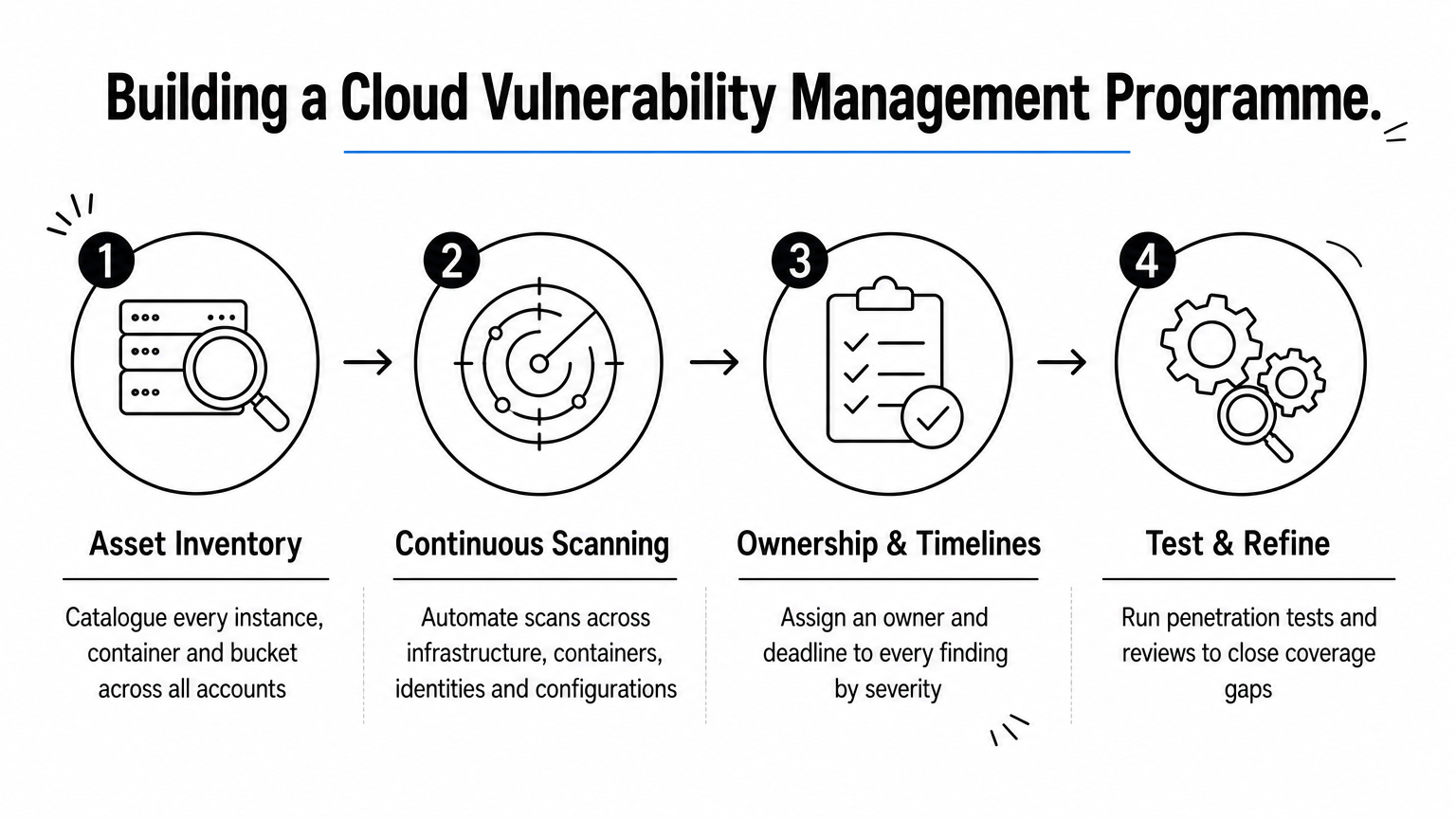
Getting cloud vulnerability management off the ground isn’t about buying a scanner and hoping for the best. It’s a structured process that starts with knowing what you actually have, then layers in automation, ownership, and feedback loops so findings turn into fixes rather than sitting in a backlog. Most businesses we work with already own some scanning tool; what’s missing is the process wrapped around it, the kind of eight steps UK SMEs can follow to make assessment repeatable.
Build a complete asset inventory first
You can’t secure what you can’t see, and this is where most programmes fail before they even start. Run a discovery sweep across every cloud account, including shadow IT projects that developers spun up without telling anyone, and catalogue every instance, container, storage bucket, and serverless function. A cloud asset inventory that’s even a few weeks out of date will leave gaps, so this step needs to feed directly into your scanning tools rather than living in a static spreadsheet.
Automate continuous scanning
Once you know what exists, set up vulnerability management automation so scanning runs continuously rather than on a fixed monthly schedule. Cloud environments change hourly, so a continuous vulnerability scanning setup should cover several layers:
- Infrastructure scanning: checking VM configurations, open ports, and network rules
- Container image scanning: catching vulnerable libraries before deployment, not after
- Identity and access review: flagging overly permissive IAM roles and unused credentials
- Configuration scanning: identifying public storage buckets and misconfigured security groups
Most mature teams run this through a dedicated platform rather than stitching together provider-native tools, since cross-account visibility gets messy fast when you’re managing AWS, Azure, and Google Cloud simultaneously.
Assign ownership and set remediation timelines
Scanning without a remediation workflow just generates noise. Every finding needs an owner, whether that’s a specific engineering team or your managed security provider, and a deadline based on severity, which is why defining vulnerability management roles comes first. Critical vulnerabilities exposed to the internet should get fixed within days, not weeks, while lower-severity internal issues can follow a slower cadence documented in your policy.
A scan result nobody owns is just a list of problems you already knew you had.
This is exactly where a lot of internal teams get stuck. They have the data but lack the bandwidth to chase every finding through to closure, which is why our managed security services build ownership and remediation tracking directly into the process rather than leaving it to an already-stretched IT team.
Test, review, and refine
Treat your process as a living system, not a one-time setup. Schedule regular reviews of scan coverage to catch new asset types your tooling might be missing, and run periodic penetration testing alongside automated scanning to catch what automated tools can’t, particularly logic flaws and chained exploits that require human creativity to spot. Vulnerability assessments and penetration tests answer different questions, and relying on only one leaves blind spots.
Within a few review cycles, most organisations find their scanning coverage was narrower than they assumed. Widening that coverage, tightening remediation SLAs, and feeding lessons from each incident back into the process is what separates a genuine cloud vulnerability management programme from a tool sitting unused on a dashboard.
Common vulnerabilities found in cloud environments
Not every cloud vulnerability looks the same, and knowing the recurring patterns helps you focus scanning effort where it actually matters. Cloud vulnerability management programmes that only chase generic CVE lists tend to miss the misconfigurations and identity issues that cause most real-world breaches, so it’s worth understanding what typically shows up in an audit of your cloud estate.

Misconfigured storage and public access
Publicly accessible storage buckets remain one of the most common findings in any cloud environment, and like most data security risks in cloud storage they’re usually the result of a default setting nobody reviewed rather than a deliberate decision. A single S3 bucket or Azure Blob container left open to the internet can expose customer records, backup files, or internal documents without triggering a single alert until someone finds it, often a researcher or attacker rather than your own team.
The most damaging cloud breaches rarely involve sophisticated exploits, they involve settings left on default.
Overly permissive identities and access keys
Overprivileged accounts sit close behind misconfigured storage as a leading cause of incidents. Developers get granted admin-level access to speed up a project, then nobody revokes it once the project ends, leaving a standing credential that an attacker only needs to compromise once. Identity and access management failures like this compound quickly in cloud environments because a single stolen key can often reach far more systems than an equivalent breach would in an on-premise network.
Outdated container images and unpatched software
Containerised deployments move fast, and that speed often comes at the cost of patching discipline. Teams pull a base image once, build on top of it for months, and never rebuild it even after known vulnerabilities in its underlying libraries get disclosed. Unpatched operating systems on virtual machines cause the same problem in a more traditional form, sitting exposed simply because a maintenance window never got scheduled, a reminder that patching is only one part of vulnerability management.
Exposed secrets and hardcoded credentials
Exposed API keys, database passwords, and access tokens hardcoded directly into application code or configuration files are a persistent finding across almost every cloud audit we run. Once that code ends up in a public repository, even briefly, automated scanners run by attackers pick it up within minutes.
| Vulnerability type | Common example | Typical impact |
|---|---|---|
| Misconfigured storage | Public S3 or Blob bucket | Data exposure, regulatory breach |
| Excessive permissions | Unused admin-level IAM role | Lateral movement after compromise |
| Outdated images | Unpatched container base image | Known exploit remains usable |
| Exposed secrets | Hardcoded API key in a repo | Immediate unauthorised access |
| Weak network rules | Open security group ports | Direct external attack path |
Weak network configurations round out the list, with security groups and firewall rules left far broader than any workload actually needs. Recognising these patterns, alongside the broader types of data security threats, is only useful if it feeds into how you decide what to fix first, which is where prioritisation becomes the harder part of the job.
Best practices for prioritising cloud vulnerabilities
Finding vulnerabilities is the easy part. Deciding which ones to fix first, and in what order, is where most cloud vulnerability management programmes actually struggle, because a typical scan can return thousands of findings and no team has the capacity to fix them all simultaneously. Getting prioritisation right means looking past a single severity score and building a risk-based process for prioritising vulnerabilities that reflects real-world risk rather than raw volume.
Don’t rely on CVSS scores alone
Severity ratings like CVSS give you a starting point, but they describe theoretical severity, not actual risk to your environment. A critical-rated vulnerability sitting on an internal server with no external access poses far less immediate danger than a medium-rated flaw on a public-facing application. Treating every CVSS 9.0 as equally urgent regardless of context leads teams to burn time on low-risk fixes while genuinely exposed systems wait in the queue.
A vulnerability score tells you how bad a flaw could be, not how likely it is to be exploited in your environment.
Factor in exploitability and exposure
Context changes everything once you layer it on top of a base severity score. Ask whether the vulnerability is internet-facing, whether a working exploit exists in the wild, and whether the affected system holds sensitive data or sits on a path to one that does. Exposure combined with exploitability, rather than severity in isolation, is what should push a finding to the top of the list. This is also where threat intelligence feeds add real value, one of the strongest use cases for threat intelligence, flagging when a previously low-priority CVE suddenly gets weaponised in active attacks.
Weight business context and asset criticality
Every vulnerability sits on an asset, and not all assets matter equally to your business. A flaw on a decommissioned test server carries a different weight than the same flaw on a system processing customer payments. Building an asset criticality tier into your prioritisation model, even a simple high, medium, low classification, means findings on your most important systems automatically rise above equivalent findings elsewhere.
| Prioritisation factor | Low priority signal | High priority signal |
|---|---|---|
| Exposure | Internal network only | Internet-facing |
| Exploitability | No known exploit | Active exploit in the wild |
| Asset criticality | Test or dev environment | Production, customer data |
| Access required | Requires authentication | Unauthenticated access |
Set clear remediation SLAs by risk tier
Once findings are scored with context, translate that into firm deadlines rather than vague intentions. Internet-facing critical vulnerabilities on production assets should carry a remediation window measured in days, while low-exposure, low-criticality findings can sit on a longer, documented cycle. Consistency here matters more than perfection, since auditors and regulators want to see that your organisation follows its own stated timelines rather than fixing things reactively whenever there’s spare capacity.
Getting this balance right is precisely the gap our vulnerability assessments that uncover external, internal, and cloud weaknesses are built to close, layering business context and exploitability data on top of raw scan output so your team spends remediation effort where it genuinely reduces risk. Prioritisation done well turns an overwhelming findings list into a manageable, defensible plan of action.
Choosing the right cloud vulnerability management tool
Market options range from basic scanners bundled into your cloud provider’s console to open-source engines like Greenbone Vulnerability Management and full platforms that unify scanning, prioritisation, and remediation tracking across every account you run. Picking the wrong one means either drowning in noise you can’t act on or missing coverage in the parts of your environment that matter most. Cloud vulnerability management tools aren’t interchangeable, and the right choice depends heavily on how complex your cloud footprint already is.
Match the tool to your cloud footprint
Single-cloud businesses running everything through AWS or Azure alone can often get reasonable coverage from native tools like AWS Inspector or Microsoft Defender for Cloud. Businesses spanning multiple providers, or running a mix of cloud and on-premise infrastructure, need a multi-cloud scanning platform that gives one consistent view rather than three separate dashboards nobody checks together. Fragmented visibility is how vulnerabilities on a neglected second or third cloud account slip through unnoticed for months.
Prioritise context over raw scan output
Any scanner can produce a list of findings. Fewer can tell you which ones actually deserve attention today, and that distinction matters more than almost any other feature on a comparison sheet. Look for tools that layer exploitability data, exposure, and asset criticality on top of a base severity score, rather than handing your team a flat list sorted by CVSS alone.
A tool that finds everything but prioritises nothing just moves the problem from your inbox to your dashboard.
This is exactly the gap our internally developed CRAFT platform was built to close, combining automated scanning with the business context needed to tell your team what to fix first rather than just what exists.
Check how it fits your existing workflow
Quality tools integrate directly with the systems your team already uses, pushing findings into ticketing platforms like Jira or ServiceNow rather than sitting in a separate vulnerability dashboard someone has to remember to check. Without that integration, remediation tracking falls apart within a few weeks as findings pile up unactioned.
| Selection criteria | What to check |
|---|---|
| Cloud coverage | Supports every provider you actually use, not just AWS |
| Prioritisation | Factors exploitability and asset criticality, not just CVSS |
| Integration | Connects to your ticketing and alerting tools directly |
| Scanning method | Agentless where possible, agent-based where deeper visibility is needed |
| Reporting | Produces audit-ready output for ISO 27001 and similar frameworks |
Weigh agentless against agent-based scanning
Agentless tools scan cloud configurations and workloads without installing software on every instance, which keeps deployment fast and avoids performance overhead. Agent-based tools dig deeper into runtime behaviour and in-memory activity that agentless scanning simply can’t see. Most mature programmes end up running a combination of both rather than betting everything on one method.
Support quality closes out the decision, since a tool that generates confusing reports or leaves your team fighting false positives wastes more time than it saves. Vendors who understand ISO 27001 and similar compliance frameworks tend to produce reporting that satisfies auditors on the first pass, which matters more than any single technical feature once certification season arrives.
Tracking success with vulnerability management metrics
Running scans and closing tickets means nothing if you can’t demonstrate the programme is actually reducing risk over time. Vulnerability management metrics give you the evidence that remediation is keeping pace with discovery, and they’re exactly what auditors, boards, and insurers ask for when they want proof rather than assurances. Without them, you’re guessing whether your cloud vulnerability management effort is improving or quietly falling behind.
Mean time to remediate is your core signal
Mean time to remediate (MTTR) tells you how long a vulnerability sits open from discovery to fix, broken down by severity tier. A programme where critical, internet-facing findings close in three days but low-severity internal issues take six weeks is healthy. One where everything drifts past thirty days regardless of severity signals a resourcing or ownership problem, not a tooling problem. Tracking MTTR by team also exposes exactly where remediation stalls, which is far more useful than a single blended average that hides the worst offenders.
If you can’t tell me your average time to fix a critical vulnerability, you don’t have a vulnerability management programme, you have a vulnerability discovery programme.
Coverage and scan cadence matter as much as speed
Speed of remediation is worthless if your scanning never reached the asset in the first place. Track scan coverage as a percentage of your known asset inventory, and compare it against discovery data regularly, since gaps here usually reveal shadow IT or newly spun-up resources that never entered your scanning scope. Cadence matters too: a monthly scan on a cloud environment that changes daily leaves weeks of blind exposure between checks.
| Metric | What it tells you | Healthy target |
|---|---|---|
| MTTR (critical) | Speed of fixing urgent, exposed flaws | Under 7 days |
| MTTR (medium/low) | Speed on less urgent findings | Under 30-60 days |
| Scan coverage | Percentage of assets actively scanned | 95%+ |
| Recurrence rate | Same finding reappearing after fix | Trending down |
| SLA compliance | Findings closed within policy deadline | 90%+ |
Recurrence rate exposes root cause failures
Seeing the same vulnerability class reappear month after month, even after individual fixes, points to a process problem rather than a scanning problem. If public storage buckets keep showing up on new projects despite repeated remediation, the fix needs to move upstream into deployment templates or developer training rather than staying reactive. Recurring findings are one of the clearest indicators that a programme is treating symptoms instead of causes.
Report metrics in business language
Boards and insurers rarely care about raw CVE counts, but they do care about trend lines showing exposure shrinking, SLA compliance improving, and critical findings closing faster quarter over quarter. Presenting these metrics clearly in a vulnerability management report also strengthens your position during ISO 27001 audits, where auditors expect documented evidence rather than a verbal assurance that things are handled. Structured reporting like this is built into how we run managed security services for clients, so the numbers you present internally are the same ones standing up to external scrutiny.
Staying ahead of cloud risk
Cloud environments will keep changing faster than any manual process can track, and that’s precisely why cloud vulnerability management has to be continuous rather than periodic. You now know what the term actually means, how to build the process around asset inventory and remediation ownership, which vulnerabilities show up repeatedly, and how to prioritise and measure your progress properly. None of this works as a one-off project. It works as a standing discipline that catches new misconfigurations, exposed credentials, and unpatched images before an attacker finds them first.
Getting there without dedicated resource is genuinely hard, which is why most businesses we speak to eventually bring in a partner rather than stretching an already busy IT team further. If you’d rather have scanning, prioritisation, and remediation handled by people who do this daily, our managed security services for your cloud environment will show you exactly where you stand today.