If your team still runs vulnerability scans manually and chases patches through spreadsheets, you already know the problem. Scan results pile up faster than anyone can triage them, critical fixes get buried behind low-risk noise, and by the time a patch ships, the threat landscape has moved on. Vulnerability management automation solves this by letting tools handle detection, prioritisation, and remediation workflows, so your analysts spend time on judgement calls rather than data entry.
This guide answers the practical question most IT managers and CISOs actually ask: how do you build automated vulnerability management into an existing security programme without breaking change control or drowning in false positives. We cover the sequence that works in the field, not just the theory.
You’ll get a clear walkthrough covering asset discovery, automated scanning schedules, risk-based prioritisation using real exploitability data, and remediation workflows that integrate with your ticketing system. We’ll also flag the common implementation mistakes we see at TrustedIA when supporting SMBs and enterprises through ISO 27001 audits and ongoing cyber risk management, so you can avoid the pitfalls and get a programme running that actually reduces your exposure rather than just generating more reports.
What is vulnerability management automation?
Vulnerability management automation is the practice of using tools and workflows to handle the repetitive, high-volume parts of finding, ranking, and fixing security weaknesses, the operational core of how threat and vulnerability management works, so people only step in for decisions that genuinely need human judgement. Instead of an analyst manually kicking off scans, exporting spreadsheets, and emailing patch requests to sysadmins, the platform does the discovery, cross-references threat intelligence, scores the risk, and opens a ticket automatically. The goal isn’t to remove people from the process. It’s to remove the manual grunt work that slows people down.
The manual cycle and why it collapses under real workloads
Most security teams still run something close to a monthly or quarterly scan cycle. Someone schedules a scan, waits for it to finish, exports a report with hundreds or thousands of findings, and then spends days deciding what matters. By the time remediation tickets reach the infrastructure team, new vulnerabilities have already appeared. According to the UK’s National Cyber Security Centre, attackers routinely exploit known vulnerabilities within days of a public disclosure, sometimes hours. A monthly cycle simply cannot keep pace with that.
If your remediation cycle takes longer than an attacker’s exploitation window, you’re not managing risk, you’re documenting it after the fact.
Spreadsheet-driven triage also introduces inconsistency. One analyst might rank a finding as critical because it sits on an internet-facing server, while another ranks the same CVE lower because they missed the exposure detail. Automation applies the same logic every time, which matters enormously when you’re trying to demonstrate consistent risk management for an ISO 27001 audit.
What automation actually replaces
It helps to see the shift side by side. The table below shows where the manual effort typically goes and what an automated equivalent looks like.
| Manual task | Automated equivalent |
|---|---|
| Analyst schedules scans manually each week or month | Continuous or scheduled scans trigger automatically across all assets |
| Findings exported to spreadsheets for review | Findings ingested directly into a central risk platform |
| Risk ranked by gut feel or CVSS score alone | Risk scored using exploitability, asset criticality, and threat intel |
| Tickets raised manually to IT teams | Tickets auto-generated and routed via integration with ITSM tools |
| Patch verification done by re-running a full scan | Targeted rescans confirm the specific fix automatically |
| Compliance evidence assembled manually before audits | Reports generated on demand from a live data set |
Where automation sits in the vulnerability lifecycle
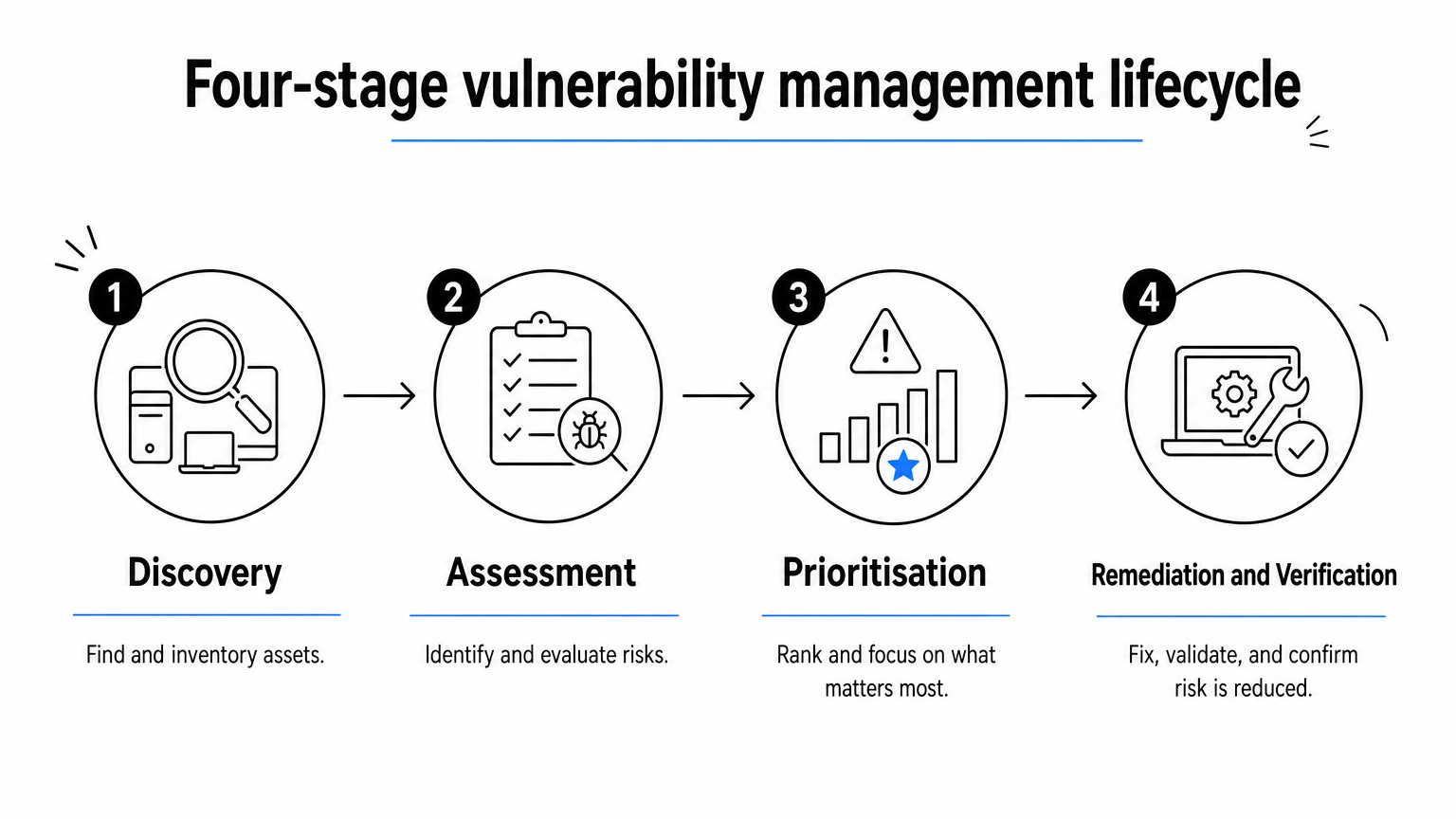
Automated vulnerability management typically covers four connected stages, mirroring the structure set out in the OWASP vulnerability management guide, and each one feeds the next without waiting for a person to hit "go":
- Discovery: agents and network scanners continuously identify assets and their exposed services.
- Assessment: findings are matched against vulnerability databases and enriched with exploit and threat data.
- Prioritisation: risk scoring weighs business context, not just a raw CVSS number.
- Remediation and verification: tickets are created, patches deployed, and fixes confirmed through targeted rescans.
Getting this right requires more than buying a scanning tool. It requires the underlying data, asset inventory, business context, and integration points, to be solid before you switch anything on. That’s the order we work through with clients during our own vulnerability assessments and penetration testing engagements at TrustedIA, following the same vulnerability assessment steps we recommend to UK SMEs, and it’s the same order this guide follows. Skip a step, and automation just means you generate bad decisions faster instead of slower.
The next four sections walk through that build sequence in practical detail, starting with the piece almost every organisation gets wrong first: knowing exactly what assets you actually have.
Step 1. Build a unified, real-time asset inventory
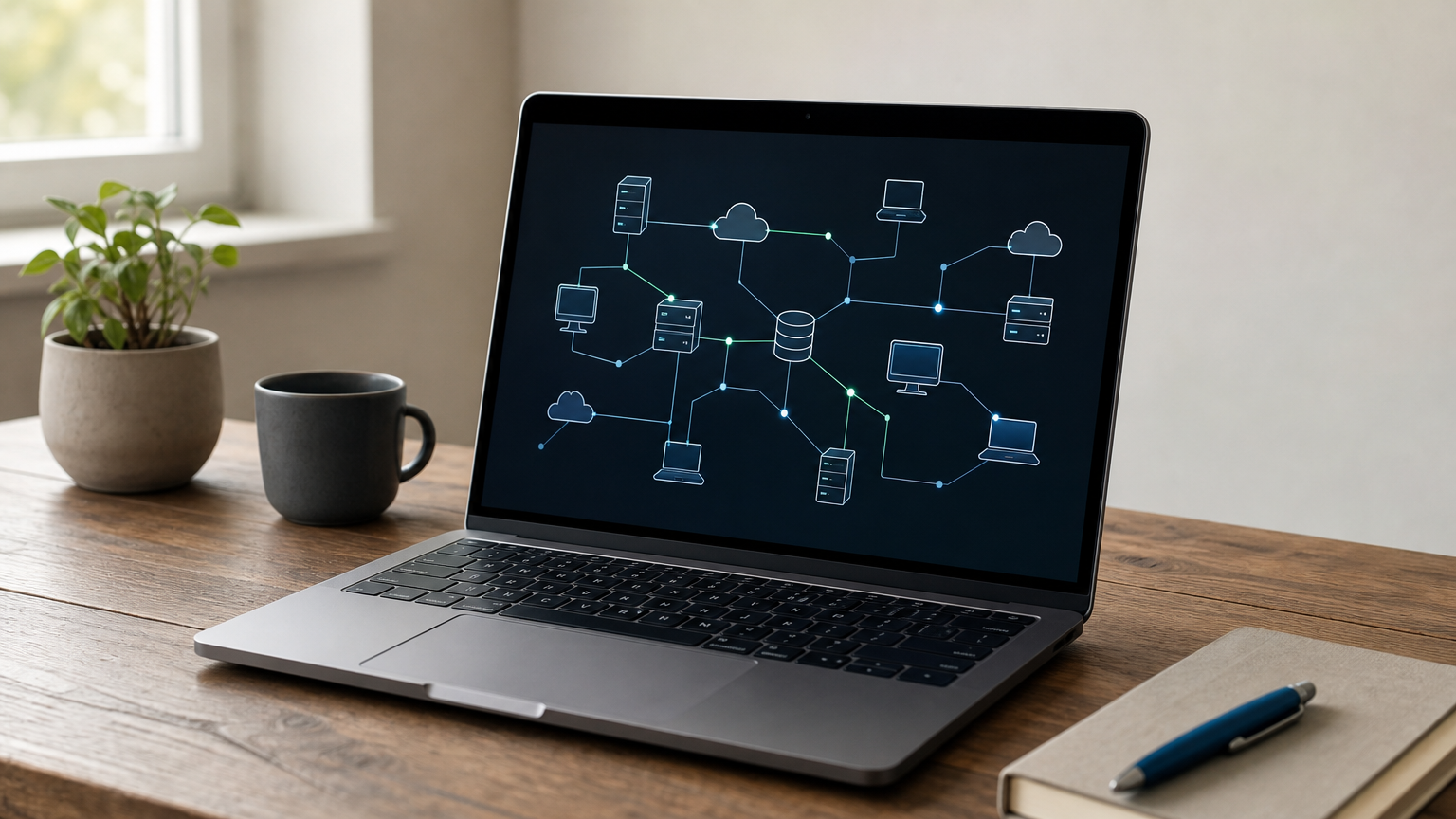
Automation can only act on what it can see. If your asset inventory is a spreadsheet last updated three months ago, every scan you run afterwards is working from a false picture. Cloud instances spin up overnight, contractors plug in laptops, and shadow IT creeps in through a marketing team’s new SaaS trial. None of that shows up in a static list, and none of it gets scanned. Real-time asset discovery is what makes every later stage of automation trustworthy rather than theatrical.
Why incomplete inventories quietly sabotage automation
Businesses often assume they know their estate until a scan turns up devices nobody remembers deploying. Complete visibility matters because a vulnerability scanner can only assess what it’s told to look at, and attackers don’t limit themselves to the assets on your list. Cloud workloads, IoT devices, and remote endpoints all expand the attack surface faster than manual audits can track, which is why continuous attack surface discovery matters.
An automated vulnerability programme built on an incomplete asset list is only automating blind spots faster.
During the ISO 27001 audits and network audits we run at TrustedIA, an out-of-date asset register is one of the most common gaps we flag, and it’s usually the reason a client’s existing scanning tool has been missing whole segments of the network for months.
Building the inventory that automation needs
Getting to a genuinely unified inventory takes a combination of methods, since no single tool sees everything:
- Deploy lightweight agents on servers, workstations, and cloud instances for continuous, near-real-time reporting.
- Run authenticated network scans to catch unmanaged or agentless devices, including printers and IoT hardware.
- Integrate with your cloud provider’s API (AWS, Azure, Google Cloud) so new instances register automatically the moment they’re provisioned.
- Pull data from your CMDB or ITSM platform to reconcile ownership and business unit against each asset.
- Reconcile duplicates and stale entries on a fixed schedule, not just at audit time.
Making the inventory a living data source
Once these sources feed a single platform, the inventory stops being a document and becomes a live data feed that every downstream automation step queries in real time. New assets get discovered, tagged, and queued for scanning without anyone raising a ticket. This is also the layer where you’ll later attach ownership and criticality data, so it’s worth getting the tagging discipline right now rather than retrofitting it once prioritisation rules are already running against messy data.
Step 2. Add business context to prioritise risk
Once your asset inventory is solid, the next failure point is treating every vulnerability with the same urgency a raw CVSS score suggests. A 9.8-rated flaw on an isolated test server sitting behind three firewalls is not the same risk as a 7.1 on a customer-facing payment gateway. Risk-based prioritisation, along the lines of NIST’s prioritisation guidance, is what stops your team from burning a week patching low-impact findings while a genuinely exploitable weakness sits untouched on a critical system.
Why CVSS alone isn’t enough
CVSS measures theoretical severity, not actual exposure in your environment. It doesn’t know whether a vulnerable server holds production data, whether it’s reachable from the internet, or whether an exploit is already circulating in the wild. Relying on CVSS as your sole ranking mechanism is exactly the kind of inconsistency that automation should be eliminating, not reproducing at scale.
A vulnerability’s severity score tells you nothing about your actual risk until it’s weighed against what the asset does and who can reach it.
Building a business-aware scoring model
Getting prioritisation right means feeding your platform data points beyond the vulnerability database itself. The factors that should shape your automated risk score include:
- Asset criticality: does the system hold regulated data, run production workloads, or support a revenue-generating process?
- Exposure: is the asset internet-facing, accessible from a flat internal network, or genuinely segmented?
- Exploit availability: is there a known proof-of-concept or active exploitation reported by sources such as CISA’s Known Exploited Vulnerabilities catalogue?
- Compensating controls: does existing endpoint detection, network segmentation, or WAF coverage reduce the practical risk?
- Ownership and SLA: which team owns the fix, and what’s the realistic patch window given change control?
Turning context into a tiered response
Once these factors feed your scoring engine, findings sort themselves into tiers that map directly to remediation SLAs, rather than a single undifferentiated backlog.
| Risk tier | Typical criteria | Target remediation window |
|---|---|---|
| Critical | Exploited in the wild, internet-facing, critical asset | 24-72 hours |
| High | Known exploit exists, sensitive data at risk | 7 days |
| Medium | No known exploit, limited exposure | 30 days |
| Low | Isolated asset, low business impact | Next patch cycle |
This is the same tiered logic we build into the independent cyber security audits and network auditing work at TrustedIA, because it gives auditors and management something concrete to point to when they ask how remediation priorities are actually decided, rather than a spreadsheet sorted by CVSS score alone.
Step 3. Automate continuous vulnerability detection
With your inventory current and prioritisation logic in place, the platform finally has enough context to run detection on its own. Continuous vulnerability detection replaces the old monthly scan window with a rolling process that checks assets as they change, not on a fixed calendar date. This is the step most vendors market as "automation", but it only works because the two previous steps gave the scanner accurate targets and a way to rank what it finds.
From periodic scans to continuous monitoring
Scheduled scans still have a place, particularly for compliance evidence, but they shouldn’t be your only detection mechanism. Agents installed during Step 1 can report new software, open ports, and configuration drift the moment they occur, while internal and external network scans fill in the gaps for devices that can’t run an agent. Combining both means a new cloud instance gets assessed within minutes of provisioning rather than sitting exposed until the next quarterly cycle. The US Cybersecurity and Infrastructure Security Agency has repeatedly flagged how quickly attackers weaponise newly disclosed flaws, which is exactly why a rolling detection process matters more than a fixed schedule.
Detection that runs on a calendar date is already out of date the moment a new asset appears.
Configuring automated scan cadence and scope
Different asset tiers warrant different scan frequencies. A sensible starting configuration looks like this:
internet-facing-assets: continuous agent monitoring + daily authenticated scan
internal-critical-servers: agent monitoring + weekly authenticated scan
general-workstations: agent monitoring + monthly authenticated scan
dev-test-environments: on-demand scan triggered by deployment pipeline
Tying scans to deployment pipelines, rather than only the calendar, catches vulnerabilities introduced during a code push or infrastructure change before they ever reach production.
Reducing false positives before they reach a human
Automation only earns trust if it doesn’t flood analysts with noise. Tune the platform to suppress duplicate findings, correlate results across scan sources, and auto-close issues that a targeted rescan confirms as resolved. Vulnerability data feeds should also cross-reference exploit intelligence sources so low-risk theoretical findings don’t consume the same attention as actively exploited ones. When we run vulnerability assessments and penetration testing for clients at TrustedIA, this tuning stage is usually what separates a scanner that gets ignored after a month from one that stays genuinely trusted by the team using it. Get detection right here, and the tickets it generates in the next step will already carry the right priority attached.
Step 4. Automate remediation, patching and reporting

Detection and prioritisation mean nothing if the fix still depends on someone remembering to chase it up. Automated remediation workflows close the loop by turning a ranked finding into a ticket, a patch deployment, and a verification check, without waiting for a person to manually push each stage forward. This is where automated vulnerability management actually reduces your exposure window, rather than just producing a longer report for someone to read next week.
Routing tickets straight into your existing workflow
Once a finding clears your risk thresholds, the platform should raise a ticket automatically in whatever system your IT team already works from, ServiceNow, Jira, or similar, complete with the asset owner, remediation SLA, and remediation steps attached. Integration with your ticketing system matters more than the platform itself: if analysts have to copy details across systems by hand, you’ve reintroduced the exact delay automation was meant to remove.
A remediation workflow that still needs someone to manually create the ticket isn’t automated, it’s just faster manual work.
Orchestrating patches without breaking change control
Patch deployment can run through your existing patch management or RMM tooling, triggered directly by the vulnerability platform for low-risk, well-tested updates, though it’s worth being clear on patch management vs vulnerability management when you define that handover. Higher-risk changes, anything touching production databases or customer-facing systems, still need a human approval step inside change control. Automating the routine, low-risk patches frees your team to focus judgement on the ones that genuinely need scrutiny. A sensible cadence looks like:
- Auto-approve and deploy: low-risk patches on non-critical, well-tested systems
- Fast-track approval: high-severity findings on critical assets, reviewed within hours
- Standard change process: anything affecting production databases, core infrastructure, or customer-facing services
Rescans should trigger automatically once a patch deploys, confirming the fix rather than leaving it as an assumption until the next full scan.
Reporting that’s ready before the auditor asks
Reporting shouldn’t be a separate task bolted on before an audit. Once tickets, patches, and rescans all live in the same platform and feed a vulnerability management dashboard, compliance evidence generates itself on demand, showing exactly when a vulnerability was found, ranked, fixed, and verified. This is the level of evidence we help clients assemble during ISO 27001 support at TrustedIA, and it’s also exactly the data set our CyberSOS incident response team draws on when a client needs to prove what was patched before an incident occurred.
Tools and technologies that power automation
No single product covers every stage of the vulnerability lifecycle, so a working automation stack is really a set of tools that talk to each other. Vulnerability management automation depends on the connections between these systems as much as on any individual product’s feature list. Get the integrations wrong and you’ll end up with several tools that each do their job well but never actually pass data to one another, which just recreates the manual handoffs you were trying to remove.
The core stack you need
Most mature setups draw on the same handful of tool categories, even if the specific vendors differ from one organisation to the next.
| Category | Function in the pipeline |
|---|---|
| Vulnerability scanners | Identify missing patches, misconfigurations, and known CVEs across servers, endpoints, and cloud workloads |
| Asset discovery / CMDB | Maintain the live inventory that scanners and prioritisation logic query |
| Threat intelligence feeds | Flag which findings have known exploits or active exploitation, such as CISA’s KEV catalogue |
| SOAR platforms | Orchestrate ticket creation, notifications, and low-risk remediation without manual triggers, the same wiring behind automated incident response |
| ITSM / ticketing tools | Route findings to the right owner with SLA and remediation detail attached |
| Patch management / RMM | Deploy approved fixes and trigger the rescan that confirms remediation |
Automation isn’t a single tool, it’s the wiring between your scanner, your ticketing system, and your patch tooling working without a person in the middle.
Choosing tools without locking yourself in
Picking a stack shouldn’t mean picking a single vendor for everything. Different environments need different strengths, a scanner that’s excellent for cloud workloads might be weak on OT devices, and forcing one platform to cover both usually leaves gaps. This is why TrustedIA takes a solution-agnostic approach when we design a client’s automated pipeline, drawing on partnerships across multiple technology providers rather than pushing a single brand, and using our own CRAFT tooling to assess where the current stack falls short before recommending changes.
Questions worth answering before you commit budget to any platform:
- Does it expose an API for ticketing and CMDB integration, or does data need manual export?
- Can it ingest external threat intelligence, or only its own vulnerability database?
- Does it support agent-based and agentless scanning for the assets you actually run?
- Will it scale to your asset count without a licensing model that punishes growth?
Running that assessment properly is exactly what an audit of your network infrastructure is built to answer before you sign a contract.
Moving forward with automated vulnerability management
Getting vulnerability management automation right isn’t about buying a bigger scanner. It’s about the sequence: a real-time asset inventory, business context that ranks risk properly, continuous detection instead of a monthly scramble, and remediation workflows that close the loop without waiting for someone to notice a ticket. Skip a step and you just automate bad decisions faster, which is worse than the manual process you started with.
Start small if you need to. Fix your asset inventory first, then layer prioritisation and detection on top before you touch remediation. Every stage builds on the one before it, and rushing the order is where most programmes stall.
If you’d rather have someone who’s already run this build sequence across ISO 27001 audits and live incident response cases handle it with you, book a vulnerability assessment with TrustedIA and find out where your current setup actually stands.