When a security incident hits, memory fails fast. Within hours, nobody agrees on when the first alert came in, who was told, or what was switched off. A cyber incident response form fixes that by giving your team one place to record facts while they are still fresh.
If you want a template, the short answer is this: a good form captures what happened, when, who was involved, and what you did about it. It should also record the systems and data affected, the severity rating, and who has been notified. Keep it to one or two pages, so people actually complete it under pressure. A cyber incident response report template works the same way, with extra space for lessons learned once the incident is closed.
Below, we set out the fields every form needs and why each one matters, drawing on 30 years of IT services experience and our work running incident response through CyberSOS. You will also see how the form fits into your wider response plan, and where it supports ISO 27001 evidence, insurer claims, and regulator reporting.
Why a cyber incident response form matters
It captures facts before memory rewrites them
Records written after the event are unreliable. In the first few hours your team is triaging, not taking notes. By the next morning, three people give three different times for the first alert. A form gives whoever is on point a fixed structure, so the timeline is recorded as it happens instead of reconstructed from memory and scattered emails.
It also stops steps being missed. Under pressure, people forget basic questions. Was the affected laptop isolated? Has the latest backup been checked? Has the managing director been told? Each field works as a prompt, so nothing important depends on someone remembering it at 2am.
It gives outsiders the evidence they ask for
Several parties will want the same facts, and they will want them quickly. Under UK GDPR, you must report a notifiable personal data breach to the ICO within 72 hours of becoming aware of it. Your insurer will expect prompt notice as well. One completed form can answer all of them, because each is asking for a different cut of the same record.
| Who is asking | What they typically want from your record |
|---|---|
| ICO | Nature of the breach, data categories, approximate numbers affected, actions taken |
| Insurer or loss adjuster | Discovery time, notification time, containment steps, costs incurred |
| ISO 27001 auditor | Evidence that incidents are assessed, handled, and reviewed (Annex A 5.24 to 5.28) |
| Leadership and customers | What happened, what was affected, and what has been fixed |
Without a form, you rebuild this picture from chat logs and half-remembered calls. That takes days you do not have, and gaps in the story can weaken an insurance claim or an audit.
An incident you cannot reconstruct is an incident you cannot report, defend, or learn from.
It makes the next incident easier
Finally, a closed form is your best source of improvement. Patterns appear when you compare records. Perhaps three incidents began with phishing emails, or detection always took longer than a day. Those findings tell you where to spend your security budget and which staff training to prioritise, which is far more useful than a vague sense that things went badly.
How to build a cyber incident response form
Design around the person filling it in
Your cyber incident response form will be completed by someone tired, stressed, and probably doing three other jobs. So design for the worst hour, not the best. Use plain language, tick boxes, and drop-down choices wherever you can. Keep free-text boxes for narrative only, such as "what happened" and "actions taken".
Most teams go wrong by copying a long template from a standards document. Six-page forms go unfinished. A tighter one or two page layout gets completed, and anything extra can sit in an appendix or an attached log.
Build it in five steps
Start from your real incident types, not a generic list. Then work through this five-step sequence:
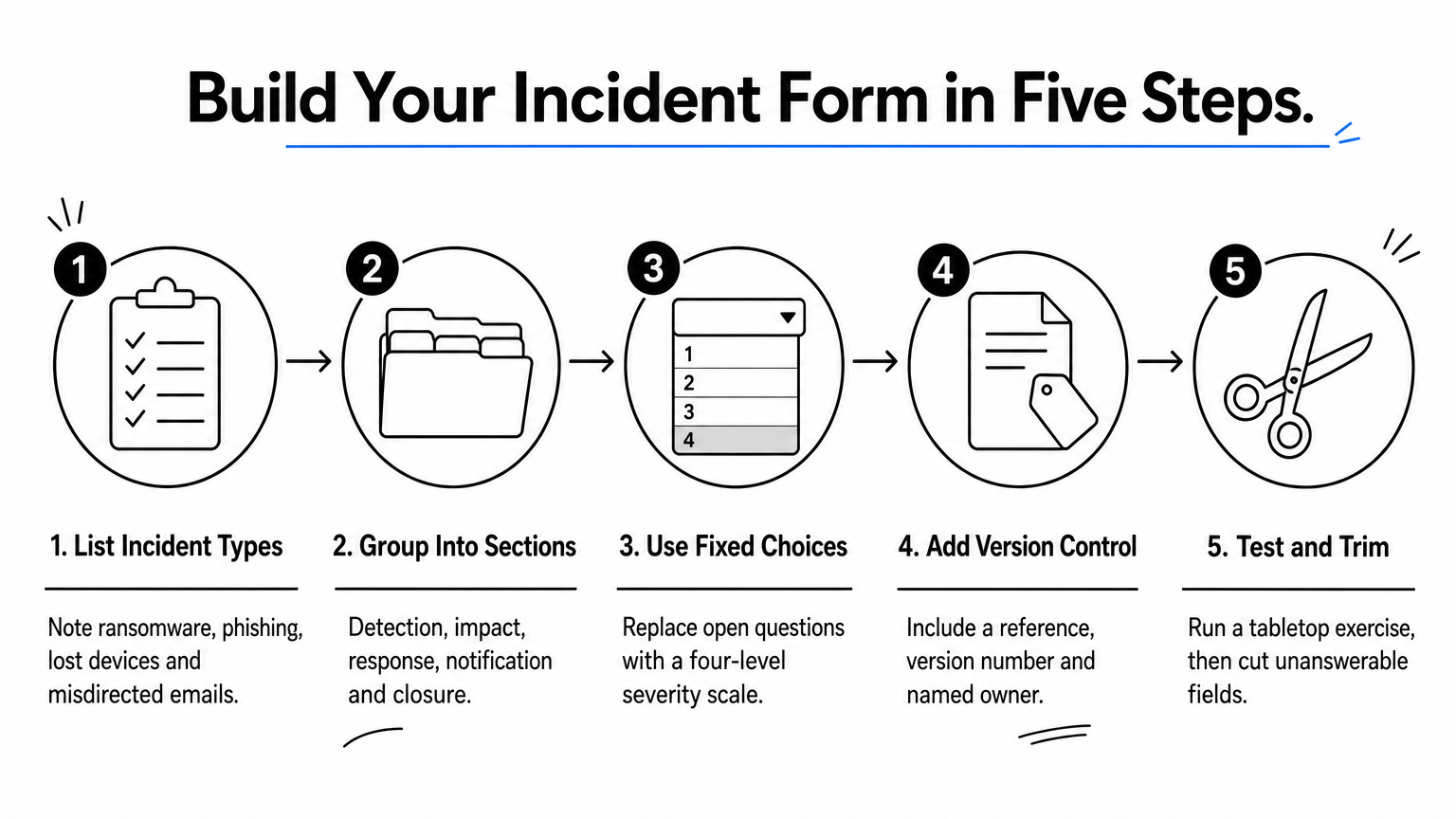
- List the incidents you are most likely to face, such as ransomware, phishing, lost devices, and misdirected emails.
- Group the fields into five sections: detection, impact, response, notification, and closure.
- Replace open questions with fixed choices, for example a four-level severity scale with a one-line definition for each level.
- Add a form reference, a version number, and a named owner, so you can show which version was used.
- Test it in a tabletop exercise, then cut every field nobody could answer.
The best form is the shortest one that still satisfies your regulator, your insurer, and your auditor.
Keep an offline copy as well. If email and file shares are down, a form stored only on the affected network is useless. Print a few copies, and store a PDF on a separate cloud account or phone that the response team can reach. The same approach works for a cyber incident response report template, which you can reuse for the post-incident review.
Fields to include in an incident report template

Every field on your cyber incident response form should answer a question that someone will ask later. Using the five sections from the build steps above, here is what a solid incident report template contains.
Fields by section
The table below sets out the minimum fields for each section. Treat anything beyond it as optional, and mark the mandatory fields clearly so a stressed responder knows what to complete first.
| Section | Fields to include |
|---|---|
| Detection | Reference number, date and time detected, who reported it and how, incident type |
| Impact | Systems, data and users affected, personal data involved (yes or no), severity rating, business impact |
| Response | Containment actions with times, who did what, evidence preserved, external help called in |
| Notification | ICO, insurer, police, customers, board, each with date, time and sender |
| Closure | Root cause, recovery confirmed, lessons learned, follow-up actions with owners and deadlines |
Fields that teams often leave out
Timestamps cause the most trouble. Record when the incident occurred, when it was detected, and when you became aware of it as three separate entries. The 72-hour ICO clock runs from awareness, and your insurer will ask about the gap between the other two.
Record the time of every decision, not just every event.
Evidence handling is the other common gap. Add a field for what was preserved, who holds it, and where it is stored. Wiping a device to restore service quickly can destroy the logs an investigator needs, so prompt people to preserve before they rebuild. Log key decisions and the reason behind them too, such as whether you isolated a server or paid for outside help. A cyber incident response report template with this detail makes the post-incident review far more honest and useful.
Where the form fits in your incident response plan
The form is not the plan. Your plan sets out who does what and in what order, while the form is the live record that runs alongside it. Think of the plan as the script and the form as the notes taken during the performance.

Mapping the form to each phase
Most plans follow the same incident response phases, and each one feeds a different part of your cyber incident response form. Open the form at the first alert, not after containment. That habit is what makes the record trustworthy.
| Plan phase | What happens | Form section |
|---|---|---|
| Prepare | Roles, contacts and templates agreed | Version, owner, contact list |
| Detect and report | Alert raised, incident confirmed | Detection |
| Assess | Scope and severity decided | Impact |
| Contain and recover | Systems isolated, services restored | Response |
| Notify | ICO, insurer, customers informed | Notification |
| Review | Root cause and lessons agreed | Closure |
Ownership and handover
Name one incident lead who owns the form from first alert to closure. Others can contribute, but one person keeps it consistent. Your plan should also state where the form is stored, who may edit it, and who receives a copy at each stage.
Shift handovers are where records break. If the response runs beyond a working day, the outgoing lead should read the form through with their replacement. The next person then starts from what is written, not from what they overheard.
The plan tells people what to do; the form proves what they did.
Closed forms should feed back into the plan. If three records show the same delay in escalation, change the escalation step rather than noting it again. Your cyber incident response report template then becomes a continual improvement tool, and under ISO 27001 that loop is exactly what an auditor wants to see.
Completing the form: a worked example
A filled-in example shows how the fields work together. Picture a 60-person accountancy firm where a finance assistant types her Microsoft 365 password into a fake invoice page. The incident lead opens the cyber incident response form within minutes and records facts, not theories.

The completed entries
| Section | Entry |
|---|---|
| Detection | INC-2026-014. Clicked 09:40, reported to IT 10:05, confirmed 10:30. Type: phishing, account compromise |
| Impact | One mailbox, three client folders. Personal data: yes. Severity: 3 of 4 (High) |
| Response | 10:35 logs exported. 10:40 password reset, sessions revoked. 10:55 forwarding rule deleted. MFA enforced. 11:15 managed provider called |
| Notification | Insurer told 14:00 by incident lead. ICO reported next morning, reason recorded: client bank details exposed |
| Closure | Root cause: no MFA on the mailbox. Actions: MFA for all users (IT manager, 14 days), phishing simulation (31 days) |
What the entries show
Look at the timestamps first. Clicked at 09:40, reported at 10:05 and confirmed at 10:30 are three separate entries, so the 72-hour ICO deadline is clear (Friday, 10:30). The insurer can also see a 25-minute gap between the click and the report.
Then check the evidence line. Logs were exported before the password reset, so an investigator can still see the attacker’s sign-ins. The notification row records why the firm reported to the ICO, not just that it did.
A form is complete when a stranger could follow the incident from it.
Finally, the closure row gives every action an owner and a deadline. That turns lessons learned into work that gets done, and the same entries drop straight into a cyber incident response report template for the review meeting.
Getting your form ready before you need it
A cyber incident response form only helps if it exists before the incident. Build it around your real incident types, keep it to one or two pages, and make sure it records the three timestamps, the evidence you preserved, and who was notified. Then store a copy offline, where a ransomware attack cannot reach it.
Practice matters as much as design. Run a tabletop exercise, cut every field nobody could answer, and name one incident lead who owns the form from first alert to closure. A form tested in calm conditions will hold up on a bad night.
If you would rather not work this out alone, we can help. Our team runs incident response through CyberSOS and supports ISO 27001 implementation. Talk to TrustedIA about incident response and ISO 27001 support, and get your form and plan tested before you need them.