
A ransomware attack, a flooded server room, a botched software update. Any one of these can take your systems offline for days, and most UK SMEs never recover the revenue lost in that window. If you’re searching for disaster recovery plan best practices, you’ve probably already had a scare, or you’ve seen what happened to a competitor and don’t want to be next.
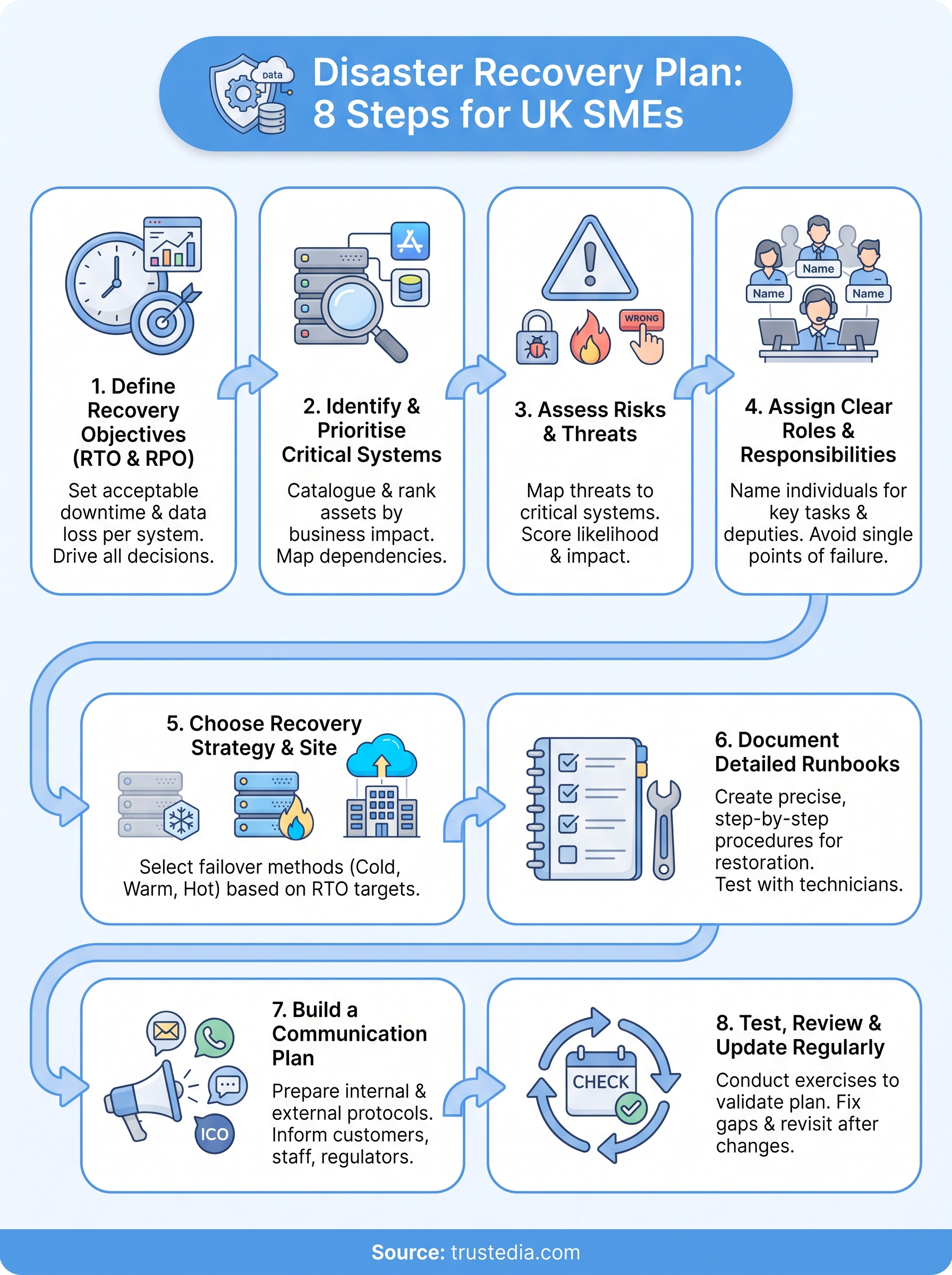
This article gives you eight practical steps for building a disaster recovery plan that actually works when you need it, not just one that sits in a folder collecting dust. We cover recovery time objectives, backup strategies, testing schedules, and the roles your team needs to play before, during, and after an incident. Each step reflects what we see repeatedly across real recoveries, not generic textbook advice.
At TrustedIA, we’ve spent over 30 years helping businesses prepare for exactly these scenarios, and our CyberSOS incident response team has handled the recovery calls when plans fail. That experience shapes everything below. By the end, you’ll have a clear framework to structure, test, and strengthen your own disaster recovery plan, whether you’re starting from scratch or fixing gaps in an existing one.
1. Define your recovery time and point objectives
Before you write a single procedure or buy a single backup licence, you need two numbers: how fast you must be back online, and how much data you can afford to lose. These are your Recovery Time Objective (RTO) and Recovery Point Objective (RPO), and they drive every other decision in your disaster recovery plan.
What it involves
RTO is the maximum acceptable downtime for a system before the disruption causes unacceptable damage to your business. RPO is the maximum amount of data loss you can tolerate, measured in time, such as the last hour of transactions or the last full working day. Both objectives should be set per system, not as one blanket figure for the whole business. Your finance platform might need a four-hour RTO and a fifteen-minute RPO, while an internal wiki could survive a two-day outage without much fuss.
Why it matters for UK SMEs
Many SMEs skip this step and jump straight to buying backup software, which is backwards. Without defined objectives, you can’t tell if your current backup schedule is actually adequate, and you can’t justify spend on faster recovery tooling to a finance director who wants numbers, not gut feeling. We’ve seen businesses discover during a real incident that their nightly backup meant losing an entire day of sales orders, simply because nobody had ever asked what an acceptable loss looked like. That’s a conversation you want to have on a quiet Tuesday afternoon, not during a ransomware outbreak.
If you haven’t put a number on acceptable downtime and data loss, you don’t actually have a recovery plan, you have a hope.
How to put it into practice
Start by listing every critical system and working through the same set of questions for each one, with input from the people who actually run the business day to day, not just IT.
- Ask the business, not just IT: talk to operations, finance, and sales leads about what downtime actually costs per hour.
- Set RTO and RPO per system: don’t apply a single figure across your entire IT estate.
- Match your backup frequency to your RPO: if your RPO is fifteen minutes, nightly backups won’t cut it.
- Revisit annually or after major change: a new CRM or ERP system can shift your tolerances significantly.
- Get sign-off from leadership: objectives without management buy-in rarely survive budget discussions.
Once these figures are agreed, everything else in your plan, from backup architecture to your recovery site choice, has a clear target to build towards.
2. Identify and prioritise your critical systems and data
Once you’ve set RTO and RPO figures, you need to know exactly which systems and data those numbers apply to. This step builds the inventory that everything else in your disaster recovery plan hangs off, and skipping it means guessing which server to restore first when the pressure is on.
What it involves
Creating a critical systems inventory means listing every application, server, and dataset your business depends on, then ranking them by how much damage their loss would cause. This isn’t just servers and laptops. It includes SaaS platforms, cloud storage, third-party APIs, and even the phone system your support team relies on. For each item, note where it lives, who owns it, what it depends on, and what breaks if it disappears.
Why it matters for UK SMEs
Most SMEs run on a tangle of legacy systems, cloud tools, and shadow IT that nobody has fully mapped. When an incident hits, teams waste precious hours figuring out what actually needs restoring before they can even start recovering it. We’ve walked into recoveries where the client didn’t know their invoicing system depended on a third-party API that was also down, doubling the outage. A clear, ranked inventory removes that guesswork entirely.
You can’t recover what you haven’t mapped, and you can’t prioritise what you haven’t ranked.
How to put it into practice
Build your inventory methodically rather than relying on memory or outdated documentation:
- Catalogue every system: include SaaS tools, cloud services, and on-premise infrastructure.
- Map dependencies: note which systems rely on others to function.
- Classify by business impact: label each as critical, important, or non-essential.
- Assign ownership: name who is accountable for each system’s recovery.
- Review quarterly: new tools and integrations get added constantly, so keep the list current.
3. Assess the risks and threats facing your business
With your critical systems ranked, the next step is working out what could actually take them down. A risk assessment connects specific threats to specific systems, so your disaster recovery plan addresses real scenarios rather than a generic checklist copied from a template.

What it involves
A proper risk assessment looks at both the likelihood and impact of threats across three broad categories: cyber (ransomware, phishing, DDoS), physical (fire, flood, power failure), and human error (accidental deletion, misconfiguration, insider mistakes). For each threat, estimate how likely it is to occur and how severely it would disrupt the systems you flagged as critical in step two. Score these on a simple scale, then rank them so you know where to focus your defences and recovery planning first.
Why it matters for UK SMEs
UK SMEs face a specific mix of exposure: cloud dependency, remote working, and often thinner security budgets than larger enterprises. The National Cyber Security Centre reports that ransomware remains one of the most damaging threats facing UK organisations of all sizes, and smaller businesses are frequently targeted precisely because attackers expect weaker defences. Without a documented risk assessment, you’re reacting to whatever hits first rather than having already planned for your most likely scenarios.
A disaster recovery plan built without a risk assessment is just guessing which fire to fight first.
How to put it into practice
Run this as a structured exercise, not a one-off brainstorm:
- List threats by category: cyber, physical, and human error, specific to your business and location.
- Score likelihood and impact: use a simple high/medium/low scale for each.
- Link threats to systems: connect each risk back to the critical systems inventory from step two.
- Prioritise mitigation: address the highest likelihood, highest impact risks first.
- Update annually: threat patterns shift, and so should your assessment.
4. Assign clear roles and responsibilities
A disaster recovery plan is only as strong as the people who execute it under pressure. This step defines who does what during an incident, so nobody’s fumbling for a phone number or waiting for permission while systems stay down.
What it involves
Building a disaster recovery team means naming specific individuals, not job titles, against specific tasks: who declares the incident, who leads technical recovery, who talks to customers, and who liaises with insurers or regulators. Every role needs a named deputy, because the person you rely on most might be on holiday, off sick, or unreachable when the incident actually happens. Document this structure clearly, with contact details that live outside your main systems in case those systems are the ones that are down.
Why it matters for UK SMEs
Smaller businesses often lack the depth of larger enterprises, meaning one or two people carry disproportionate weight during a crisis. We’ve seen recoveries stall for hours simply because the one person who knew the admin password was unreachable and nobody else had been given access. Clear ownership and accountability removes that single point of failure and keeps decisions moving even when key people are unavailable.
A recovery plan without named owners is just a document waiting for someone else to take charge.
How to put it into practice
Assign roles deliberately and record them somewhere accessible offline:
- Name individuals, not departments: assign real people with real contact details.
- Appoint deputies: every critical role needs a backup who can step in immediately.
- Define decision authority: state clearly who can declare an incident and authorise spend.
- Store details offline: keep a printed or offline copy, since your intranet may be part of the outage.
- Brief the team regularly: run through roles at least twice a year so nobody’s caught out.
5. Choose the right recovery strategy and site
Once you know your objectives, your critical systems, and your risks, you can pick a recovery strategy that actually fits your business rather than whatever a vendor happens to be selling that month. This is where your disaster recovery plan moves from paperwork into infrastructure decisions.

What it involves
Selecting a recovery strategy means deciding how and where your systems come back online after an incident, whether that’s a cloud-based failover, a secondary physical site, or a hybrid mix of both. Your choice depends directly on the RTO and RPO figures you set in step one, since a four-hour recovery target rules out slow, manual restore processes.
| Strategy | Typical RTO | Best suited to |
|---|---|---|
| Cold site | Days | Low-priority systems, tight budgets |
| Warm site | Hours | Mid-tier systems needing faster recovery |
| Hot site / cloud failover | Minutes | Business-critical systems, strict RTOs |
Why it matters for UK SMEs
Many SMEs default to whatever backup product they already own, without checking it can actually hit their recovery targets. We’ve seen businesses assume their cloud backup meant instant failover, only to discover during testing that restoring a full server took twelve hours, not the thirty minutes they’d promised customers.
Your recovery strategy is only as good as its slowest step, so test the whole chain, not just the backup itself.
How to put it into practice
Match your strategy to each system’s requirements rather than applying one approach everywhere:
- Map strategy to RTO: use hot sites or cloud failover only where speed genuinely justifies the cost.
- Consider hybrid setups: combine cloud and physical options across different systems.
- Check vendor SLAs: confirm contracted recovery times match your actual objectives.
- Budget realistically: faster recovery costs more, so spend where it matters most.
- Involve your solution-agnostic partner: avoid being locked into one vendor’s product roadmap.
6. Document detailed recovery procedures and runbooks
Strategy tells you where systems will run after an incident, but someone still has to carry out the actual restore, step by step, often at 3am under pressure. A runbook turns your recovery strategy into instructions specific enough that any competent technician can follow them, not just the one person who built the system.
What it involves
A proper runbook documents the exact sequence for restoring each critical system: which console to log into, which backup snapshot to pull, which order dependent services must start in, and how to confirm the restore actually worked. Vague steps like "restore the server" are worthless under pressure. Each runbook should include credentials locations (not the credentials themselves), expected duration, and rollback instructions if the restore fails partway through.
Why it matters for UK SMEs
SMEs rarely have deep bench strength in IT, so recovery often falls to whoever’s available, not necessarily the person who normally manages that system. We’ve watched recoveries drag on for hours because the only documentation was in someone’s head, and that someone was unreachable. Detailed recovery documentation means your disaster recovery plan survives staff turnover, holidays, and sick leave, rather than depending on institutional memory.
A recovery plan that only works if the right person answers their phone isn’t really a plan.
How to put it into practice
Write runbooks as if the reader has never touched the system before:
- Write step-by-step instructions: assume no prior knowledge of the specific system.
- Include screenshots or diagrams: visual references speed up unfamiliar tasks.
- Note dependencies and sequencing: specify what must restore first.
- Store runbooks offline and online: keep copies accessible even if primary systems are down.
- Assign an owner per runbook: someone responsible for keeping it accurate as systems change.
7. Build a clear communication plan for stakeholders
Restoring servers means nothing if your customers, staff, and suppliers hear about the outage from Twitter before they hear it from you. A communication plan sets out who tells whom, what they say, and when, so silence never becomes the story during a disaster recovery effort.
What it involves
Stakeholder communication covers internal updates to staff, external messages to customers and suppliers, and regulatory notifications where required, such as reporting a data breach to the ICO within 72 hours under UK GDPR. Draft template messages in advance for common scenarios: a data breach, a prolonged outage, a ransomware incident. Assign who approves external statements, since panicked, unapproved messaging can cause as much damage as the incident itself.
Why it matters for UK SMEs
Smaller businesses often improvise communication mid-crisis, and that’s when mistakes happen: inconsistent messaging, missed regulatory deadlines, or promises the technical team can’t keep. We’ve seen a client’s support inbox flood with complaints simply because nobody sent a holding statement in the first hour, even though recovery was already underway. A clear plan protects your reputation while the technical fix is still in progress.
Silence during an outage tells customers more than any statement you could have sent.
How to put it into practice
Prepare your messaging before you need it, not while the clock is running:
- Draft templates in advance: cover customer, supplier, staff, and regulator communications.
- Name an approver: one person signs off external statements to avoid mixed messages.
- Set notification deadlines: know your ICO reporting window and other contractual obligations.
- Choose backup channels: agree how you’ll communicate if email or your website is down.
- Update stakeholders regularly: even "still investigating" beats no update at all.
8. Test, review and update your plan regularly
A disaster recovery plan that’s never been tested is a theory, not a plan. This final step turns everything you’ve built in steps one through seven into something proven, by actually running it and finding out where it breaks before a real incident does.
What it involves
Testing your plan means running structured exercises that exercise different parts of the process: tabletop walkthroughs where the team talks through a scenario, simulated failovers that restore systems to a test environment, and full live tests that switch production over to your recovery site. Each test should have a defined scope, a scenario, and a way to measure whether you hit your RTO and RPO targets from step one.
Why it matters for UK SMEs
Businesses change constantly: new software, new staff, new suppliers, and each change can quietly break a step in your recovery procedure without anyone noticing. We’ve run tests where a runbook referenced a server that had been decommissioned eight months earlier, and nobody had updated the document. Regular testing catches these gaps while you’ve got time to fix them, rather than during an actual outage.
A disaster recovery plan you’ve never tested is just an assumption dressed up as a strategy.
How to put it into practice
Build testing into your annual calendar rather than treating it as optional:
- Run tabletop exercises quarterly: walk the team through a scenario without touching live systems.
- Schedule a full failover test annually: prove your recovery site actually works under real conditions.
- Measure against RTO and RPO: record actual recovery times and compare them to your targets.
- Update the plan after every test: fix gaps immediately, while the lessons are fresh.
- Involve every named role: test the people and the process, not just the technology.
Making resilience part of business as usual
Eight steps look like a lot on paper, but together they turn disaster recovery from a dusty document into something your business actually runs on. Objectives, inventory, risk assessment, roles, strategy, runbooks, communication, and testing all reinforce each other. Skip one and the rest weaken considerably. Getting started matters more than getting it perfect, since a plan with gaps you’re actively closing beats no plan at all.
Regard your disaster recovery plan as a living part of how you operate, not a one-off project you file away after the audit. Revisit it after every major change, every test, and every near-miss, and it’ll still work when a real incident arrives.
If building or strengthening that plan feels like more than your team has time or expertise for, that’s exactly where we come in. Talk to TrustedIA about your disaster recovery plan and get the resilience your business needs, backed by three decades of handling exactly this.