
A ransomware attack, a burst pipe, or a key supplier going under can shut your business down in hours. If you don’t have a plan ready, you’re making decisions under pressure, and that’s when costly mistakes happen. Business continuity planning for small businesses isn’t a nice-to-have anymore; it’s what separates a firm that reopens within days from one that never does.
This guide walks you through building a plan that actually fits a small business, not a watered-down version of an enterprise template with forty pages you’ll never read. You’ll learn how to identify your critical operations, work out realistic recovery timeframes, and put practical response steps in place that your team can follow without a consultant standing over their shoulder.
We’ll cover risk assessment, data and system recovery, communication plans for staff and customers, and how to test your plan so it doesn’t just sit in a drawer gathering dust. Having supported businesses through real cyber incidents at TrustedIA, we know exactly where continuity plans fall apart in practice, and we’ve built this guide to help you avoid those gaps.
What is a business continuity plan and why it matters
A business continuity plan (BCP) is a written document that spells out how your business keeps operating, or gets back on its feet fast, when something disrupts normal operations. That could be a cyber attack, a fire, a flood, a key staff member leaving suddenly, or your main supplier collapsing. The plan covers who does what, which systems and processes need to come back online first, and how you’ll communicate with staff, customers and suppliers while you sort things out. It’s not a disaster recovery document alone, and it’s not just an IT problem either; it touches every part of how your business runs.
Many small business owners assume continuity planning is something only large corporations need, or that their cyber insurance policy covers the gap. Neither is true. Insurance pays out money eventually, but it doesn’t tell your team what to do at 8am on the day your systems go down, and it won’t stop you losing customers to a competitor who answered the phone while you were still figuring out what happened. A written response plan removes the guesswork exactly when guesswork is most dangerous.
A business continuity plan is what turns a crisis into an inconvenience.
The financial case is straightforward. Every hour your business is down costs you in lost sales, staff wages for idle time, and often penalty clauses if you supply other businesses under contract. According to the UK government’s Cyber Security Breaches Survey, a large share of UK businesses experienced a breach or attack in the past year, and smaller firms are frequently the least prepared to respond. Customers notice slow or chaotic recovery too, and many take their business elsewhere after a bad experience, regardless of how good your product usually is.
Beyond the immediate financial hit, continuity planning matters for contractual and compliance reasons. If you supply larger organisations or work in regulated sectors, they’ll increasingly ask you to prove you have a continuity plan before they’ll sign or renew a contract. This is also closely tied to frameworks like ISO 27001, which requires documented continuity arrangements as part of a wider information security management system. Getting this right now saves you scrambling to produce a plan under deadline pressure from a client or auditor later.
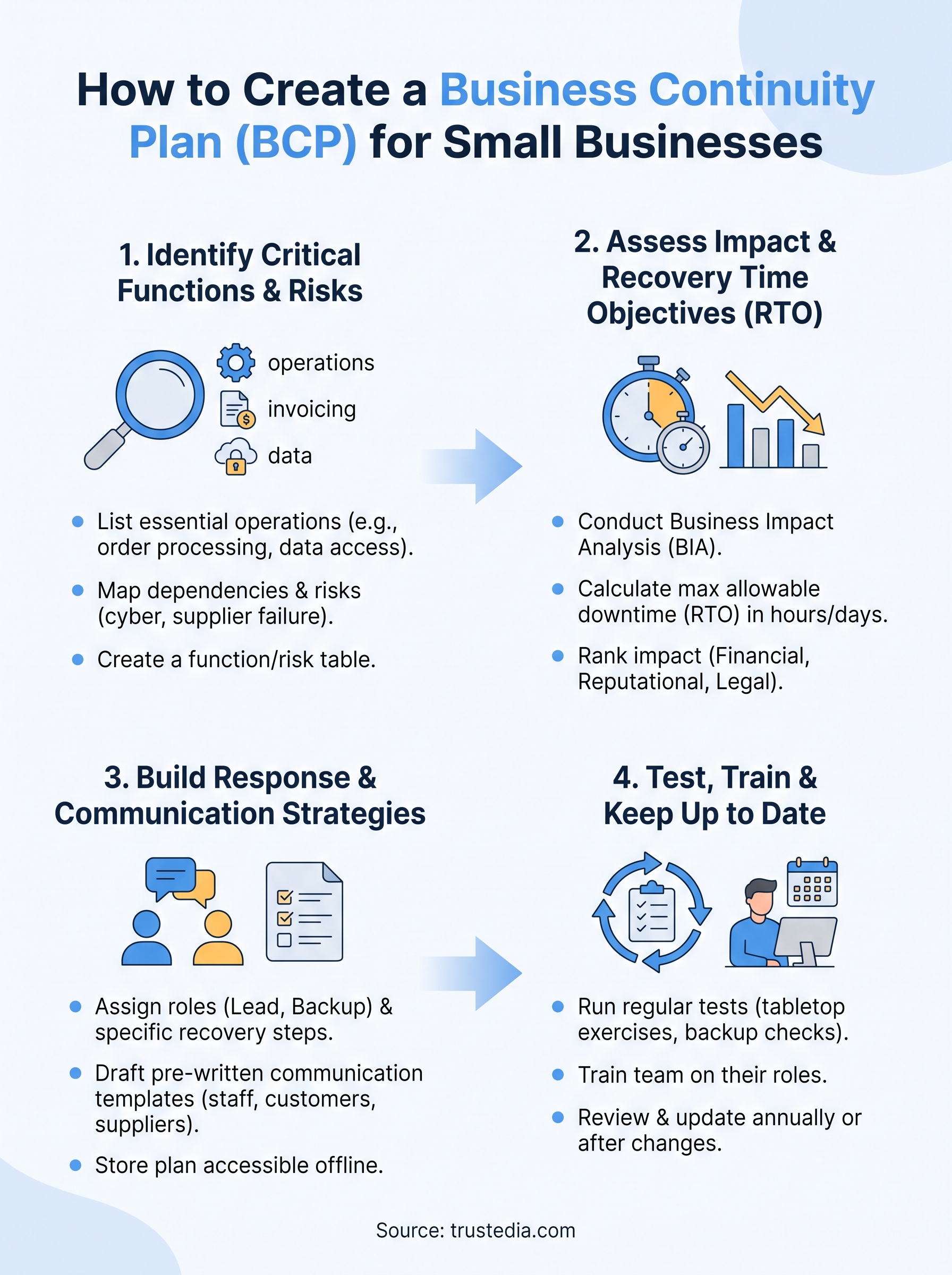
Step 1. Identify your critical business functions and risks
Start by listing what your business actually needs to keep running, not everything it does. Ask yourself: if this stopped tomorrow, would customers notice within a day? If the answer is yes, it’s critical. For most small businesses, this list includes invoicing, order processing, customer communication, and whatever system holds your core data, whether that’s a CRM, an accounting package, or a shared drive full of client files.
Next, map each critical function to the risks that could take it down. Don’t just think cyber attacks; think broadly. A supplier risk assessment matters just as much as checking your firewall, especially if you rely on one supplier for stock or a single contractor for IT support.
You can’t protect what you haven’t identified, so start with a plain list of what actually keeps the lights on.
Work through this checklist for each critical function:
- Which staff, systems, and suppliers does it depend on?
- What would happen if that dependency failed for a day? A week?
- Is there a single point of failure, one person, one server, one supplier, with no backup?
- What’s the realistic likelihood of each risk, based on your industry and location?
Be honest about probability. A flood matters if you’re near a river; it’s less relevant if you’re on the fifth floor of an office block. A ransomware attack is a genuine risk for every business with a network connection, regardless of size. This step doesn’t need spreadsheets or specialist software. A simple table with function, dependency, risk, and likelihood gives you a working document you can build on in the next steps.
Step 2. Assess the impact of disruption with a business impact analysis
Once you know your critical functions, work out what happens if each one goes down for an hour, a day, or a week. This is your business impact analysis (BIA), and it turns your risk list into numbers you can actually plan around. The goal is a recovery time objective (RTO) for each function: the maximum time it can be unavailable before the damage becomes serious.

The BIA tells you which fires to put out first when everything feels urgent at once.
Calculate your recovery time objectives
Ask practical questions for each function. How much revenue do you lose per hour it’s down? Do you breach a contract if it’s unavailable past a certain point? Will regulators or clients need notifying? Your accounting system might tolerate a day offline; your order processing probably can’t. Write down the RTO in hours or days, not vague terms like "as soon as possible".
Rank impact by category
Score each function against a few categories so you can see priorities at a glance:
| Function | Financial impact | Reputational impact | Legal/contractual impact | RTO |
|---|---|---|---|---|
| Order processing | High | Medium | Low | 4 hours |
| Customer data system | High | High | High | 1 hour |
| Internal email | Low | Low | Low | 24 hours |
This table becomes the backbone of your recovery strategy in the next step, since it tells you exactly where to spend your limited time and budget first.
Step 3. Build your response, recovery and communication strategies
With your RTOs set, write down exactly what happens when a disruption hits, in the order it needs to happen. This is where most plans either become genuinely useful or turn into shelfware nobody opens. Each critical function needs a named person responsible for getting it back online, a backup contact if that person is unreachable, and the specific steps to take, not a general instruction to "restore systems".
Assign roles and recovery steps
Build a simple response table for each function on your BIA list:
| Function | Lead person | Backup contact | First action | Recovery resource |
|---|---|---|---|---|
| Customer data system | IT Manager | Managed service provider | Isolate affected systems | Backup restore from cloud storage |
| Order processing | Operations lead | Office manager | Switch to manual order log | Paper-based fallback process |
A plan without a named owner for each task isn’t a plan, it’s a wish list.
Draft your communication plan
Alongside recovery steps, prepare communication templates in advance so nobody’s writing customer emails while also fighting a fire. Keep these ready to adapt:

Subject: Service update from [Business Name]

We're currently experiencing a technical issue affecting [service].
Our team is actively working on it and we expect it resolved by [time/date].
We'll update you as soon as we have more information.
Have separate short scripts ready for staff, suppliers, and customers, since each audience needs different levels of detail. Staff need practical instructions; customers need reassurance and a timeframe; suppliers may need to know if deliveries or payments will be delayed. Store all of this, contacts, templates, and recovery steps, somewhere accessible even if your main systems are down, such as a printed copy or an offline cloud folder.
Step 4. Test, train and keep your plan up to date
A plan that’s never been tested is just a theory. Run a tabletop exercise every six months where you walk through a scenario, such as a ransomware attack locking your systems, and talk through who does what, in real time, using the plan you’ve written. You’ll find gaps fast: contacts that are out of date, backups that haven’t actually been checked, or a recovery step that assumes access to a laptop nobody can currently reach.
A plan you’ve never tested is a guess dressed up as a strategy.
Run a simple annual test cycle
Keep testing manageable rather than trying to simulate every disaster at once:
- Quarterly: check backups actually restore, not just that they run
- Every six months: tabletop walkthrough with the whole response team
- Annually: full test of at least one critical system failover
- After any real incident: update the plan with what you learned
Train your team and review regularly
Everyone named in the plan needs to know their role before the day it matters, not read it for the first time during an actual outage. Run a short staff briefing at least once a year, and whenever a new person takes on a continuity role. Review the whole document whenever something changes: new suppliers, new software, a office move, or staff turnover in key positions. Set a calendar reminder for a full review at least annually, because a continuity plan built around last year’s systems and last year’s team won’t hold up when you actually need it.
Building lasting resilience for your business
A business continuity plan doesn’t need to be perfect on day one. It needs to exist, get tested, and improve every time you run it or use it for real. Start with your critical functions, work out realistic recovery times, write down who does what, and put a date in the calendar to test it. That’s the whole job, done properly rather than done exhaustively.
Most small businesses that fail after a disruption don’t fail because the disruption was unsurvivable. They fail because nobody had written down what to do before the pressure hit. Your plan is what closes that gap, and every hour you spend building it now is an hour you won’t spend panicking later.
If you want a second pair of eyes on your plan, or you’re not sure where the real gaps sit, talk to TrustedIA about a proper continuity and resilience review.