Ask five IT managers to define business continuity planning vs disaster recovery planning and you’ll likely get five different answers. The terms get used interchangeably in board meetings and vendor pitches, yet they cover different ground, and mixing them up leaves gaps in your risk strategy that only surface when something actually breaks.
Here’s the short version: disaster recovery is about restoring your IT systems, data, and infrastructure after an incident, while business continuity is the wider plan that keeps your whole organisation functioning while that recovery happens. One rebuilds the servers; the other keeps staff, customers, and operations moving in the meantime. Neither works well without the other.
In this article, we’ll break down how a business continuity plan vs disaster recovery plan differ in scope, ownership, and timeline, show where they overlap, and explain why treating them as one document usually backfires. We’ll also cover what a properly built version of each looks like, so you can spot the weak points in your own approach before an incident forces the issue.
Why the distinction matters for your risk strategy
Treating business continuity and disaster recovery as one interchangeable plan is one of the most common mistakes we see when we review a client’s cyber resilience setup. It feels efficient to bundle them into a single document, but it creates a single point of failure in your thinking: you end up with a plan that’s strong on technical recovery and weak on everything else, or vice versa. A proper risk strategy needs both halves working, and working separately, because they answer different questions during an incident.
What happens when the plans get merged
Imagine a ransomware attack that takes down your file servers overnight. Your IT team follows the disaster recovery steps, restores from backup, and has systems back online within six hours. Sounds like a win, until you realise nobody briefed the customer service team on what to tell callers, nobody activated a backup premises for staff who couldn’t log in, and nobody notified suppliers about delayed orders. The technical recovery succeeded, but the business kept bleeding because there was no separate continuity plan running alongside it. This is the gap that a business continuity plan vs disaster recovery plan comparison is meant to expose before it costs you real money.

A restored server doesn’t mean a functioning business, and a functioning business doesn’t fix a broken server.
Insurers, auditors and regulators expect both
If you’re pursuing ISO 27001 certification, assessors will ask to see continuity arrangements as part of Annex A controls, and they’ll expect these to be distinct from your technical recovery documentation. Cyber insurers ask similar questions during underwriting and, more pointedly, during claims. If your policy required a tested continuity plan and all you can produce is a server restoration checklist, you risk a disputed payout at the worst possible moment. We’ve supported clients through TrustedIA’s ISO 27001 professional services specifically because auditors kept flagging this exact gap between the two disciplines, and a gap analysis of your continuity management system is usually the quickest way to find it first.
The real cost of blurring the lines
The practical fallout from merging these plans, or skipping one entirely, tends to show up in predictable ways:
- Longer downtime because staff wait for IT before doing anything, rather than following a parallel continuity process.
- Reputational damage from customers hearing nothing during an outage, even if systems are quietly being restored behind the scenes.
- Compliance failures during audits or insurance reviews when only one plan exists where two were required.
- Wasted spend on disaster recovery infrastructure that never gets used properly because staff don’t know how to operate around it.
- Confused ownership, with IT and operations teams both assuming the other is handling communications or alternate working arrangements.
Getting this right isn’t about paperwork for its own sake. It’s about making sure that when something does go wrong, the right people know exactly which plan they’re following and what it’s meant to achieve. That clarity is what separates businesses that recover in days from those that are still untangling the mess months later. The next section breaks down exactly where the boundaries sit, so you can see precisely which parts of your current setup belong to continuity and which belong to recovery.
Key differences between business continuity and disaster recovery
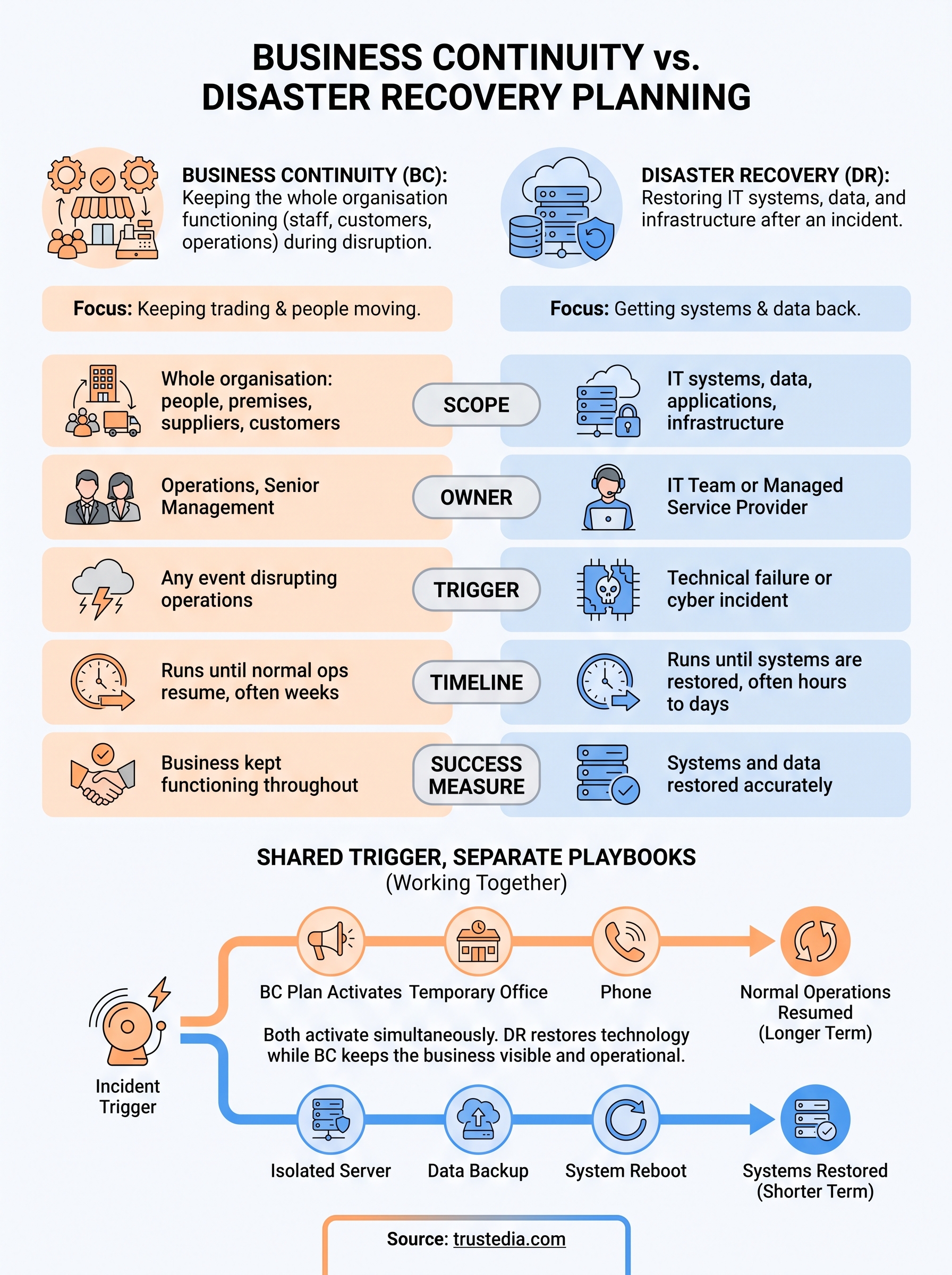
Once you strip away the jargon, a disaster recovery plan vs business continuity plan comes down to five practical differences: what each plan covers, who owns it, how long it runs, what triggers it, and what "success" looks like. Knowing these distinctions is what lets you audit your own documents and spot which one you’re actually missing.
Scope and ownership differ from the start
Disaster recovery sits squarely with IT. It covers servers, applications, data backups, cloud infrastructure and network hardware, and it’s usually owned by whoever runs your systems, whether that’s an in-house IT manager or an outsourced provider. Business continuity sits higher up, typically owned by operations or senior management, because it covers everything the organisation needs to keep functioning: staff, premises, suppliers, customer communications, and cash flow. One plan asks "how do we get the data back?" The other asks "how do we keep trading while that happens?"
If your recovery plan only mentions servers, you don’t have a continuity plan, you have half of one.
Timeline and trigger points
Disaster recovery activates the moment a technical failure is detected, whether that’s a ransomware lockout, a server crash, or a cloud outage. Business continuity activates alongside it, but runs on a broader clock, sometimes for weeks after systems are technically back online, because rebuilding customer trust and supplier relationships takes longer than restoring a database.
| Factor | Business Continuity | Disaster Recovery |
|---|---|---|
| Scope | Whole organisation: people, premises, suppliers, customers | IT systems, data, applications, infrastructure |
| Typical owner | Operations, senior management | IT team or managed service provider |
| Trigger | Any event disrupting operations | Technical failure or cyber incident |
| Timeline | Runs until normal operations resume, often weeks | Runs until systems are restored, often hours to days |
| Success measure | Business kept functioning throughout | Systems and data restored accurately |
Why neither replaces the other
Some businesses assume a solid disaster recovery setup, cloud backups, failover servers, tested restore procedures, covers them. It doesn’t. Technical recovery says nothing about who answers the phones, where staff work if the office is unusable, or what you tell customers in hour one. Understanding this business continuity plan vs disaster recovery plan split isn’t academic. It determines whether your business keeps functioning during the exact hours when recovery is still underway, which is precisely when customers and staff are watching closest.
How to build a business continuity plan
Building a workable business continuity plan starts long before you write a single procedure. You need to know what actually matters to the organisation, which parts of the business generate revenue, which relationships can’t survive a week of silence, and which staff functions are genuinely irreplaceable in the short term. Skip this groundwork and even the best continuity plan template gives you a document full of good intentions that nobody can actually follow when the power’s out and the phones won’t stop ringing.
Start with a business impact analysis
Every credible plan begins with a business impact analysis (BIA), a structured exercise that ranks your business functions by how quickly their loss would hurt you. Payroll, customer support, order processing and supplier payments usually sit near the top; internal reporting or long-term projects usually sit lower down. The BIA tells you where to spend your continuity budget and, just as importantly, where you can afford to let things wait.
A continuity plan without a business impact analysis is just a guess dressed up as a document.
Define your response teams and communication chain
Once priorities are set, assign real people to real roles, not job titles that happen to exist on an org chart. Each team needs a named lead, a deputy, and a clear trigger for when they activate.
- Incident coordinator: makes the call to activate the plan and keeps overall timing on track.
- Communications lead: handles staff, customer, and supplier messaging on a fixed schedule, not ad hoc.
- Operations lead: arranges alternate premises, equipment, or remote working arrangements.
- Finance lead: manages supplier payments and cash flow through the disruption.
Write down exactly who contacts whom, in what order, and through which channel if email or the usual phone system is unavailable.
Test, train and revise the plan
A plan that only exists on paper fails the first time it’s needed. Test the plan at least twice a year with tabletop exercises, walking your response teams through a realistic scenario, such as losing the office building or a key supplier, and note where the plan breaks down. Revise the document after every test and after any real incident, because the gaps you find in a drill are far cheaper than the gaps you find during an actual outage. Businesses using ongoing continuity and recovery management from TrustedIA usually build this testing rhythm in from day one, rather than treating it as an afterthought once the plan is written.
How to build a disaster recovery plan
A disaster recovery plan lives or dies on how well you understand your own technical estate before an incident, not during one. Building a disaster recovery plan step by step means mapping every system, application and data store, then deciding, in advance, how quickly each needs to come back and how much data loss you can tolerate. Get this mapping wrong and you’ll spend a crisis discovering dependencies nobody documented.
Set recovery objectives for every system
Start by setting realistic RTO and RPO targets for each critical system: your Recovery Time Objective, how long you can survive without it, and your Recovery Point Objective, how much data you can afford to lose. A payment processing system might need an RTO of two hours and an RPO of minutes; an archive server might tolerate a day of either.
| System | RTO | RPO |
|---|---|---|
| Customer database | 2 hours | 15 minutes |
| Email and file servers | 4 hours | 1 hour |
| Internal reporting tools | 24 hours | 24 hours |
If you haven’t set an RTO and RPO for a system, you don’t have a recovery plan for it, you have a hope.
Choose your recovery method and document every step
Once objectives are set, decide how each system actually gets restored, whether that’s failover to a secondary site, cloud-based backup restoration, or rebuilding from images. Documenting the exact steps, credentials, and vendor contacts needed matters because the person running recovery at 3am may not be the person who set the system up in the first place. Ongoing managed security support from TrustedIA builds this documentation and testing into day-to-day operations, rather than leaving it as a one-off exercise nobody revisits.
Test recovery under realistic conditions
Testing a backup restore in isolation tells you little about a live failure involving multiple systems at once. Running full recovery drills that simulate a real ransomware lockout or hardware failure shows you how long each step actually takes against your stated RTOs. Reviewing these results after every drill, and after every real incident, is what turns a disaster recovery plan from a document into something your team can actually execute under pressure.
How the two plans work together in practice
A real incident doesn’t wait for you to decide which plan applies. Both activate together, often within the same first hour, and the businesses that recover fastest are the ones where staff already know which document governs which decision. Picture a server room fire: disaster recovery kicks in to failover systems to a secondary site, while business continuity simultaneously moves staff to a backup location, notifies customers of delays, and keeps invoices going out. Neither team waits for the other to finish before starting their own work.
Shared triggers, separate playbooks
Good practice ties both plans to the same trigger event but keeps the response steps entirely separate. Your incident coordinator declares the disruption once, and from that single announcement, the IT team opens the disaster recovery runbook while the operations lead opens the continuity plan. This is where a CyberSOS-style incident response service earns its keep, coordinating the technical recovery so your continuity team can focus entirely on keeping the business visible and functioning, rather than chasing IT for updates every twenty minutes.
The two plans should start at the same moment and finish at different times, technical recovery is usually the shorter race.
A practical example of the handoff
Here’s how the sequence typically plays out during a ransomware incident, showing where each plan takes the lead:

| Time | Disaster Recovery Action | Business Continuity Action |
|---|---|---|
| Hour 0 | Isolate affected systems, begin forensic checks | Activate incident coordinator, brief response teams |
| Hour 1-6 | Restore from clean backups, verify integrity | Move staff to alternate working arrangements, notify key customers |
| Hour 6-24 | Bring systems back online in priority order | Manage supplier communications, monitor cash flow impact |
| Day 2-7 | Confirm no residual threat, patch vulnerabilities | Rebuild customer confidence, review staff welfare |
Why the overlap needs a single point of coordination
Without someone tracking both timelines at once, updates get duplicated, contradicted, or missed entirely. Appointing one incident coordinator who receives status reports from both teams, rather than letting IT and operations report independently to senior management, keeps the response coherent. Testing this handoff together, not just each plan in isolation, is what actually proves your business continuity vs disaster recovery setup will hold up when both plans are running at full speed under real pressure.
Putting your plans into practice
Getting business continuity planning vs disaster recovery planning right isn’t about writing two thicker documents. It’s about knowing which questions each plan answers, who owns those answers, and proving through testing that both hold up when they’re running at the same time under real pressure. Businesses that treat them as separate disciplines recover faster, keep customers informed, and pass audits without scrambling for missing paperwork.
Start small if you need to: run a business impact analysis, set RTOs and RPOs for your critical systems, and schedule your first tabletop exercise this quarter. Waiting for a perfect plan before testing anything is how gaps stay hidden until an incident finds them for you. If you’d rather have specialists build and test both plans properly, talk to TrustedIA about business continuity and disaster recovery consulting and get your resilience strategy in order before you need it.