Running penetration tests against your AWS-hosted infrastructure without understanding the AWS penetration testing policy can put your organisation at risk, not from attackers, but from AWS itself. Violating their Acceptable Use Policy could lead to service suspension or account termination, which is the opposite of what a security assessment is supposed to achieve.
AWS has updated its stance on penetration testing significantly over the years. You no longer need to request prior approval for most tests, but that doesn’t mean everything is fair game. There are specific services you’re allowed to test, clearly defined activities that remain strictly prohibited, and grey areas that catch teams off guard. Knowing exactly where those boundaries sit is essential before scoping any engagement.
At TrustedIA, we conduct penetration testing across cloud environments as part of our managed security services, and AWS engagements come with their own rulebook. This article breaks down what AWS permits, what it prohibits, and how to stay compliant while still getting meaningful results from your security assessments.
What the AWS penetration testing policy covers
The AWS penetration testing policy sits within Amazon’s broader Acceptable Use Policy and defines the rules for any security testing you carry out against AWS infrastructure, services, or resources you own. It does not just apply to full penetration tests. The policy covers vulnerability scanning, exploit attempts, denial-of-service simulations, and any automated probing of AWS systems, meaning the scope of what counts as "testing" is wider than many teams expect.
The shift away from prior authorisation
AWS removed the mandatory pre-authorisation requirement for most penetration testing activities back in 2019. Before that change, you had to submit a formal request and wait for written approval before you could begin any assessment. Now, AWS allows customers to perform security testing on their own AWS resources without contacting AWS in advance, provided the testing falls within the permitted services list and does not violate the prohibited activities defined in the policy.
This does not mean you have blanket permission to test anything you like. The permitted services list is specific, and testing outside it still requires direct communication with AWS.
That said, the removal of prior approval applies only to testing your own AWS accounts and resources. If your engagement spans multiple AWS accounts or involves third-party infrastructure, the rules change and you need written permission from the account owners as well as adherence to the AWS policy simultaneously.
What the policy actually governs
At its core, the policy draws a line between testing your own cloud environment and actions that could affect AWS’s shared infrastructure or other customers. Because AWS operates on a shared responsibility model, your resources sit on physical hardware and networks that serve thousands of other customers. Any test that risks impacting availability, performance, or the integrity of shared services falls outside what AWS permits, regardless of your intent.
The policy also distinguishes between simulated attacks and real exploitation. You can probe your own systems for weaknesses, but you cannot actually launch attacks that generate excessive traffic loads or attempt to access resources outside your account boundary. Understanding this distinction shapes everything about how you scope, execute, and document a compliant AWS security assessment.
Permitted services and security testing activities
AWS maintains a defined list of services you can test without prior approval. The current aws penetration testing policy grants you explicit permission to probe these services without contacting AWS directly first. Testing outside this list is not automatically prohibited, but it does require you to reach out to AWS Security before your engagement begins.
Services you can test without approval
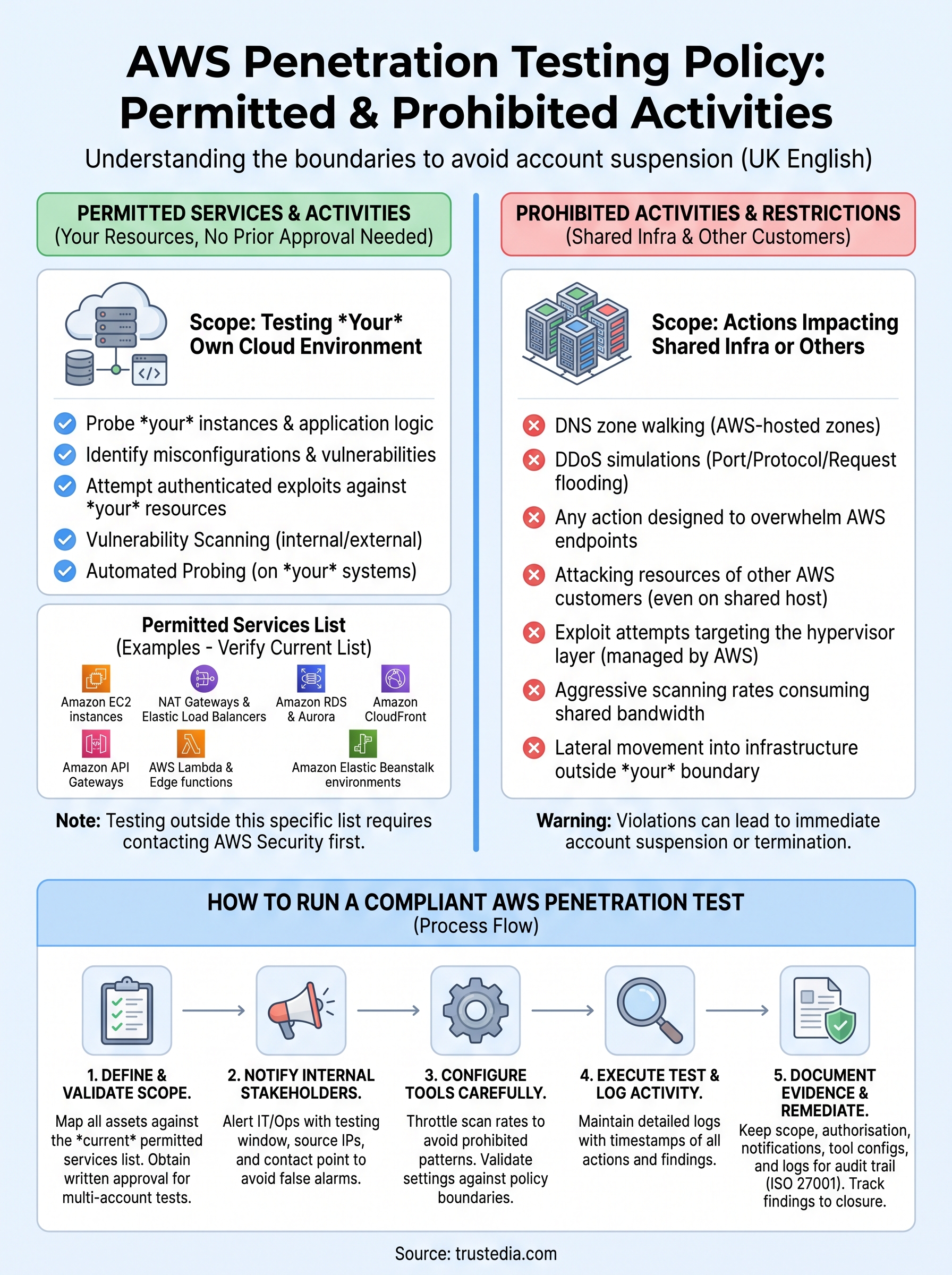
Currently, AWS permits security testing across eight core service categories. These include Amazon EC2 instances, NAT gateways, and Elastic Load Balancers, along with Amazon RDS, Amazon CloudFront, Amazon Aurora, Amazon API Gateways, AWS Lambda and Lambda Edge functions, Amazon Lightsail resources, and Amazon Elastic Beanstalk environments. If your infrastructure runs on any of these, you can proceed without requesting advance permission from AWS.

Always verify the current permitted services list directly on the AWS Customer Support Policy for Penetration Testing page, as AWS updates it periodically.
What "permitted" actually means in practice
Having permission to test a service does not give you unlimited freedom within it. You can probe your own instances, test application logic, identify misconfigurations, and attempt authenticated exploits against resources tied to your account. What you cannot do is use that permission as a basis for lateral movement into shared infrastructure outside your account boundary.
Your testing scope should map directly to resources you own or resources you have explicit written permission to assess from the relevant account holder. Documenting your scope clearly before testing begins protects you if AWS queries the activity logged against your account.
Prohibited activities and testing restrictions
The aws penetration testing policy draws hard lines around activities that could affect AWS’s shared infrastructure or disrupt other customers. These restrictions apply regardless of how your test is scoped, what tools you use, or whether your intent is purely defensive. Ignoring these rules is not a grey area. AWS can suspend or terminate your account without warning if your activity triggers their detection systems.
Activities that are always off limits
AWS explicitly prohibits several categories of testing that you must never attempt. DNS zone walking of AWS-hosted zones, denial-of-service and distributed denial-of-service simulations (including port flooding, protocol flooding, and request flooding), and any action designed to overwhelm AWS endpoints are all banned outright. You also cannot use your tests as a pretext to probe infrastructure outside your account boundary.

Even if your test produces the same traffic pattern as a prohibited activity unintentionally, AWS may treat it as a violation, so verify your tooling configuration before you start.
Testing restrictions tied to shared resources
Certain restrictions apply specifically because AWS operates on a shared infrastructure model. You cannot attempt to access, modify, or disrupt resources belonging to other AWS customers, even if those resources share the same physical host as your own. Any test that risks cascading impact across tenants is prohibited, including aggressive scanning rates that consume shared bandwidth.
These shared-resource restrictions also extend to the underlying host systems. Exploit attempts targeting the hypervisor layer or any component below your instance level are strictly off limits. AWS manages that layer, and anything reaching beyond your instance or account boundary falls squarely into prohibited territory under the policy.
How to run an AWS penetration test compliantly
Running a compliant AWS penetration test requires careful planning before any tool fires a single packet. Start by reviewing the aws penetration testing policy in full on the AWS Security page, then map every asset in your engagement scope against the permitted services list. If any target sits outside that list, contact AWS Security directly before you begin testing.
Define your scope against the permitted list
Your scope document should explicitly name every AWS resource you intend to test, including account IDs, instance IDs, and service types. Match each one against the permitted services list and flag anything that falls outside it. Written scope approval from all relevant account holders is essential if your engagement touches multiple accounts, even if those accounts belong to the same organisation.
Notify your internal stakeholders
Before testing begins, alert your IT and operations teams so they can distinguish legitimate test traffic from a genuine incident. Unexpected alerts during a penetration test can trigger incident response procedures, which wastes time and creates confusion. Share the testing window, source IP addresses, and a point of contact so your team can triage alerts correctly without unnecessary escalation.
Keep a record of every notification sent, including timestamps and recipients, as this documentation protects you if AWS queries the activity logged against your account.
Your testing tools also need careful configuration. Aggressive scan rates and broad network sweeps can mimic prohibited traffic patterns even when the underlying intent is legitimate. Throttle your tooling, validate your settings against the policy restrictions, and run a brief sanity check before launching the full engagement.
Evidence to keep for audits and ISO 27001
Penetration testing is a key control under ISO 27001, and the evidence you gather during an AWS engagement supports your audit trail directly. Auditors reviewing your information security management system (ISMS) will look for proof that tests were scoped correctly, conducted within policy boundaries, and that findings were tracked through to remediation. Keeping structured records from the start protects you during both internal reviews and formal certification audits.
What to document before and during testing
Your pre-test documentation should capture every resource included in your scope, including AWS account IDs, instance IDs, and confirmation that each service appears on the permitted services list under the aws penetration testing policy. Include copies of any written authorisation from account holders, internal stakeholder notifications with timestamps, and the tool configurations you applied to stay within prohibited activity boundaries.
During testing, log all activity with timestamps so you can demonstrate what ran, when, and against which targets. Raw tool output, screenshots of significant findings, and tester notes all contribute to a complete and defensible record.
Store your pre-test scope document, authorisation records, and test logs together so auditors can trace the full lifecycle of each engagement without requesting additional materials.
Linking findings to remediation for ISO 27001
ISO 27001 expects you to track vulnerabilities through to closure, not just identify them. For each finding from your AWS assessment, record the severity rating, the remediation action taken, the date it was resolved, and evidence of re-testing where applicable. This chain of finding to fix demonstrates that your penetration testing programme produces measurable security improvement, which is exactly what auditors look for.
Final checks before you start
Before your testers launch any tools, run through one last review of the aws penetration testing policy to confirm your scope matches the permitted services list and that you have written authorisation from every relevant account holder. Verify that your tooling is configured to stay within traffic limits that could trigger prohibited activity flags, and confirm that your internal teams have received timestamped notification of the testing window and source IPs.
Check that your documentation folder contains your scope document, authorisation records, stakeholder notifications, and tool configuration notes. Missing any of these before you start means you are either out of compliance or unable to prove you were not if AWS queries your account activity later.
Getting this right matters for both security and certification. If you want expert support running a compliant cloud security assessment, speak to TrustedIA’s penetration testing team to scope your engagement correctly from the start.