Most cyber attacks targeting Microsoft 365 don’t arrive as obvious threats. They slip past native security filters disguised as routine emails, shared files, or Teams messages, exploiting the trust users place in everyday tools. For organisations that rely on Microsoft 365 as their productivity backbone, that blind spot is a serious problem. Datto SaaS Defense is purpose-built to close it, providing an additional layer of threat protection that catches what Microsoft’s built-in defences miss, particularly zero-day phishing, malware, and business email compromise attempts.
At TrustedIA, we take a solution-agnostic approach to cybersecurity, recommending tools based on what actually solves the problem rather than vendor loyalty. After assessing and deploying a wide range of Microsoft 365 security solutions across our managed services clients, we’ve seen first-hand where native protections fall short, and where dedicated tools like Datto SaaS Defense earn their place in the stack. Our experience across endpoint detection, vulnerability assessments, and SOC operations gives us practical insight into how this solution fits within a broader security posture.
This article breaks down what Datto SaaS Defense is, how it works, what it protects against, and how to get it up and running. Whether you’re evaluating it for your own organisation or managing it on behalf of clients, you’ll walk away with a clear, practical understanding of its role in defending Microsoft 365 environments.
Why Datto SaaS Defense matters for Microsoft 365
Microsoft 365 is the most widely used productivity suite in the world, which makes it the most targeted. Attackers know that email, SharePoint, and Teams are where sensitive data lives and where employees spend most of their working day. Microsoft does include built-in security controls, but those controls are built around known threat signatures and general filtering rules, not the real-time behavioural detection needed to catch today’s most sophisticated attacks. That gap between adequate and genuinely protected is precisely where Datto SaaS Defense operates.
The limits of Microsoft’s built-in protections
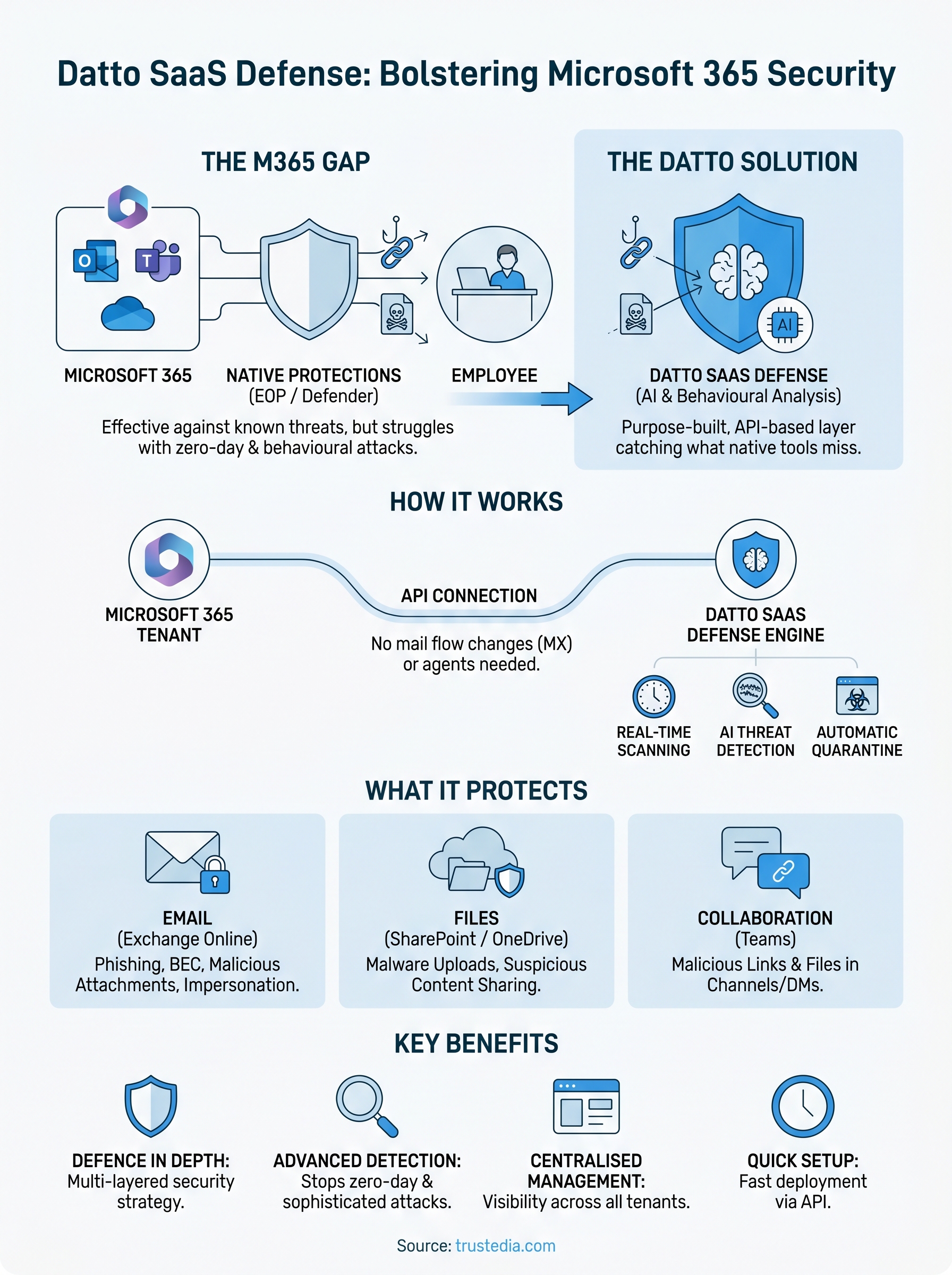
Microsoft 365 ships with Exchange Online Protection (EOP) and, at higher licence tiers, Microsoft Defender for Office 365. These tools do a reasonable job of blocking spam and known malware. The problem is that they rely heavily on reputation-based filtering and signature matching, which means they can only block threats that have already been identified and catalogued. A zero-day phishing link or a newly registered malicious domain sits entirely outside that catalogue, so it passes straight through to the user’s inbox.
Microsoft’s native security is built for breadth, not depth. It protects against threats it already knows about, but that list always lags behind what attackers are actively deploying.
Your licence tier also matters here. Many small and medium-sized businesses run on Microsoft 365 Business Basic or Business Standard, neither of which includes Defender for Office 365. That leaves a large proportion of organisations operating with only EOP standing between their users and a successful attack.
How attackers exploit trusted Microsoft 365 channels
Phishing campaigns targeting Microsoft 365 users have become highly specific. Attackers no longer send generic emails with suspicious links. Instead, they craft convincing impersonations of internal colleagues, use compromised accounts to distribute malicious files via SharePoint, or embed threats in Teams messages, knowing that users place far more trust in internal-looking communication than in external email.

Business Email Compromise (BEC) is a particularly damaging attack type because it rarely involves malware. Attackers manipulate trusted communication channels to redirect payments or extract credentials. These attacks are specifically designed to avoid triggering standard security filters, which is why a solution focused on behavioural analysis and AI-driven detection can catch threats that signature-based tools cannot.
Why a dedicated layer makes the difference
Adding a dedicated solution to your Microsoft 365 environment means you are no longer relying on a single line of defence. Security professionals call this defence in depth, the principle that no single control should be your only safeguard. When a phishing email slips past EOP, a purpose-built tool is positioned to catch it before the user ever sees it.
For managed service providers and IT teams managing multiple Microsoft 365 tenants, the ability to apply consistent, centralised security policies across all clients significantly reduces both risk and management overhead. Datto SaaS Defense gives you visibility across your entire environment without requiring you to check each tenant individually, which translates directly into fewer incidents and faster response times when something does go wrong.
What Datto SaaS Defense does and how it works
Datto SaaS Defense works by sitting directly alongside Microsoft 365 rather than in front of it. It connects via Microsoft’s API layer, which means there is nothing to proxy, no DNS changes to make, and no re-routing of email traffic through a third-party server. Once connected, it scans emails, files, and messages in real time, completely independent of Microsoft’s own filtering systems, giving you a second set of eyes on everything that moves through your environment.
AI-driven threat detection
The core of the platform is its AI-powered detection engine, which analyses incoming content for behavioural patterns rather than matching against a static list of known threats. When a suspicious link arrives in a mailbox, the engine does not simply check whether the domain appears on a blocklist. It examines the message structure, the sender’s behaviour, and the content in context, comparing these signals against a continuously updated model trained on real attack data to determine whether the message constitutes a genuine threat.
This behavioural approach is what allows Datto SaaS Defense to catch zero-day threats that signature-based tools would miss entirely.
Because analysis occurs at the API level, detection typically happens before the email reaches the user’s inbox. Threats are quarantined automatically, without requiring any user interaction, which removes the human-error element that attackers routinely exploit.
How it connects to your Microsoft 365 environment
Setup uses OAuth-based authorisation, so you grant the platform access to your Microsoft 365 tenant through a secure, standards-based handshake. There are no agents to install on individual machines, and no changes to mail flow records, such as MX or SPF, are required. This makes initial deployment straightforward, typically completed in under an hour for a single tenant, which is a meaningful advantage when you are rolling it out across multiple clients or business units.

After connection, the platform continuously monitors Exchange Online, SharePoint, OneDrive, and Teams across your environment. All activity is surfaced through a centralised management console where you can review, release, or escalate quarantined items, giving you clear, actionable visibility across every major Microsoft 365 channel.
What it protects in Microsoft 365
Datto SaaS Defense covers the three main areas of Microsoft 365 where threats enter and spread: email, file storage, and collaboration messaging. Each channel carries different risks, and each requires specific detection logic to catch the threats that move through it. Understanding exactly what the platform protects helps you assess whether your current security posture has any gaps worth addressing.
Exchange Online and email threats
Exchange Online is the highest-priority target for most attackers because email remains the most reliable delivery mechanism for phishing, malware, and BEC attacks. Datto SaaS Defense scans every inbound and outbound message, analysing links, attachments, and sender behaviour to identify threats before they reach the inbox. This includes newly registered domains used in phishing campaigns, malicious files embedded in standard formats such as PDFs and Office documents, and impersonation attempts that mimic messages from known contacts.
Outbound scanning is often overlooked, but it is equally important: if a compromised account starts sending phishing emails to your contacts, you need to know immediately rather than after the damage is done.
The platform also monitors internal email traffic, not just messages arriving from outside your organisation. Attackers who gain access to one account within your tenant will often pivot by sending malicious content to other internal users, exploiting the trust employees place in messages from colleagues.
SharePoint, OneDrive, and Teams
SharePoint and OneDrive are increasingly used to distribute malicious files because users trust links shared through these platforms far more than links arriving from unknown external sources. Datto SaaS Defense scans files uploaded to both services, detecting malware and suspicious content before other users open or download them. This means a single compromised upload does not become a widespread incident across your organisation.
Microsoft Teams presents a similar risk. Attackers use compromised accounts or external guest access to drop malicious files or links directly into channels and direct messages. The platform monitors Teams activity in real time, applying the same AI-driven detection logic used across email and file storage to catch threats regardless of which channel they arrive through. That consistent coverage across all three services is what makes the protection genuinely comprehensive rather than partial.
How to set up and manage Datto SaaS Defense
Setting up Datto SaaS Defense is significantly simpler than most security tools at this level of protection. Because the platform connects via Microsoft’s API rather than modifying mail flow, you avoid the usual complexity of adjusting MX records, configuring connectors, or deploying agents on individual machines. Most IT teams and MSPs complete the initial setup within an hour, making it a practical choice even when you are managing tight deployment windows.
Connecting your Microsoft 365 tenant
The process starts with an OAuth authorisation request to your Microsoft 365 tenant, which you complete through the Datto SaaS Defense portal. You log in with a Global Administrator account, approve the permissions the platform requires, and establish the connection. From that point, the platform automatically scans Exchange Online, SharePoint, OneDrive, and Teams, with no additional configuration required before it begins providing coverage.
For MSPs managing multiple client tenants, the platform supports multi-tenant onboarding, so you can connect each client’s environment from a single management console rather than logging into separate portals. This keeps your workflow consistent and reduces the time required to onboard new clients to the platform.
Once connected, protection is active immediately. There is no waiting period or warm-up phase before the detection engine begins analysing your environment.
Managing alerts and quarantine
Day-to-day management centres on the centralised management console, where all detected threats appear with context about what was found, where it was found, and why the platform flagged it. When the system quarantines a message or file, you can review the full threat details, release the item if it turns out to be a false positive, or escalate it for further investigation.
Alerts are fully configurable by severity and delivery method, so you can match notification behaviour to your team’s workflow without generating unnecessary noise. If you are managing a high-volume environment, filtering alerts by severity prevents notification fatigue while ensuring that genuinely critical detections still reach the right people without delay. Reviewing quarantine logs regularly, even during quiet periods, helps you spot patterns that might indicate a broader campaign targeting your organisation.
Limits, tuning and common questions
Datto SaaS Defense covers a lot of ground, but no security tool is without limits. Understanding where the platform stops helps you make informed decisions about what additional controls you might need alongside it, rather than discovering gaps after an incident occurs.
What it does not cover
The platform focuses exclusively on Microsoft 365 environments and does not extend to other cloud services your organisation might use, such as Google Workspace or Salesforce. If your team relies on multiple SaaS platforms beyond Microsoft 365, you will need separate coverage for those environments.
Datto SaaS Defense also does not replace endpoint protection. It catches threats moving through Microsoft 365 channels, but malware already running on a device sits entirely outside its detection scope. Pairing it with a strong endpoint detection and response solution gives you coverage across both layers.
Tuning to reduce false positives
False positives are a reality with any AI-driven detection system, and addressing them early saves you significant friction later. Datto SaaS Defense allows you to configure allow lists and custom policies to account for known-good senders, trusted file types, or internal workflows that might otherwise trigger the detection engine.
Spending time adjusting policies in the first few weeks after deployment significantly reduces alert noise over the long term.
Reviewing your quarantine logs regularly during the initial period after setup helps you identify patterns and fine-tune the platform’s behaviour before false positives become a recurring distraction for your team.
Common questions
A few questions come up consistently when teams first evaluate or deploy Datto SaaS Defense. The table below directly addresses the most frequent ones.
| Question | Answer |
|---|---|
| Does it replace Microsoft Defender? | No, it works alongside it as an additional detection layer. |
| Does it log activity before setup? | No, scanning begins at the point of connection. |
| Can it detect internal account compromise? | Yes, it monitors internal email and file activity, not just external threats. |
| Does setup require MX record changes? | No, the connection is API-based with no mail flow changes needed. |
Where to go from here
Datto SaaS Defense fills a genuine gap in Microsoft 365 security that native tools consistently leave open. If your organisation runs on Microsoft 365, understanding what lies between your users and active threats is a direct business risk. The platform’s API-based deployment, AI-driven detection, and multi-channel coverage provide measurable protection with minimal operational overhead.
Choosing the right combination of security tools depends on your existing stack, your licence tier, and the specific risks your organisation faces. A qualified security partner with hands-on experience across managed services can assess your current posture and identify exactly where dedicated threat protection will have the greatest impact on your security programme.
For an honest assessment of your Microsoft 365 environment, speak to the TrustedIA team. We carry over 30 years of experience in managed security and can tell you precisely where your gaps are and what to do about them.