Endpoint threats are growing more sophisticated, and the tools you use to detect and stop them matter. Datto Endpoint Detection and Response (EDR) is one solution that continues to gain traction among businesses looking to strengthen their security posture, but is it the right fit for your organisation? That depends on your environment, your risk profile, and how the platform aligns with your specific requirements.
At TrustedIA, we take a solution-agnostic approach to cybersecurity. With over 30 years of experience delivering managed security services, including endpoint protection, vulnerability assessments, and SOC operations, we evaluate tools like Datto EDR on their merits rather than brand loyalty. Our goal is always to recommend what actually works for the businesses we support.
This article breaks down Datto EDR’s core features, real-world performance, and user reviews to help you make an informed decision. Whether you’re comparing endpoint solutions for the first time or reassessing your current stack, you’ll find practical detail here, not vague marketing claims. We’ll cover what Datto EDR does well, where it falls short, and how it fits into a broader cybersecurity strategy.
What Datto endpoint detection and response does
Datto Endpoint Detection and Response is a managed security platform designed to monitor, detect, and respond to threats across every device on your network. Rather than relying on signature-based blocking alone, it continuously analyses endpoint behaviour in real time, looking for patterns that signal malicious activity, whether that involves known malware or a novel attack technique your antivirus has never encountered before.
When a threat actor moves laterally through your network, traditional tools often miss it. Datto EDR is built specifically to catch that kind of behaviour before damage escalates.
How Datto EDR collects and processes threat data
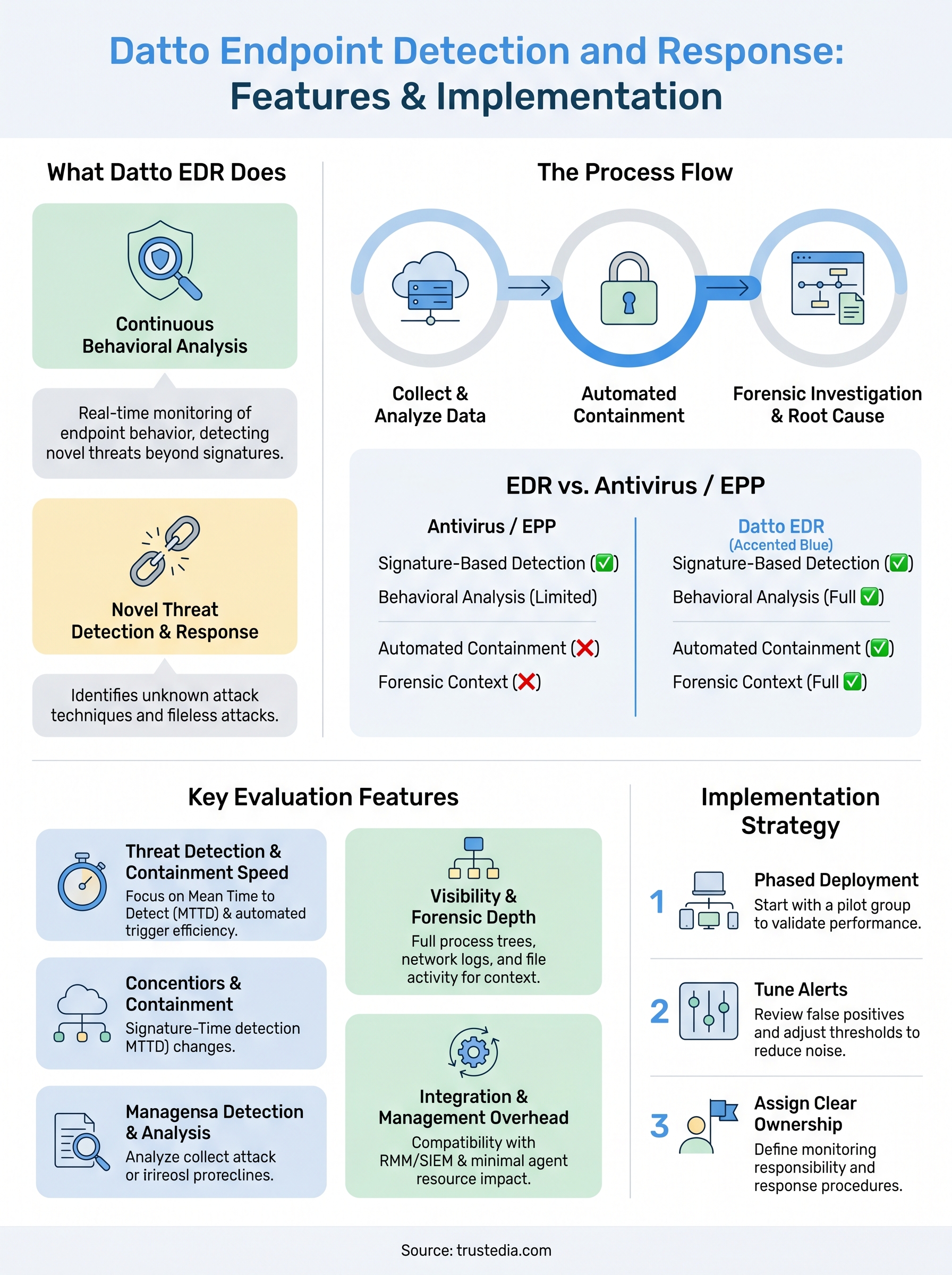
The platform deploys a lightweight agent on each endpoint, whether that is a Windows workstation, a server, or a laptop used remotely. That agent continuously streams telemetry data back to Datto’s cloud infrastructure, where machine learning models and threat intelligence feeds analyse it for suspicious activity. When something looks wrong, automated containment actions can isolate the affected device from the rest of your network within seconds, preventing a potential breach from spreading.

What happens after a threat is detected
Detection alone is not enough. Once Datto EDR flags a threat, it provides your security team or your managed service provider with a detailed incident timeline showing exactly what happened, which processes ran, which files were accessed, and which user accounts were involved. This forensic visibility means you are not guessing at the scope of an incident. Your team can investigate the root cause and confirm that remediation is complete, rather than simply removing the visible symptom and hoping the problem is gone.
Combining continuous monitoring, automated response capabilities, and in-depth forensics is what separates EDR platforms from older endpoint tools. For organisations that lack a dedicated security operations team, this capability is especially valuable because it significantly reduces the window between compromise and containment.
How Datto EDR differs from antivirus and EPP
Most businesses still rely on antivirus software or an Endpoint Protection Platform (EPP) as their primary line of defence. Both tools have a role, but they operate on a fundamentally different logic to Datto endpoint detection and response, and understanding that difference shapes how you build your security stack.
What antivirus and EPP actually do
Antivirus tools scan files against a database of known malicious signatures. EPP solutions extend this by adding features such as application control and basic behavioural blocking. Your antivirus will stop a known piece of ransomware the moment it recognises the signature. Still, it struggles when an attacker uses a technique it has not seen before, such as a fileless attack that runs entirely in memory.
If your endpoint security relies solely on signature matching, you have a significant gap that sophisticated attackers can walk straight through.
Where Datto EDR goes further
Datto EDR does not wait for a known signature to trigger a response. Instead, it continuously monitors endpoint behaviour, examining process chains, network connections, and file system changes to identify suspicious activity, regardless of whether the threat appears on any known list.
| Capability | Antivirus / EPP | Datto EDR |
|---|---|---|
| Signature-based detection | Yes | Yes |
| Behavioural analysis | Limited | Full |
| Automated containment | No | Yes |
| Forensic investigation | No | Yes |
Your security team gains full forensic context around every alert, so you can investigate, contain, and recover far faster than a traditional EPP solution allows.
Key features to evaluate in Datto EDR
When assessing Datto Endpoint Detection and Response for your organisation, not every feature carries equal weight. Prioritising the right capabilities ensures you get genuine security value rather than a long checklist of functions your team will rarely use.
Threat detection and containment speed
How quickly the platform detects and isolates a threat directly affects the extent of damage a breach can cause. Look for real-time behavioural analysis, automated device isolation, and clear alert prioritisation so your team focuses on genuine risks rather than noise. Key indicators to check include:
- Mean time to detect (MTTD) across different attack types
- Automated containment triggers with minimal manual intervention required
The faster a threat is contained, the smaller your blast radius. Containment speed is one of the most meaningful metrics in any EDR evaluation.
Visibility and forensic depth
Your security team needs more than a basic alert. Full process trees, network connection logs, and file activity records provide the context needed to investigate what actually happened. Without that forensic depth, you risk missing persistence mechanisms that allow attackers to return after initial remediation.
Integration and management overhead
A capable EDR solution needs to fit within your existing environment without creating friction. Compatibility with your RMM tools, SIEM, and identity management systems reduces operational overhead for your team. Also, weigh up the agent’s resource impact on endpoints, particularly if you support older hardware or remote users on limited connections.
What to look for in independent Datto EDR reviews
Most vendor-produced content presents a product in the best possible light, so independent reviews are where you get the real picture. When researching Datto Endpoint Detection and Response, you need to approach reviews critically and know which signals actually matter for your organisation.
Check who is actually writing the review.
Reviews carry far more weight when they come from verified users in comparable environments, such as IT managers at SMBs, MSPs supporting multiple clients, or in-house security teams with limited headcount. Prioritise reviews that specify company size, industry, and how long the reviewer has been using the platform. Vague five-star ratings from anonymous sources tell you very little.
A review from an MSP managing 50 clients gives you more signal than a generic positive write-up with no context behind it.
Look for patterns rather than outliers. A single negative review about agent performance might reflect an edge case, but if a dozen reviewers raise the same issue with false positive rates or console responsiveness, that is a pattern worth taking seriously.
Focus on operational feedback, not feature lists
Day-to-day usability matters as much as capability. Look for comments on alert volume, the typical duration of investigations, and whether the support team responds quickly when something breaks. Features that sound impressive in a brochure often look different once your team is managing them under real-world conditions.
How to implement and run Datto EDR
Getting Datto Endpoint Detection and Response running in your environment involves more than just deploying an agent. A structured rollout ensures you get reliable coverage without disrupting day-to-day operations and sets your team up to use the platform effectively from day one.
Deploy in phases
Rolling out to every endpoint at once creates unnecessary risk. Start with a pilot group covering a representative sample of your environment, such as a mix of workstations, servers, and remote devices. This lets you validate agent performance, alert volumes, and integration behaviour before scaling across your full estate.

Phased deployment gives you the chance to catch configuration issues early, before they affect your entire network.
Tune alerts before relying on them.
Raw alert output from any EDR platform can be overwhelming. After your pilot phase, review the false positive rate and adjust detection thresholds to match your environment. Tuning alerts to reflect your specific applications and user behaviour reduces noise significantly and helps your team focus on genuine threats rather than chasing irrelevant flags.
Assign clear ownership
EDR platforms only deliver value if someone actively monitors and acts on them. Define who owns the platform, whether that is an internal security lead or a managed service provider. Establishing clear escalation paths and response procedures means that when an alert fires, your team knows exactly what to do next and wastes no time deciding who takes responsibility.
Where to go from here
Datto endpoint detection and response gives you a capable platform for behavioural threat detection, automated containment, and forensic investigation. The platform only delivers on that potential, though, when it is properly configured, actively monitored, and backed by clear response procedures. If your organisation lacks the internal resources to manage it day-to-day, you risk paying for a capability you never fully use.
Choosing the right endpoint security solution depends on your environment, your team’s capacity, and your broader security strategy. Getting those factors right matters far more than picking the most feature-rich product on the market. TrustedIA works with businesses across the UK to evaluate, deploy, and manage endpoint security solutions without pushing a specific vendor. Our solution-agnostic approach means you get the tool that fits your situation, not one chosen to hit a sales target. If you want a clear-eyed assessment of your current endpoint security posture, speak to the TrustedIA team today.