When a server fails or ransomware locks down your files, the question isn’t whether you had a backup; it’s how quickly you can get back to work. Datto Cloud BCDR is built to answer that question, combining backup, disaster recovery, and cloud virtualisation into a single platform designed for business continuity under pressure. For organisations that can’t afford hours (let alone days) of downtime, it’s become one of the most widely adopted solutions on the market.
At TrustedIA, we deploy and manage BCDR solutions as part of our managed security services, drawing on over 30 years of IT services experience. Our approach is solution-agnostic; we recommend what genuinely fits your environment rather than defaulting to a single vendor. That said, Datto’s cloud BCDR platform consistently proves its value to the SMBs and enterprises we work with across the UK, particularly those building resilience aligned with ISO 27001 requirements.
This article breaks down how Datto’s cloud BCDR actually works, from image-based backups to instant cloud virtualisation. We’ll cover its core features, the technology behind its recovery capabilities, and the real-world use cases where it makes the most difference. Whether you’re evaluating BCDR options for the first time or looking to strengthen an existing disaster recovery strategy, this guide gives you the technical details you need to make an informed decision.
What Datto Cloud BCDR is and what it is not
Datto Cloud BCDR is a managed backup and disaster recovery platform that protects physical and virtual servers by capturing image-based snapshots at regular intervals and replicating them to Datto’s secure cloud infrastructure. When something goes wrong, whether that’s hardware failure, ransomware, or accidental deletion, you can recover from those snapshots without waiting for a full system rebuild. The platform sits at the intersection of backup, recovery, and business continuity, handling all three functions within a single managed service.
What it actually is: a unified recovery platform
At its core, Datto Cloud BCDR works by taking incremental, image-based backups of your entire system, including the operating system, applications, and data, rather than just selected files. Each snapshot captures the full state of the machine at that point in time. Those snapshots replicate to the Datto Cloud, where they’re stored and can be spun up as live virtual machines if your local hardware fails or becomes inaccessible. That means you’re not waiting for a physical device to be replaced or rebuilt. Your systems can run directly from the cloud while you sort out the underlying problem.

This is the fundamental shift in modern BCDR: recovery is measured in minutes, not days, because the system doesn’t need to fully restore data before you can get back to work.
The platform also includes local appliance options, in which a physical Datto device sits on your network and stores recent backups locally for the fastest possible recovery. If a server fails, you can boot directly from the appliance, while the cloud copy provides an additional layer of redundancy in case the local device is also affected.
What it is not: a traditional backup solution
It’s worth being direct about what Datto Cloud BCDR is not, because the distinction matters when you’re evaluating options. This is not a file-level backup service like you’d use to archive documents or sync individual folders to a storage location. That approach works for user-level data recovery, but it fails when an entire server goes down, and you need the operating system, applications, and configurations restored simultaneously and quickly.
Datto Cloud BCDR also isn’t a cold storage archive. It’s designed for active, ongoing protection with fast recovery objectives, not for long-term data retention in isolation. If your organisation needs both rapid recovery and long-term archival, those are separate requirements that need separate solutions. Understanding that boundary helps you plan a resilience strategy that genuinely meets your needs, rather than assuming a single product handles everything.
Why cloud BCDR matters for UK organisations
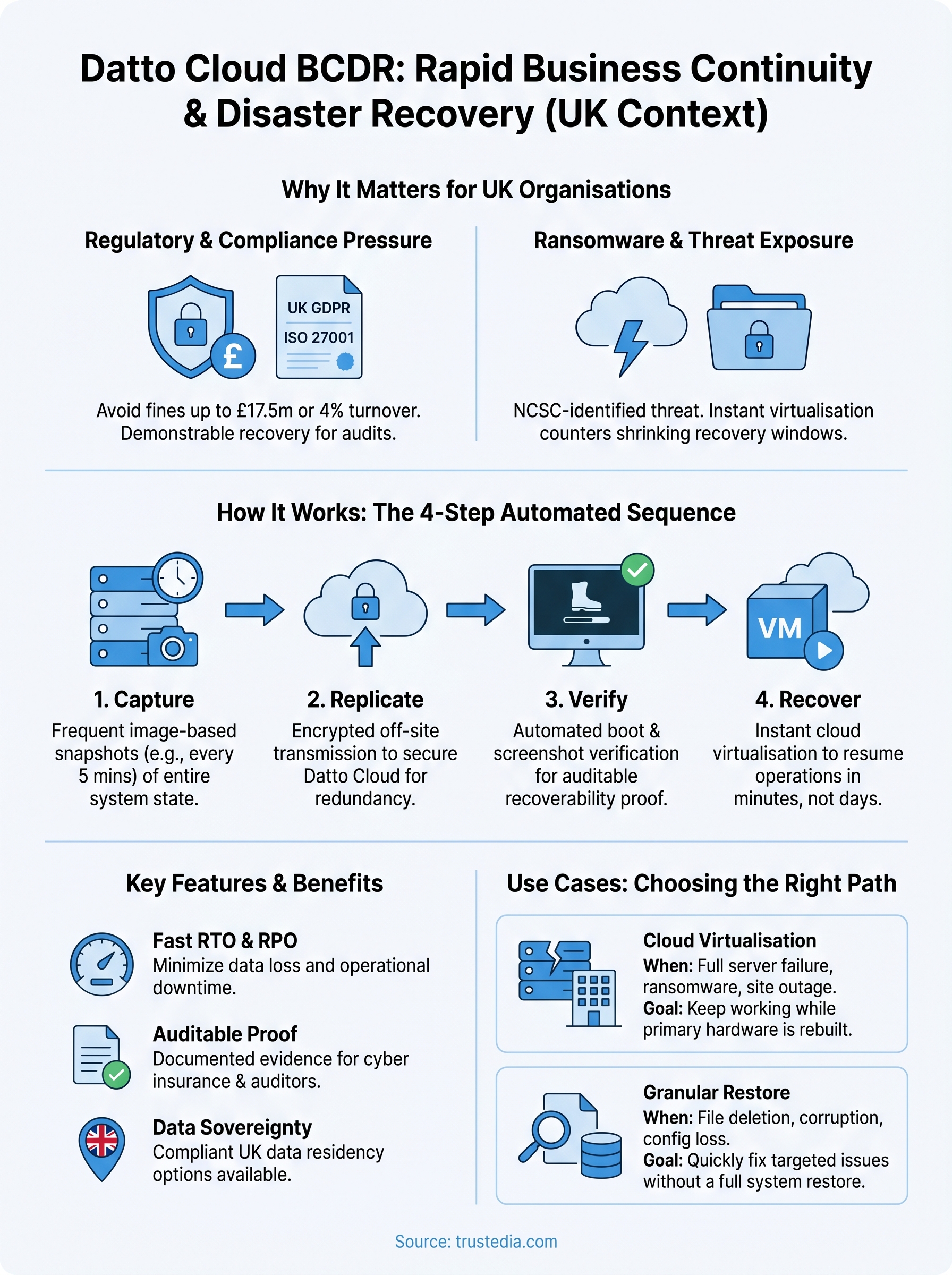
UK businesses face a specific combination of regulatory obligations and threat exposure that makes cloud-based disaster recovery more than a technical preference. Under UK GDPR, the Information Commissioner’s Office (ICO) can issue fines of up to £17.5 million or 4% of global annual turnover for serious data breaches, and your ability to demonstrate rapid, documented recovery processes directly affects how regulators assess your response to an incident.
Ransomware and the shrinking window to recover
Ransomware attacks on UK businesses have increased sharply over recent years, with the National Cyber Security Centre (NCSC) consistently identifying them as one of the most significant threats facing organisations of all sizes. When an attack hits, your recovery time objective (RTO) and your recovery point objective (RPO) determine how much work is lost and how long your systems stay offline. Without cloud virtualisation in place, most organisations face hours or days of disruption while systems are rebuilt from scratch.
The difference between recovering in 15 minutes and recovering in 15 hours is not just operational; it directly affects revenue, customer trust, and regulatory standing.
ISO 27001 and business continuity obligations
If your organisation is working towards or maintaining ISO 27001 certification, you need documented, tested business continuity and disaster recovery controls. Annex A of the standard specifically addresses the availability of information and resilience planning, and auditors will expect evidence that your recovery processes actually work, not just that they exist on paper. Datto Cloud BCDR supports this directly by providing verifiable backup and recovery processes, with regular recovery testing built into the platform.
Demonstrating measurable recovery capabilities also carries real commercial weight. Clients, partners, and cyber insurers increasingly scrutinise your resilience posture as part of their own due diligence, and having a tested, cloud-based DR plan gives your organisation a credible, documented answer to those questions, which matters directly when underwriting decisions are being made.
How Datto Cloud BCDR works in practice
Understanding the mechanics helps you evaluate whether a solution genuinely fits your recovery requirements. Datto Cloud BCDR follows a clear automated sequence: capture, replicate, verify, and recover. Each step runs continuously in the background, so your team doesn’t need to trigger backups manually or monitor the process around the clock.
Snapshot capture and cloud replication
The platform installs a lightweight agent on each protected server, which captures image-based snapshots at intervals you define, typically every 5 minutes. Each snapshot includes the operating system, application state, and all data, providing a complete point-in-time copy for recovery. Those snapshots replicate to the Datto Cloud over an encrypted connection, so your off-site copy stays intact even if your local environment is completely compromised.
If ransomware hits your local systems and your on-site appliance simultaneously, your cloud replicas remain unaffected and ready to use.
Replication happens incrementally after the first full backup, meaning only changed data blocks are sent each time. This keeps network overhead low and ensures that even frequent snapshot intervals don’t create bandwidth problems for your day-to-day operations.
Recovery options and backup verification
When an incident occurs, you have two immediate paths: boot the protected machine as a virtual instance directly in the Datto Cloud, or restore from a local appliance if the issue is limited to a single device. Cloud virtualisation spins up within minutes, allowing your team to access systems while the underlying hardware is repaired or replaced.
Datto also runs automated screenshot verification, which boots each backup in an isolated environment and captures a screenshot to confirm the system started successfully. This gives you documented, visual evidence that your backups are recoverable without manual testing each cycle, a practical proof point for auditors and cyber insurers reviewing your recovery capabilities.
Features to look for in Datto Cloud BCDR
Not every BCDR platform delivers the same capabilities, and selecting the right feature set determines whether you can actually meet your recovery objectives when an incident occurs. When evaluating Datto Cloud BCDR, focus on the technical specifics that directly affect how fast you recover, how far back you can go, and how confidently you can demonstrate that your backups actually work.
The features that matter most are the ones tied directly to your RTO and RPO, not the ones that look impressive on a product datasheet.
Recovery speed, RPO, and backup verification
Your recovery time objective (RTO) and recovery point objective (RPO) should drive every feature conversation you have with a provider. Look for snapshot intervals as short as five minutes and cloud virtualisation that spins up in minutes rather than hours. Beyond raw speed, automated screenshot verification is a non-negotiable capability: the platform should boot each backup in an isolated environment and capture documented evidence that the system started successfully, giving you auditable proof of recoverability for ISO 27001 audits and cyber insurance reviews.

Key capabilities to confirm with your provider:
- Minimum snapshot frequency supported
- Cloud spin-up time for virtualised instances
- Screenshot or boot verification per backup cycle
- Encrypted replication in transit and at rest
Retention flexibility and data sovereignty
Tiered retention policies determine how far back you can recover, which becomes critical when ransomware sits undetected for days or weeks before it is triggered. Look for platforms that combine frequent short-term snapshots with longer-term monthly and yearly restore points. Data sovereignty is a separate but equally important consideration for UK organisations operating under UK GDPR: confirm where your replicated data is physically stored and whether your provider can evidence compliance with UK data residency requirements before you commit to a solution.
Use cases and when to choose cloud DR vs restore
Datto Cloud BCDR handles two distinct recovery workflows, and choosing the right one for a given incident directly affects how quickly your business gets back to operational. Cloud virtualisation and file or volume restores are both available within the platform, but they serve different purposes. Knowing which to use under which circumstances saves time and avoids unnecessary complexity during an already stressful recovery event.
Choosing the wrong recovery method doesn’t just slow you down; it can introduce additional risk at exactly the moment your environment is most vulnerable.
When cloud virtualisation is the right call
Cloud virtualisation makes sense when a server is completely unavailable, and you need business operations to continue while hardware is repaired or replaced. Common scenarios include physical server failure, a ransomware attack that has encrypted your local systems, or a site-level outage affecting your primary environment. In these cases, spinning up a virtual instance in the Datto Cloud lets your team keep working without waiting for a full rebuild, often within minutes of the incident being identified.
This approach also applies when you need to run systems in parallel during a migration or infrastructure change, using the cloud instance as a live fallback rather than an emergency-only option.
When a standard restore is the better option
Not every incident requires full cloud virtualisation. If a single file is deleted, a database becomes corrupted, or a specific application configuration is lost, a granular restore from a recent snapshot is faster and less disruptive than booting an entire virtual machine. Datto’s platform supports file-level and volume-level restores, as well as full system virtualisation, so that you can match the recovery method to the scope of the problem.
For smaller incidents, a targeted restore keeps your live environment stable and avoids the overhead of managing an unnecessary parallel cloud instance.
Next steps to improve recovery readiness
If you’ve read this far, you already understand why reactive recovery planning falls short. The real gap isn’t whether backups exist; it’s whether your organisation can restore operations quickly enough to make a difference. Datto Cloud BCDR closes that gap through cloud virtualisation, automated verification, and fast recovery objectives, but only if it’s configured and tested correctly.
Start by reviewing your current RTO and RPO against your actual business requirements. Then, audit whether your existing backup solution covers full system images, cloud virtualisation, and encrypted off-site replication. If those capabilities are missing, your continuity plan carries more risk than you may realise.
Recovery testing is the step most organisations skip. Schedule verified recovery tests at least quarterly and document the results for ISO 27001 audits and cyber insurance reviews.
To build a resilience strategy that genuinely fits your environment, speak to the TrustedIA team about managed BCDR and incident response services.