When a ransomware attack, a failed server or a flooded office takes your systems offline, nobody wants to be writing a plan from scratch. You want a disaster recovery plan template UK businesses can fill in before trouble starts, so your team knows who does what, in which order, and how fast.
Here is the direct answer. A usable IT disaster recovery plan needs seven parts: an asset and system inventory, a business impact analysis, recovery time and recovery point targets, a named response team, step-by-step recovery procedures, a communications list, and a testing schedule. Fill those in, keep the plan short enough that people will read it, and review it at least once a year. Skip any of them and the plan will fail when you need it.
This guide walks you through each section of the template in plain terms, with UK points to check, such as ICO breach reporting within 72 hours and ISO 27001 expectations. At TrustedIA, we have spent over 30 years helping businesses recover from incidents, so we also flag the mistakes we see most often and the eight steps UK SMEs should follow instead.
What a UK disaster recovery plan template must include

A good template is a working document, not a policy binder. Each section should answer one question your team will ask during an outage, and the whole plan should sit in a file someone can open when the network is down.
The seven core sections
| Section | Question it answers | What to record |
|---|---|---|
| Asset and system inventory | What do we run? | Servers, cloud services, SaaS, laptops, network kit, owners, locations |
| Business impact analysis | What hurts most if it stops? | Critical processes, cost per hour of downtime, dependencies |
| RTO and RPO targets | How fast, and how much data can we lose? | One target pair per system |
| Response team | Who decides and who acts? | Names, deputies, mobile numbers |
| Recovery procedures | What do we do, and in what order? | Numbered steps, backup locations, where credentials are held |
| Communications list | Who needs to know? | Staff, customers, insurer, suppliers, the ICO |
| Testing schedule | Does it actually work? | Test types, dates, results, fixes |
Order matters here. The inventory feeds the impact analysis, the analysis sets your targets, and the targets decide how you write the procedures. Build the template in that sequence and you avoid rewriting it halfway through. The six steps that follow use the same order.
A recovery plan is only as good as the first page someone reads at 3am.
UK-specific points to build in
Several UK requirements shape what goes into the plan. You do not need a lawyer to add them, but you do need a dedicated space in the template for each one.
- UK GDPR and the Data Protection Act 2018: if an incident puts personal data at risk, you must usually report it to the ICO within 72 hours of becoming aware. Add a short breach assessment box to your plan, built around the ICO’s published guidance for UK organisations.
- ISO 27001: the 2022 version includes control 5.30, ICT readiness for business continuity. Auditors will ask for evidence of tested recovery, not just a document.
- Sector rules: operators of essential services fall under the NIS Regulations, and FCA-regulated firms have SYSC continuity and operational resilience duties. Note which apply to you.
- Cyber insurance: many policies require prompt notification and the use of an approved incident response panel. Record the policy number and claims helpline on page one.
Keep it short and keep copies offline
Short plans get used. For most small and medium-sized businesses, 10 to 20 pages is enough, with one-page checklists for the highest-risk scenarios such as ransomware or loss of a site.
Store copies where an outage cannot reach them. A plan that lives only on the server that has just failed is useless. Keep a printed copy, an encrypted USB stick and a copy in a separate cloud account, and hold emergency credentials in a password vault with break-glass access that two named people can open.
Step 1. Set scope, ownership and legal requirements
Start with the boundaries. Scope, ownership and legal duties belong on the first page of your template, because every later decision depends on them. Get them wrong and you will spend Step 4 arguing about who is allowed to restore what.
Define what the plan covers
Write a short scope statement. Say which sites, systems and scenarios the plan covers, and which it leaves out. Be explicit about exclusions, such as personal devices or a subsidiary with its own IT, so nobody assumes cover that does not exist. Cover at least four scenarios: ransomware, server or cloud failure, loss of a site, and loss of a key supplier.
SCOPE
Sites covered:    [head office, warehouse, home workers]
Systems covered:  [see inventory, Step 2]
Scenarios:        ransomware / server or cloud failure / site loss / supplier failure
Out of scope:     [e.g. personal devices, subsidiary X]
Plan owner:       [name]    Deputy: [name]
Version: 1.0      Last reviewed: [date]    Next review: [date]
Assign an owner and a deputy
Every plan needs one named owner and a deputy who can act when the owner is on holiday or unreachable. In a small or medium-sized business, that is usually the IT manager or operations director. Get a director to sign the plan off, because recovery spends money and pauses normal work, and someone senior must be willing to authorise that.
A plan with no named owner is a document nobody is responsible for.
Record your legal and contractual duties
Check contracts as well as legislation. Your customers may have been promised uptime or breach notification within a set number of hours, and your insurer may void cover if you miss its reporting window. Put each duty in a single table so nobody has to hunt for it mid-incident.
| Duty | What to record in the template |
|---|---|
| UK GDPR and ICO | Data protection lead, 72-hour reporting steps |
| Cyber insurance | Policy number, notification deadline, claims helpline |
| Customer contracts | Uptime commitments, notification clauses |
| Sector rules | NIS Regulations or FCA obligations, if they apply |
| Data location | Where personal data sits, including third-party processors |
Step 2. Inventory your systems and assess business impact
You cannot recover what you have not listed. This step turns a blank disaster recovery plan template UK businesses can download into something specific to you. First you record everything you run, then you rank it by what hurts most when it stops.
Build the inventory
Start with a spreadsheet and give each system one row. Include cloud and SaaS tools as well as servers, because forgotten systems are the ones that do not come back, and check that your Microsoft 365 and Google Workspace data is backed up. Ask every department head what they open each morning. That question finds shadow IT faster than any scan.
| System | Owner | Location | Depends on | Data held | Backup |
|---|---|---|---|---|---|
| Sage 200 | Finance director | Office server | Active Directory, network | Payroll, customer data | Nightly to cloud |
| Microsoft 365 | IT manager | Cloud | Internet, DNS | Mailboxes, files | Third-party backup |
| Phone system | Operations director | Hosted | Internet | Call recordings | Supplier |
Record dependencies carefully. An application may be healthy but useless if the login service or internet line it relies on is down. Flag every system that holds personal data, so the ICO assessment from Step 1 has a ready starting point.
Rate the business impact
For each system, answer three questions with the people who use it, not just IT, as part of preparing the business for IT disruption and data loss:
- Which business process stops if this is unavailable?
- What does one hour, one day and one week of downtime cost in lost sales, idle wages and contract penalties?
- What has to be running before this system can work?
Rank every system as critical, high, medium or low. Keep the ratings blunt. If you rate more than a quarter of systems as critical, you have not prioritised, and Step 3 will become unaffordable.
Rank systems by what their downtime costs the business, not by how much IT cares about them.
Finally, put the ranked list in the template as a single table. During an incident, the team works from the top down, and the order is already agreed before anyone is under pressure.
Step 3. Set RTO and RPO targets for each system
Ranking tells you the order of recovery. RTO and RPO targets give each system a deadline, and they turn a vague wish to "get back up quickly" into something you can test.
What the two targets mean
RTO, the recovery time objective, is how long a system can stay down before the damage becomes unacceptable. RPO, the recovery point objective, is how much data you can afford to lose, measured in time back from the failure.
Take an example. If your accounts package has an RPO of 24 hours, a nightly backup is enough. If your card payment system has an RPO of 15 minutes, nightly backups fail you, and you need replication or very frequent snapshots from an instant local and cloud recovery platform.
RTO is how long you can wait, and RPO is how much you can afford to lose.
Set a target pair for every system
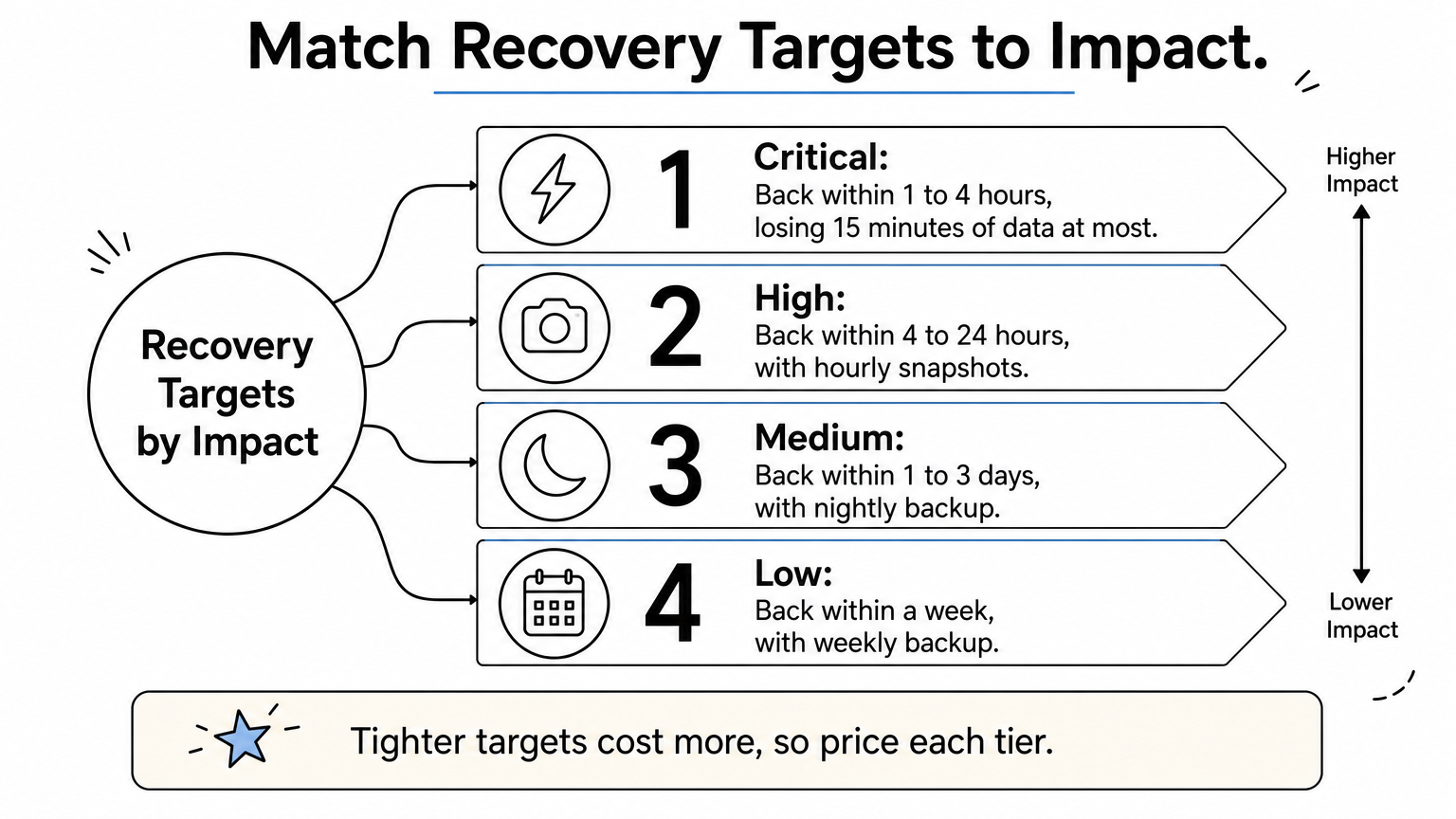
Use your impact ranking from Step 2 to fill in this starting grid, then adjust it with each system owner.
| Impact rating | Typical RTO | Typical RPO | Usual approach |
|---|---|---|---|
| Critical | 1 to 4 hours | 15 minutes or less | Replication, failover |
| High | 4 to 24 hours | 1 to 4 hours | Frequent snapshots |
| Medium | 1 to 3 days | 24 hours | Nightly backup |
| Low | Up to 1 week | 24 hours or more | Weekly backup |
Tighter targets cost more, so price each tier before you commit. Show the director what a four-hour RTO costs against a 24-hour RTO. Often the business accepts a slower target once it sees the bill.
Check the targets are achievable
Targets mean nothing if your backups cannot meet them. Restoring 2 TB over a 100 Mbps line takes about 44 hours at best, so a four-hour RTO needs local copies or failover, not just cloud backup. Also check that backups are held apart from your main network, because ransomware often encrypts connected copies.
Add RTO and RPO columns to your inventory table and get the figures signed off. Any disaster recovery plan template UK businesses use should show one target pair beside every system, so the team never has to guess during an outage.
Step 4. Write recovery procedures and assign roles
Now the plan becomes something people can follow. Procedures tell the team what to do and in what order. Roles tell them who does it. Write both so a competent colleague, not just your IT lead, could pick them up on a bad day.

Name the response team
Keep the team small. Four to six people is enough for most small and medium-sized businesses, every role needs a named deputy, and each one should have clearly defined duties during a recovery. Record mobile numbers, not just email addresses, because email may be down.
| Role | Responsibility |
|---|---|
| Incident lead | Declares the disaster, makes the calls, authorises spend |
| Technical lead | Runs recovery in the order set in Step 2 |
| Communications lead | Handles staff, customers and insurer (see Step 5) |
| Data protection lead | Assesses personal data risk and ICO reporting |
| Scribe | Logs times, actions and decisions |
Write each procedure as a runbook
Write one runbook per system, starting with your critical ones. Use numbered steps with one action per step. State where the backup lives and which vault entry holds the credentials, but never write the passwords into the plan itself. Copy this block for each system.
RUNBOOK: [system name]          RTO: [x]   RPO: [x]
Trigger:          [what tells you this system is down]
Owner / deputy:   [name] / [name]
Before you start: [dependencies that must be up, e.g. network, Active Directory]
1. [Confirm the fault and isolate affected machines]
2. [Locate the latest clean backup: location, vault entry]
3. [Restore to: server / cloud tenant]
4. [Check the data: who signs it off]
5. [Hand back to users and log the time restored]
Fallback if restore fails: [alternative route]
A procedure that lives in one person’s head is not a procedure.
Ransomware needs a different first step. Isolate infected devices before restoring anything, then restore only from backups you have verified as clean, following the steps for containing and recovering from a ransomware attack. Otherwise you simply reinstall the problem.
Whichever disaster recovery plan template UK firms pick up, the runbooks are the part you must write yourself, because only you know how your systems fit together. Ask the person who normally fixes each system to draft the steps, then have someone else follow them cold. Every point where they get stuck is a gap to close.
Step 5. Plan communications and incident escalation
Technical recovery can go perfectly and the business can still look chaotic. Silence and conflicting messages do more damage than the outage itself, so decide now who says what, to whom, and when.
Build the contact list
Keep one table in the template, printed and stored offline. Use mobile numbers and name a deputy for each contact. Put the insurer’s claims line first, because many policies expect notification before you spend money on outside help.
| Contact | Why they need to know | When |
|---|---|---|
| Staff | Instructions, working arrangements | Within 1 hour |
| Insurer | Cover, approved response panel | Immediately |
| Suppliers and IT providers | Support, failover | Within 1 hour |
| Customers | Delays, data risk | Once impact is clear |
| ICO | Personal data breach | Within 72 hours |
| Police or NCSC | Serious cyber crime | After containment |
Set escalation levels
Three levels are enough. Write the trigger for each, so nobody debates severity while systems are down.
- Level 1, minor: the technical lead fixes it and logs it.
- Level 2, major: the incident lead hears within 30 minutes and the response team assembles.
- Level 3, disaster: a director is told, the insurer is called and the data protection lead starts the ICO assessment.
Treat any suspected ransomware as Level 3 straight away. You can always downgrade later, but you cannot get back the hours lost by under-reacting.
Decide who speaks for the business before the incident, not during it.
Pre-write your holding statements
A disaster recovery plan template UK firms can rely on includes ready-made messages, so the communications lead edits rather than invents, which is the whole point of writing your crisis messaging in advance. Add a backup channel too, such as a phone tree or a messaging group, because email may be down.
STAFF: We are dealing with an IT incident. Do not use [system].
Updates at [time] via [channel]. Do not discuss this externally.

CUSTOMER: We have a technical issue affecting [service].
We expect to restore it by [time]. Next update: [time].
Step 6. Test, review and maintain the plan
Testing is the step most businesses skip, and it decides whether everything before it works. An untested plan is a set of assumptions, and restore times on paper rarely survive contact with real systems. Treat your disaster recovery plan template UK version as a living document, and build a testing schedule into it from day one.

Run four types of test
Start small. A walkthrough costs an hour and finds more gaps than you expect, while a restore test proves your backups are usable. Move on to larger exercises and realistic test scenarios once the basics pass, and make the ransomware simulation your yearly benchmark.
| Test | What it proves | How often |
|---|---|---|
| Walkthrough | Roles are clear, contact details are right | Twice a year |
| Backup restore | Backups are clean and meet the RPO | Monthly for critical systems |
| System recovery or failover | The RTO is achievable | Annually |
| Ransomware simulation | The whole plan, including communications | Annually |
A backup you have never restored is only a hope.
Record results and fix the gaps
Every test ends with a written record. Log these points in the template, because ISO 27001 auditors ask for evidence of tested recovery, alongside the other records the standard expects you to keep:
- Date and scenario tested
- Measured recovery time against the RTO
- What failed or confused people
- An owner and a deadline for each fix
Compare the actual recovery time with your target every time. If a system misses its RTO twice, change the technology or change the target, and tell the director which one you chose.
Review on a schedule
Review the whole plan at least once a year, and sooner when any of these happen:
- You add or retire a major system
- A key person joins, leaves or changes role
- You switch a supplier, cloud provider or backup tool
- You suffer a real incident, even a small one
After each review, update the version number and the review dates from Step 1, then replace every offline copy. An old printout with a wrong phone number is worse than no printout, because people trust it.
Putting your plan into practice
A disaster recovery plan template UK businesses can trust comes down to six steps, done in order: scope and ownership, inventory, RTO and RPO targets, runbooks, communications, and testing. Follow that sequence and you end up with a plan short enough to use and specific enough to work.
Start this week. Book half a day with your IT lead and a director, fill in the scope page and list your ten most important systems. A rough plan today beats a perfect one next quarter, because you can improve a draft but you cannot restore data you never backed up.
If you would rather have an expert check your targets, run a test or build the plan alongside you, see how our tested continuity and disaster recovery services work. We can also help you gather the ISO 27001 evidence your auditors will ask for.