Every laptop, server and mobile device connected to your network is a potential entry point for attackers. Antivirus software alone can’t catch the ransomware and fileless malware attacks that dominate today’s threat reports, which is exactly why so many IT managers start asking how does endpoint detection and response actually work under the hood.
In short, EDR combines continuous endpoint monitoring with behavioural analysis to spot suspicious activity that traditional tools miss, then triggers an automated response to isolate the threat before it spreads. It watches processes, file changes and network connections in real time, flags anomalies against known attack patterns, and gives your security team the forensic detail needed to investigate properly.
We’ve spent years deploying EDR as part of our Managed Security Services here at TrustedIA, so this article breaks down each stage of the process: data collection across your devices, threat detection using behavioural rules and machine learning, and the containment steps that stop an incident becoming a breach. By the end, you’ll understand exactly what’s happening behind the scenes when EDR protects your business.
Why endpoint detection and response matters
Attackers have shifted their focus. Endpoints, not networks, are now where most breaches start, because laptops and remote devices are harder to lock down than a server sitting behind your firewall. Once a single compromised device gives an attacker a foothold, they can move laterally through your systems for weeks before anyone notices. That’s the gap EDR was built to close, and it’s why understanding how does endpoint detection and response actually operate matters far more than most IT managers realise until they’ve lived through an incident.
Attackers now target endpoints first
Phishing emails, malicious USB drives and unpatched remote desktop software all lead to the same place: an endpoint. From there, attackers escalate privileges, disable local security tools and pivot toward your servers and backups. Fileless malware, which runs in memory rather than writing to disk, slips past traditional signature-based antivirus because there’s no file to scan. EDR closes this gap by watching process behaviour rather than relying on a list of known bad files, which is precisely the mechanism that lets it catch attacks nothing else sees.
If an attacker only needs one unmonitored endpoint to succeed, you need every endpoint monitored to stop them.
The cost of slow detection
Dwell time, the gap between initial compromise and discovery, is the single biggest factor driving up breach costs. The UK’s National Cyber Security Centre regularly flags detection speed as the difference between a contained incident and a full-blown breach involving data loss, downtime and regulatory reporting. Businesses without continuous endpoint monitoring often only discover an attack when ransomware notes appear on screens, by which point the damage is already done.
Here’s how the numbers typically break down for organisations we’ve worked with, based on the type of monitoring in place:
| Detection approach | Typical dwell time | Outcome when compromised |
|---|---|---|
| No endpoint monitoring | Weeks to months | Full ransomware deployment, data exfiltration |
| Signature-based antivirus only | Days to weeks | Known malware blocked, novel attacks missed |
| EDR with continuous monitoring | Minutes to hours | Threat isolated before lateral movement |
Compliance and insurance now expect it
More than cost alone, regulatory pressure is pushing EDR from optional to expected. ISO 27001 auditors increasingly ask how you detect and respond to endpoint threats, not just whether you have antivirus installed. Cyber insurance underwriters have caught up too: many policies now require documented endpoint monitoring as a condition of cover, and claims can be reduced or refused if a business can’t show it had proper detection capability in place at the time of an incident.
Small and medium businesses often assume this level of scrutiny only applies to large enterprises. It doesn’t. Insurers and auditors treat a 20-person accountancy firm the same way they treat a 500-person manufacturer when it comes to basic endpoint hygiene, because the attackers don’t discriminate by company size either.
Why in-house teams struggle without it
Security teams without EDR are effectively investigating incidents blind. Logs from individual devices rarely give the full picture, and stitching together what happened across dozens or hundreds of endpoints manually takes hours you don’t have during an active attack. EDR gives you the forensic timeline automatically, showing exactly which process launched, what it touched and where it tried to spread, so your team spends its time responding rather than piecing together clues.
Organisations that lack this visibility tend to make one of two mistakes: they either overreact, taking systems offline unnecessarily on a false alarm, or they underreact, dismissing a genuine threat because nobody had the context to recognise it. Getting automated response right removes the guesswork from both scenarios, which is the real reason EDR matters more with every passing year of increasingly sophisticated attacks.
How EDR works: the four-stage detection cycle
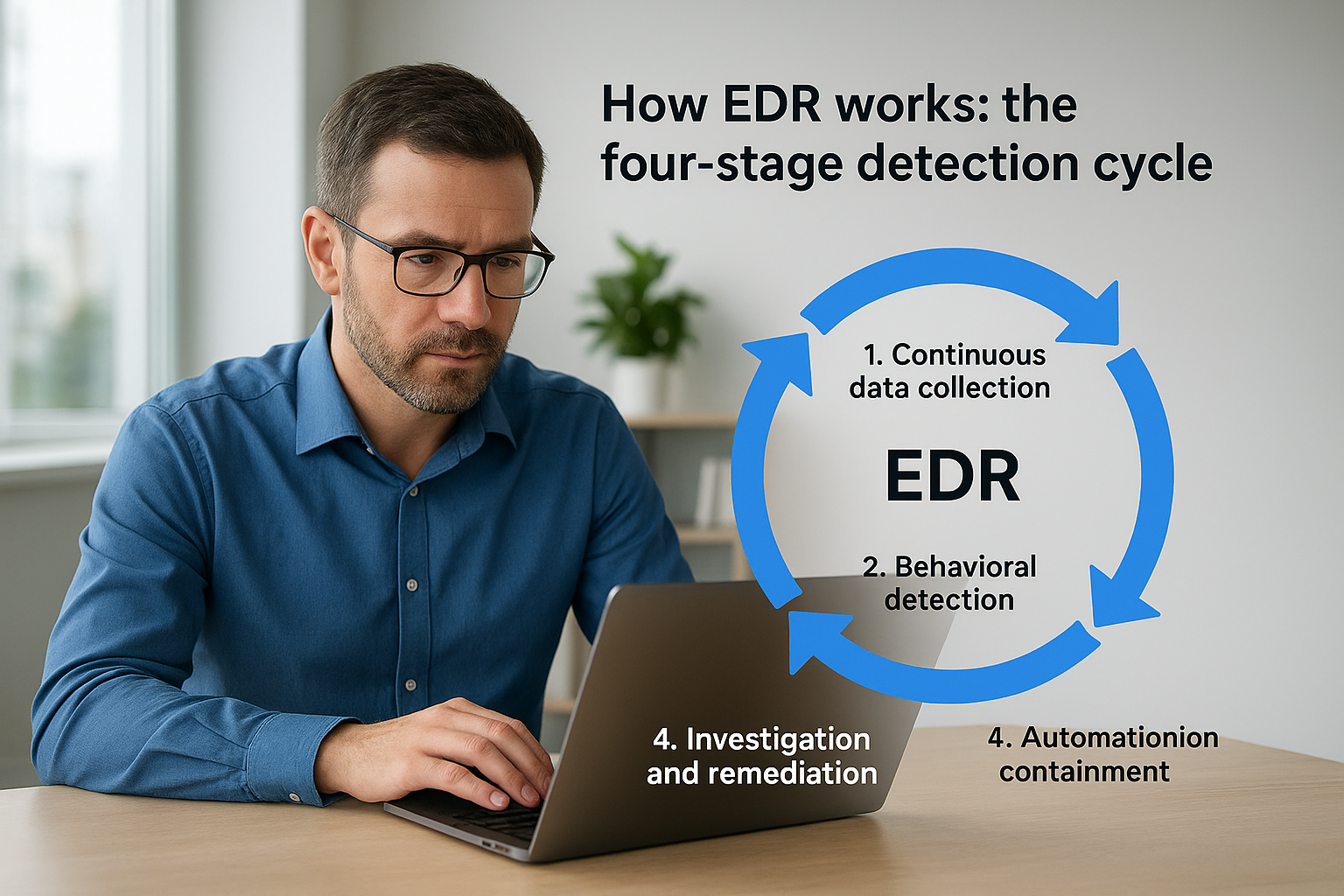
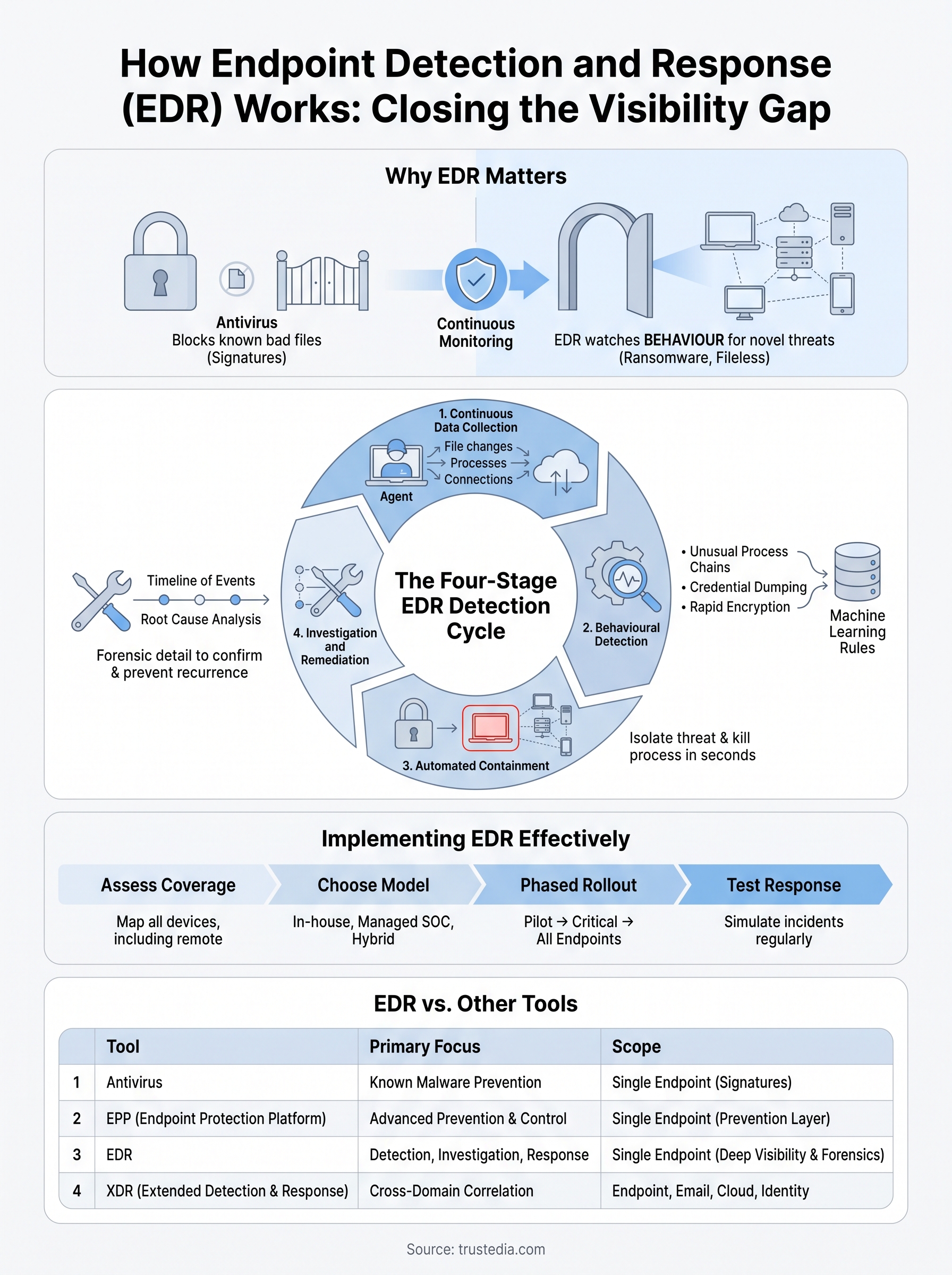
Strip away the marketing language and every EDR platform runs the same basic loop: collect data, detect anomalies, contain the threat, then feed the findings back into your defences. Understanding this cycle answers the question of how does endpoint detection and response work far better than any product datasheet, because it’s the mechanism itself that matters, not the vendor logo on the dashboard.
Stage one: continuous data collection
A lightweight agent sits on every endpoint, server, laptop, virtual machine, recording process launches, file changes, registry edits, network connections and login events. This isn’t a periodic scan; it’s continuous telemetry streaming back to a central platform around the clock. The agent deliberately captures far more than antivirus ever did, because you can’t detect what you never recorded, and forensic investigations later depend entirely on how much detail was logged at the time.
Stage two: behavioural detection
Raw telemetry becomes useful once it’s compared against behavioural rules and machine learning models trained on known attack patterns. Rather than asking "is this file on a blacklist", EDR asks "does this sequence of actions look like an attack chain", spotting things like a Word document spawning PowerShell, which then reaches out to an unfamiliar external server. That question, not a signature match, is what separates modern detection from legacy antivirus.
Detection isn’t about recognising bad files anymore, it’s about recognising bad behaviour.
Common signals that trigger an alert include:
- Unusual parent-child process relationships (e.g. Excel launching cmd.exe)
- Credential dumping attempts against memory
- Rapid file encryption across multiple directories
- Connections to known command-and-control infrastructure
- Privilege escalation outside normal admin activity
Stage three: automated containment
Once a threat is confirmed, the platform acts without waiting for a human to click a button. Automated containment typically isolates the affected endpoint from the network, kills the malicious process, and blocks related file hashes across every other device, all within seconds of detection. This speed matters enormously: an attacker moving laterally can compromise several machines in the time it takes a security analyst to read an email alert, so the automation itself is the control, not just a convenience layered on top of human decision-making.
Stage four: investigation and remediation
Containment buys time, but it doesn’t finish the job. The platform builds a forensic timeline showing exactly what the attacker touched, which files were modified, and how far they got before isolation kicked in. Your team, or TrustedIA’s Security Operations Centre, uses this timeline to remove residual malware, patch the entry point and confirm nothing was missed. Findings from this stage then get fed back into stage two’s detection models, so the same attack pattern is recognised faster next time.
Each stage depends on the one before it. Skip data collection and detection has nothing to work with; skip automated containment and even perfect detection arrives too late.
How to implement EDR in your organisation
Rolling out EDR isn’t a case of installing an agent and walking away. Getting real value from it means planning the deployment, tuning detection rules to your environment and making sure someone is actually watching the alerts. Skip any of these steps and you end up with an expensive tool generating noise nobody acts on, which defeats the point of asking how does endpoint detection and response work in the first place.
Assess your current endpoint coverage
Before buying anything, map every device that touches your network: laptops, servers, mobile devices, even IoT kit that rarely gets patched. Most businesses we assess underestimate this list by a wide margin, particularly once remote workers and personal devices enter the picture. Endpoint coverage gaps are exactly where attackers land first, so this inventory isn’t paperwork, it’s the foundation the whole deployment rests on.
Choose an approach that fits your resources
Once you know what needs protecting, decide who’s going to watch it. Many SMBs don’t have the headcount to staff round-the-clock monitoring, which is where a managed EDR service earns its cost several times over.
| Deployment model | Best suited to | Trade-off |
|---|---|---|
| In-house EDR with dedicated analyst | Larger IT teams with security budget | Requires 24/7 staffing to be effective |
| Managed EDR / SOC service | SMBs without in-house security capacity | Relies on provider’s response times |
| Hybrid (in-house triage, outsourced overnight) | Mid-sized organisations | Needs clear handover process |
An EDR platform is only as good as the team, or the provider, watching what it flags.
Roll out in phases, not all at once
Deploying agents across every device simultaneously invites chaos: false positives flood in, staff panic over alerts that turn out to be legitimate software, and your team can’t tell signal from noise. A phased rollout avoids this entirely.

- Pilot the agent on a small group of low-risk devices first
- Tune detection rules against your normal business software to cut false positives
- Expand to critical servers and finance systems next
- Roll out to remaining laptops and remote endpoints
- Document response procedures so staff know what happens when an alert fires
Test your response before you need it
Installing EDR without testing the response process is like buying a fire extinguisher and never checking it works. Run a simulated incident, ideally with a partner who does this for a living, and time how long it takes from detection to containment. Vulnerability assessments and penetration testing fit naturally alongside EDR here, because they reveal the gaps an attacker would actually exploit before EDR ever gets the chance to respond. TrustedIA builds this testing into our Managed Security Services precisely because a platform nobody has stress-tested is a platform you’re trusting blindly.
EDR vs antivirus, EPP and XDR explained
The security market throws around a lot of overlapping acronyms, and IT managers asking how does endpoint detection and response compare to antivirus often end up more confused than when they started. The short answer is that these tools solve different problems, and most organisations need more than one of them working together rather than picking a single winner.
Antivirus catches what it already knows
Traditional antivirus relies on signature matching, comparing files against a database of known malware. It’s fast, cheap and still worth running, but it’s blind to anything it hasn’t seen before, including the fileless malware and zero-day exploits that make up a growing share of real attacks. If the malware doesn’t match a signature, antivirus lets it straight through.
EPP adds prevention, EDR adds visibility
Endpoint Protection Platforms (EPP) sit a step above antivirus, bundling firewall rules, device control and some behavioural blocking into a single preventative layer. EPP is designed to stop known threats at the door. EDR picks up where EPP leaves off: it assumes some threats will get through prevention and focuses on detecting and investigating what happens next, giving you the forensic timeline that EPP was never built to provide.
Prevention stops what it recognises; detection catches what prevention misses.
XDR extends the same logic beyond the endpoint
Extended Detection and Response (XDR) takes the EDR model and widens it to cover email, cloud workloads, identity systems and network traffic, correlating signals across all of them rather than looking at endpoints in isolation. That’s genuinely useful for larger organisations with the security maturity to act on cross-domain alerts, but it also means more data, more tuning and more cost. For most SMBs, a well-run EDR deployment covers the realistic threat picture without the added complexity XDR brings.
Here’s how the four typically stack up:
| Tool | Detects unknown threats? | Provides forensic detail? | Scope |
|---|---|---|---|
| Antivirus | No | Minimal | Single endpoint |
| EPP | Limited | Basic | Single endpoint |
| EDR | Yes | Full timeline | Single endpoint, deep visibility |
| XDR | Yes | Full timeline | Endpoint, email, cloud, identity |
Layering, not replacing
None of this means you rip out your existing antivirus the moment EDR arrives. In practice, the most resilient setups layer these tools, using EPP-style prevention to block the obvious stuff and reserving EDR’s behavioural analysis for the attacks that slip through. Businesses without the scale to justify XDR still get strong protection from EDR alone, provided it’s monitored properly and paired with the vulnerability assessments and phishing simulation work that reduce how often attackers get an opening in the first place.
Common EDR use cases and real-world examples
Theory only gets you so far. Seeing where EDR actually earns its keep, in the specific moments an attack unfolds, makes the mechanics from the previous sections click into place. Below are the scenarios we see most often across the businesses TrustedIA supports, each one showing a different angle on how does endpoint detection and response actually behaves under pressure.
Ransomware caught mid-encryption
A finance team member opens what looks like a supplier invoice, and within seconds a background process starts encrypting files across a shared drive. Signature-based antivirus has nothing to match because the payload was built specifically to avoid detection. EDR spots the rapid file encryption pattern instead, a behaviour no legitimate application produces at that speed across that many directories, and isolates the endpoint automatically. In deployments we’ve run, this containment step typically fires within seconds of the first suspicious write, stopping encryption from spreading past the initial device.

The value of EDR isn’t stopping the first file from being touched, it’s stopping the fiftieth.
Credential theft after a phishing click
Someone clicks a link, enters their credentials into a convincing fake login page, and the attacker now has valid access rather than malware to hide. This is where behavioural monitoring proves its worth over prevention tools: EDR flags the unusual login location, the sudden privilege escalation attempt, or the credential dumping activity against system memory that follows. None of that looks like a virus. All of it looks like an attacker testing what they can reach next.
Insider misuse and unusual data access
Not every incident starts outside the business. A departing employee copying client files to a USB drive, or an account accessing systems well outside its normal working hours, generates the same kind of anomalous signal EDR is built to catch. The forensic timeline it produces gives HR and legal teams exact evidence of what was accessed and when, which matters just as much for internal disputes as it does for external attacks.
Supply chain compromise through a trusted vendor
Attackers increasingly target smaller suppliers to reach larger clients further up the chain. When a compromised update from a trusted vendor lands on an endpoint, EDR doesn’t need to know the vendor was compromised. It only needs to see the unexpected process behaviour that follows: an update tool spawning a shell, reaching out to an unfamiliar server, or attempting to disable local security controls.
| Scenario | Signal EDR detects | Typical outcome |
|---|---|---|
| Ransomware | Mass file encryption pattern | Endpoint isolated in seconds |
| Phishing follow-up | Credential dumping, unusual login | Access flagged before lateral movement |
| Insider misuse | Abnormal data access, off-hours activity | Evidence trail for HR/legal |
| Supply chain compromise | Trusted process behaving abnormally | Malicious activity blocked despite trusted source |
Each of these examples reinforces the same point: attacks rarely announce themselves through a known bad file. They announce themselves through behaviour, which is exactly what EDR was designed to watch.
Where EDR fits into your security strategy
EDR isn’t a silver bullet, and nothing in this article suggests otherwise. It’s one layer in a strategy that still needs prevention tools, staff training and tested response plans working alongside it. What EDR gives you that nothing else does is continuous visibility into what’s actually happening on your endpoints, plus the automated containment that buys your team time when it matters most.
Understanding how does endpoint detection and response actually work should change how you think about your own setup. If you’re relying on antivirus alone, or you’ve deployed EDR without anyone watching the alerts, you’ve got gaps attackers will find eventually. Ready to close them properly? Talk to TrustedIA about Managed Security Services and get EDR deployed, tuned and monitored by people who do this every day.