Most cyber attacks don’t start with a hacker breaking through a firewall. They start with an email, and an employee who clicks the wrong link. An employee phishing test simulates that exact scenario, giving you a controlled way to see how your team responds to a realistic phishing attempt before a real one lands in their inbox.
The concept is straightforward: send fake phishing emails to your staff, track who clicks, who reports, and who enters credentials, then use that data to reduce your actual risk. But running one properly means thinking about more than just the email template. You need to consider legal and ethical boundaries, choose the right platform, set meaningful metrics, and, critically, turn the results into training rather than blame.
At TrustedIA, phishing simulation is a core part of the managed security services we deliver for businesses across the UK. We run these tests regularly for our clients alongside broader security awareness programmes, so we know what works, what backfires, and where most organisations get stuck. This article draws on that hands-on experience to walk you through how to set up and run an employee phishing test safely, what to measure, and how to use the results to strengthen your security posture genuinely, not just tick a compliance box.
What is an employee phishing test?
An employee phishing test is a planned, controlled simulation where your security team or a managed service provider sends realistic-looking fake emails to your staff to see how they respond. The emails mimic genuine phishing attempts, impersonating a trusted sender, using a convincing pretext, and prompting the recipient to click a link, open an attachment, or hand over credentials. No real harm is done, but the data you collect is genuine: you find out exactly who in your organisation is vulnerable to social engineering before a real attacker does.
The mechanics behind a simulated attack
Phishing simulations work by replicating the exact tactics that real threat actors use. Your provider creates a spoofed or lookalike email that appears to come from a familiar source, such as your IT department, a delivery company, a bank, or even a senior colleague. The email contains a specific call to action, typically a link to a fake login page, a request to open an attached document, or a prompt to confirm sensitive information.
When an employee clicks the link, they are taken to a controlled page hosted by your simulation platform. At this point, no credentials are actually captured or stored by an attacker. The platform records the interaction, logs what happened, and typically displays an immediate educational prompt explaining that the employee just clicked a simulated phishing link. This immediate feedback is a critical part of the learning loop, not an afterthought.
The closer your simulated phishing emails look to real-world attacks your employees are likely to encounter, the more useful your results will be.
What gets measured during a phishing test
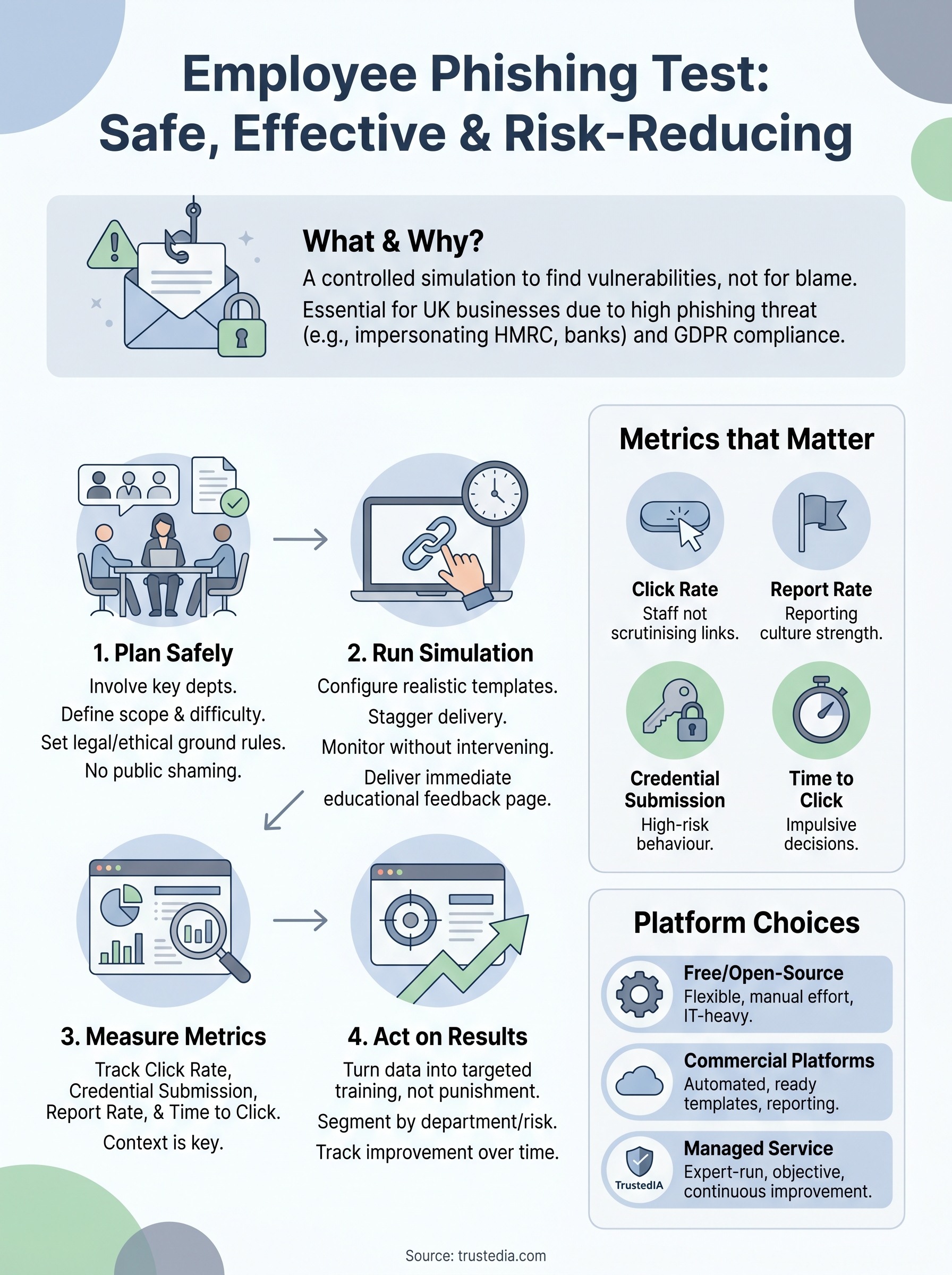
The metrics your platform captures go well beyond a simple click rate. A well-structured test tracks several distinct behaviours across your workforce, each telling you something different about where your risk sits.
- Open rate: how many employees opened the email at all
- Click rate: how many clicked the link or opened the attachment inside it
- Credential submission rate: how many went as far as entering a username, password, or other information into the fake landing page
- Report rate: how many recognised the email as suspicious and flagged it through your reporting process
- Time to click: how quickly employees acted after receiving it, which reveals how urgently worded subject lines drive impulsive behaviour
Each of these data points gives you a different signal about your security posture. A high click rate tells you your staff are not scrutinising sender details or urgency cues carefully enough. A low report rate is often the more concerning figure, because it means real attacks could sit in inboxes undetected for much longer.
The difference between a test and a training tool
Many organisations treat phishing simulations as a purely measurement exercise, but that approach misses most of the value. The test itself is a training moment, particularly when staff receive an immediate and clear explanation of what they just encountered and what they should have done instead.
This is where the framing of your programme matters enormously. If your organisation uses results to single out or publicly shame employees who click, you undermine the psychological safety that effective security awareness depends on. Your team will start avoiding reporting suspicious emails for fear of scrutiny, which is the opposite of what you need. The most effective phishing programmes use test results to design targeted follow-up training, adjust the difficulty of future simulations, and track improvement across the organisation over time.
Why phishing tests matter for UK organisations
Phishing is consistently the most common attack vector targeting UK businesses. The UK government’s Cyber Security Breaches Survey identifies phishing as the method behind the majority of reported incidents, and that pattern has held year after year. Running a regular employee phishing test is not a theoretical exercise. It is a direct response to the most likely way your organisation will actually be breached.
The UK threat landscape
The volume of phishing attacks directed at UK organisations has grown significantly, and attackers have become far more convincing. Emails now impersonate HMRC, Companies House, NHS suppliers, and major banks with a level of polish that makes simple advice like “check for spelling mistakes” largely ineffective. Spear phishing, where targeted attacks are built around personal or organisational details, is increasingly common even against smaller businesses, because the information needed to craft a convincing message is often publicly available on LinkedIn or company websites.
Your employees are the last line of defence when a phishing email bypasses your technical controls, and their decisions under pressure determine whether an attack succeeds.
Most UK businesses rely on email security filters to catch phishing attempts, but no filter catches everything. When a malicious email does land in someone’s inbox, the outcome depends entirely on the person reading it. Without regular testing, you have no reliable way to know how your team will respond when that moment arrives.
Compliance and legal obligations
UK organisations handling personal data operate under the UK GDPR, which imposes clear obligations to protect that data through appropriate technical and organisational measures. Training employees to recognise phishing attacks falls squarely within those obligations. The Information Commissioner’s Office has issued fines where organisations suffered data breaches that could have been prevented through basic security awareness measures, and has made clear that human error does not automatically excuse a data controller from liability.
For organisations working toward or maintaining ISO 27001 certification, phishing simulations are directly relevant to the standard’s requirements around security awareness and competence. Annex A controls related to human resource security point toward demonstrable, measured training activity, not just a policy document sitting on a shared drive.
Phishing tests give you documented evidence that your organisation actively measures and responds to human-layer risk. That evidence matters during audits and carries considerable weight if the ICO ever investigates a breach. Showing that you tested, measured, and trained your workforce is a meaningful demonstration of organisational due diligence that a policy alone cannot provide.
When you should and should not run one
Timing affects how much value you get from a phishing simulation. Running an employee phishing test at the right moment means your results reflect genuine baseline behaviour rather than noise created by an unrelated organisational event. Before you set up a campaign, take a few minutes to check whether your current circumstances actually support running one.
When it makes sense to run a test
The strongest case for running a phishing simulation is when you have no reliable data on how your workforce responds to phishing attempts. If you have never tested before, your security posture at the human layer is essentially unknown, regardless of what your policies say. A baseline test gives you a concrete starting point and shows you where to focus your training investment first.
You should also run one when onboarding a significant number of new employees, following a company acquisition, or after you have recently moved a large team to a new email platform. Each of these situations introduces people or processes that your existing security culture has not yet reached. Phishing tests in these windows give you early visibility into where gaps exist before attackers find them for you.
If your organisation has recently updated its security awareness training, a phishing test shortly afterwards tells you whether the training actually changed behaviour, not just whether people completed it.
Running tests on a regular schedule, typically every three to six months, is also appropriate for most UK businesses. Regularity matters because threat tactics change, and employees who passed a test six months ago may still be caught by a different approach today.
When to hold off
Avoid launching a phishing test during periods of significant organisational stress or uncertainty, such as a redundancy process, a merger, or a major system outage. Employees under pressure are not demonstrating their typical behaviour, so your results will not give you an accurate picture of everyday risk. Worse, a poorly timed test can feel manipulative and damage the trust you need for your security culture to function.
You should also pause if you have not yet built a clear process for handling results. Simulating without a follow-up plan means you collect data you cannot act on, and staff who receive the post-click educational prompt will receive no structured follow-up training. A phishing test without a response plan is a waste of time. Before you send the first simulated email, confirm that your training resources, reporting process, and communication approach are already in place and ready to activate as soon as your results come in.
How to plan a safe phishing test
Planning determines whether your employee phishing test produces actionable intelligence or creates more problems than it solves. Before you configure a single email template, you need to decide on scope, communication, and accountability. Rushing this stage is the most common reason phishing programmes fail to deliver lasting improvement.
Get the right people involved before you start
The planning conversation needs to include IT, HR, and senior leadership from the beginning, not just the security team. HR input helps you avoid scheduling clashes with sensitive periods and ensures you handle results in line with your people policies. Leadership sign-off matters because it gives the programme formal authority, and means that if employees raise concerns, there is a clear organisational position behind the decision to test.
Document who approved the test, when, and on what basis before you send a single email.
You also need to decide whether to run this internally or bring in a managed security provider. Internal teams often lack the infrastructure to run convincing simulations at scale, and using external expertise keeps the programme objective and removes the risk of colleagues learning about it in advance.
Define your scope and difficulty level.
Your first decision is who to include in the simulation. Testing your entire organisation gives you the broadest picture of risk, but starting with specific departments, particularly those with access to financial systems or sensitive data, is a reasonable approach for your first round. Think about which teams represent the highest consequence if they click, not just the most likely to click.
Difficulty level matters significantly. Sending an obvious, poorly worded email produces a low click rate that tells you nothing useful. Realistic templates that reflect current attack trends, such as fake IT support requests, delivery notifications, or HMRC correspondence, deliver results that reflect genuine risk. You can adjust difficulty across future test rounds once you have a baseline to compare against.
Set the legal and ethical ground rules
Running a phishing simulation on employees in the UK requires a clear legal basis under UK GDPR. You are processing data about how individuals behave during the test, and that processing needs to be documented in your records of processing activities. Most organisations rely on legitimate interests as their lawful basis, but you should confirm this with your Data Protection Officer or legal team before you proceed.

The ethical dimension is equally important. Your policy should be explicit that test results drive training improvements, not individual disciplinary action. This does not mean you publicise who clicked, but it does mean employees who ask about results receive a consistent, honest answer. Building that trust upfront makes every future simulation more effective because staff are far more likely to engage with follow-up training when they understand its purpose.
How to run the test step by step
With your plan approved and your stakeholders aligned, you are ready to execute your employee phishing test. Running the actual campaign is straightforward once your preparation is solid, but several practical decisions during this phase still affect the quality of your results.
Configure your campaign settings
Your first task is to build out the email template and landing page inside your chosen simulation platform. Select a template that reflects a realistic current threat, a fake IT password reset, an HMRC notice, or a parcel delivery prompt that works well for most UK organisations. Make sure the sending domain closely resembles a legitimate one your employees would recognise, rather than something obviously fake, since the goal is to test behaviour under realistic conditions, not to catch people out with an absurd scenario.
Set your send schedule to distribute emails throughout the day rather than sending them all at once. Batching the send prevents a cluster of confused employees from tipping off colleagues before the campaign reaches everyone. Most platforms let you stagger delivery automatically, which removes that risk without requiring manual intervention.
Avoid launching your campaign on a Monday morning or the day after a bank holiday, when inboxes are full and employees process emails quickly without scrutinising them carefully.
Launch and monitor in real time
Once you start the campaign, resist the urge to intervene unless something goes seriously wrong, such as a technical error affecting the landing page. Watching click data come in during a live campaign is tempting, but making any adjustments mid-run compromises your results. Let the simulation run its full course before you draw any conclusions.
Keep an eye on your IT helpdesk queue during the campaign. Employees who suspect a phishing attempt may report it directly to IT rather than through your formal reporting button. Log those contacts separately, because they still represent a positive security behaviour even if they used the wrong channel. Your final data set should capture both formal reports and helpdesk contacts, so you are not undercounting security-aware employees.
Deliver immediate educational feedback.
Your platform should be configured to display an educational landing page as soon as an employee clicks the simulated link. This page should be clear and constructive: explain what they clicked, show them what made the email stand out, and tell them exactly what to do next time. Keep the message brief and specific rather than lengthy and generic, since employees who have just realised their mistake are more receptive to a focused explanation than a wall of text.
After the campaign closes, send a company-wide communication confirming that a simulation took place. This message does not need to share individual results, but it should acknowledge the exercise, share aggregate findings, and confirm what training or follow-up is coming next.
How to measure results and reduce risk
Your employee phishing test delivers value only when you treat the results as a starting point for change, not as a final score. Raw click rates mean little without context, and context only comes from comparing your findings against a clear set of benchmarks and then building a structured response around what the data tells you.
The metrics that matter most
Start with your click rate and credential submission rate as your primary risk indicators. A click rate above 20 to 30 per cent on a moderately realistic template suggests your workforce has not developed consistent habits around link scrutiny. A high credential submission rate is a more urgent signal, since it means employees are not just clicking but actively providing information that a real attacker would use to access your systems.
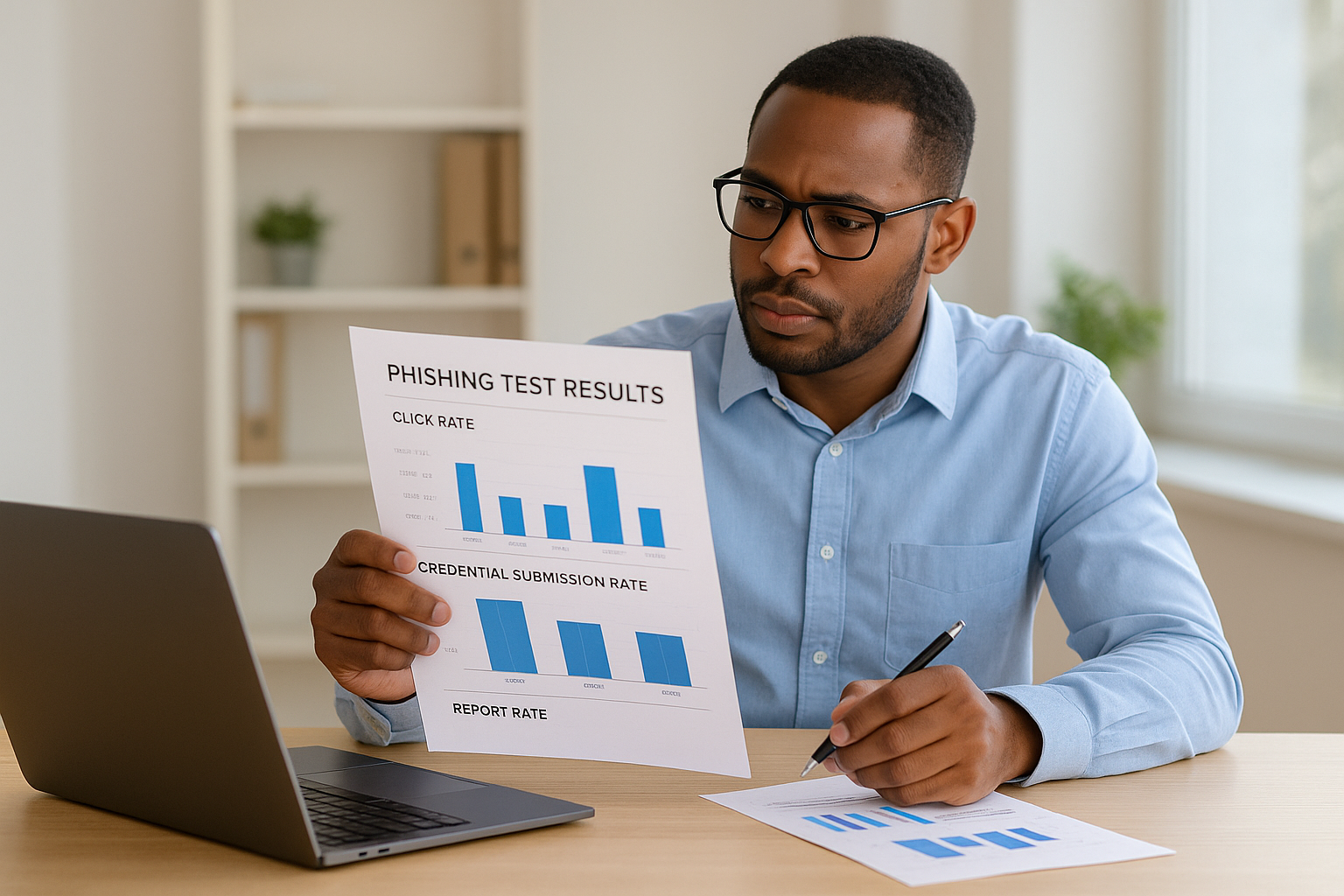
Your report rate deserves as much attention as your click rate. If only a small proportion of staff flagged the simulation as suspicious, your reporting culture is underdeveloped. This matters because reporting speed determines how quickly your security team can act when a real campaign hits. A workforce that reports quickly limits the window an attacker has to exploit a successful click.
A low click rate combined with a low report rate is not a success. It means most employees simply ignored the email rather than recognising it as a threat.
Track time-to-click as a secondary indicator. Employees who click within the first few minutes of receiving the email are responding to urgency rather than scrutinising the message. That behavioural pattern suggests training should focus on slowing decision-making under pressure, not just on teaching people to spot specific phishing indicators.
Turning data into training action
Once you have your results, segment them by department, seniority level, and role. Finance teams, senior executives, and HR staff who handle payroll data typically represent higher-consequence targets, so a high click rate in those groups should trigger faster follow-up training than the same figure in a lower-risk department. Use your data to prioritise where your training budget and time go next, rather than rolling out the same generic course to everyone.
Repeat your simulation three to six months after delivering targeted training to the highest-risk groups. Your follow-up test results give you a direct measure of whether your training investment changed behaviour in practice. If click rates in those groups have dropped and report rates have risen, your programme is working. If the numbers have not moved, the training content or delivery method needs to change, not just the phishing template.
Schedule a quarterly review of your overall programme metrics to make trends visible over time. A single test result is a data point. A series of results over 12 months provides an accurate picture of your organisation’s security resilience at the human layer.
Tools and platforms for phishing tests
Choosing the right platform shapes everything from how convincing your simulations look to how easily you can analyse results and schedule follow-up training. The market splits broadly into three categories: free and open-source tools, commercial self-service platforms, and fully managed services delivered by a security provider. Each suits a different level of in-house capability and testing frequency, so your choice should reflect your team’s capacity to run and interpret campaigns, not just your budget.
Free and open-source options
The most widely used open-source platform is GoPhish, which lets you build phishing templates, send campaigns, and track basic results without licensing costs. It gives you genuine flexibility and works well for organisations with a technically capable IT team that can handle server setup, template maintenance, and data interpretation. The trade-off is that the infrastructure, reporting logic, and educational landing pages are entirely your responsibility for building and maintaining.
Free tools are a practical starting point for smaller organisations running occasional, low-complexity campaigns, but they rarely include automated training integrations, threat-intelligence-backed template libraries, or benchmarking data that makes results easier to act on. As your programme matures, you will likely find that the manual overhead outweighs the cost savings.
Commercial simulation platforms
Commercial platforms such as KnowBe4, Proofpoint Security Awareness Training, and Microsoft’s Attack Simulator within Microsoft Defender for Office 365 offer ready-made template libraries, automated training assignments, and detailed reporting dashboards. These platforms reduce the operational burden of running regular simulations and make it straightforward to connect test results directly to targeted training content without manual work between the two stages.
If your organisation already uses Microsoft 365, the Attack Simulator is worth evaluating first since it integrates directly with your existing environment and reduces the need for additional tooling.
The main consideration with commercial platforms is that they still require someone in your team to own the programme: set the schedule, interpret results, choose appropriate templates, and act on what the data shows. The platform handles delivery and reporting mechanics, but your people run the programme.
When a managed service makes more sense
For many UK businesses, the most effective approach to an employee phishing test programme is handing it to a managed security provider who runs the full cycle on your behalf. Your provider selects templates based on current threat intelligence, manages the technical infrastructure, delivers post-click training, and reports results in a format your leadership team can act on without interpreting raw data.
A managed service also brings continuity and objectivity that internal programmes struggle to maintain, particularly in smaller organisations where the person running the test is often also on the recipient list.
Next steps
Running an employee phishing test is one of the most direct investments you can make in your organisation’s security. It tells you exactly where your human-layer risk sits, which departments need targeted training, and whether your current awareness programme is actually changing behaviour. The data you collect from a well-run simulation gives your leadership team concrete evidence of risk rather than assumptions based on policy documents.
The difference between a one-off test and a genuinely effective programme is structure. You need the right templates, a clear follow-up training process, and results that mean something to decision-makers without requiring hours of manual interpretation. That is where external expertise removes the friction and keeps the programme running consistently.
If you want to build a phishing simulation programme that delivers measurable, lasting improvement rather than a tick-box exercise, speak to the TrustedIA team about how our managed security services can support your organisation.