Most businesses assume their Microsoft 365 or Google Workspace data is fully protected by the platform provider. It isn’t. Native retention policies have gaps, and accidental deletions, ransomware, or rogue users can wipe out critical information before anyone notices. Datto SaaS Protection exists to close that gap, offering MSPs a purpose-built backup and recovery solution designed specifically for cloud productivity suites.
At TrustedIA, our solution-agnostic approach to cybersecurity means we evaluate tools like Datto SaaS Protection on their merits, not on brand loyalty. With over 30 years of experience delivering managed security services and helping organisations build resilient data protection strategies, we understand what MSPs and their clients actually need from a SaaS backup platform, and where the pitfalls are.
This article breaks down what Datto SaaS Protection offers, how it works, its core features, and whether it’s the right fit for your managed services portfolio.
What Datto SaaS Protection is
Datto SaaS Protection is a cloud-to-cloud backup and recovery platform built specifically for Managed Service Providers. It automatically captures data from Microsoft 365 and Google Workspace, including emails, files, contacts, calendars, and shared drives. Rather than relying on the native retention settings built into those platforms, Datto SaaS Protection creates independent copies of your clients’ data and stores them in a separate cloud environment you control.
Native retention policies in Microsoft 365 and Google Workspace are not backups, and treating them as such leaves your clients exposed to permanent data loss.
Who builds it, and what it targets
Datto, now part of Kaseya, developed SaaS Protection to address a clear gap in the managed services market. Cloud productivity platforms have grown rapidly, but data protection responsibilities remain with the organisation using them, not the vendor. Datto SaaS Protection targets MSPs who need to deliver reliable, scalable backup services to multiple clients from a single management interface.
The platform is built around multi-tenancy, meaning you can manage backup policies, run restores, and monitor data health across all your clients without switching between separate accounts. This makes it practical for MSPs handling a handful of clients or several hundred, without adding significant operational overhead.
How it fits into the wider product ecosystem
Datto SaaS Protection sits within the broader Datto and Kaseya product suite, which spans business continuity, disaster recovery, and remote monitoring tools. Its focus is narrow by design: protecting SaaS data and doing it well. For MSPs building out a layered security and backup stack, this dedicated focus keeps the product lean and purpose-built, rather than trying to do too much at once.
That narrow focus also means it integrates cleanly with other tools your team likely already uses, reducing the friction of adding it to an existing managed services offering.
Why SaaS backup matters for Microsoft 365 and Google
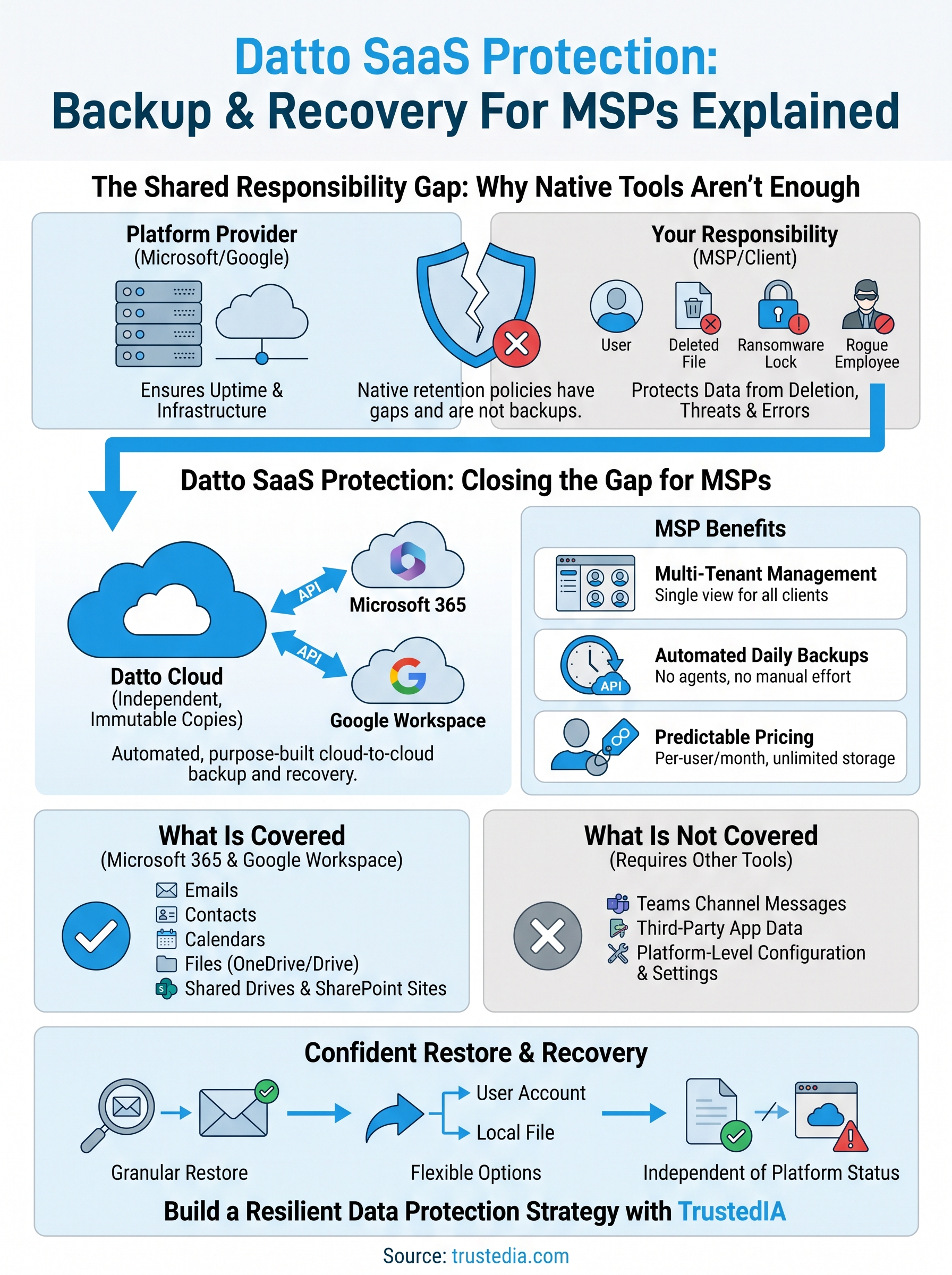
Microsoft and Google both operate under a shared responsibility model. They guarantee platform uptime and infrastructure stability, but protecting your data is your responsibility. Deleted files, ransomware, rogue users, and accidental overwrites can all cause permanent data loss that neither provider will recover.
The limits of native retention
Microsoft 365 and Google Workspace both include basic retention features, but these are not built for granular recovery. They are designed for compliance holds and litigation support, not point-in-time restores at the item level. Common scenarios where native tools fall short include:
- Accidental deletion after the retention window closes
- Ransomware that encrypts data before you identify the threat
- Malicious deletion by a departing employee
Where Datto SaaS Protection fills the gap
Datto SaaS Protection maintains independent, immutable copies of your clients’ data entirely outside the platform. You can restore a single email, a calendar entry, or an entire mailbox without relying on the platform vendor to assist.

This separation matters because a compromise of Microsoft 365 or Google Workspace does not affect your backup. Your restore point stays clean regardless of what happens inside the platform itself.
What it backs up and what it does not
Before you commit to any backup solution, you need to understand exactly what it protects and where it stops. Datto SaaS Protection covers the core data objects your clients generate daily, but it does not capture everything inside Microsoft 365 or Google Workspace. Knowing those limits upfront lets you set accurate expectations and identify where additional tooling may be needed.
What the platform covers
The platform backs up the following data objects across both supported environments:
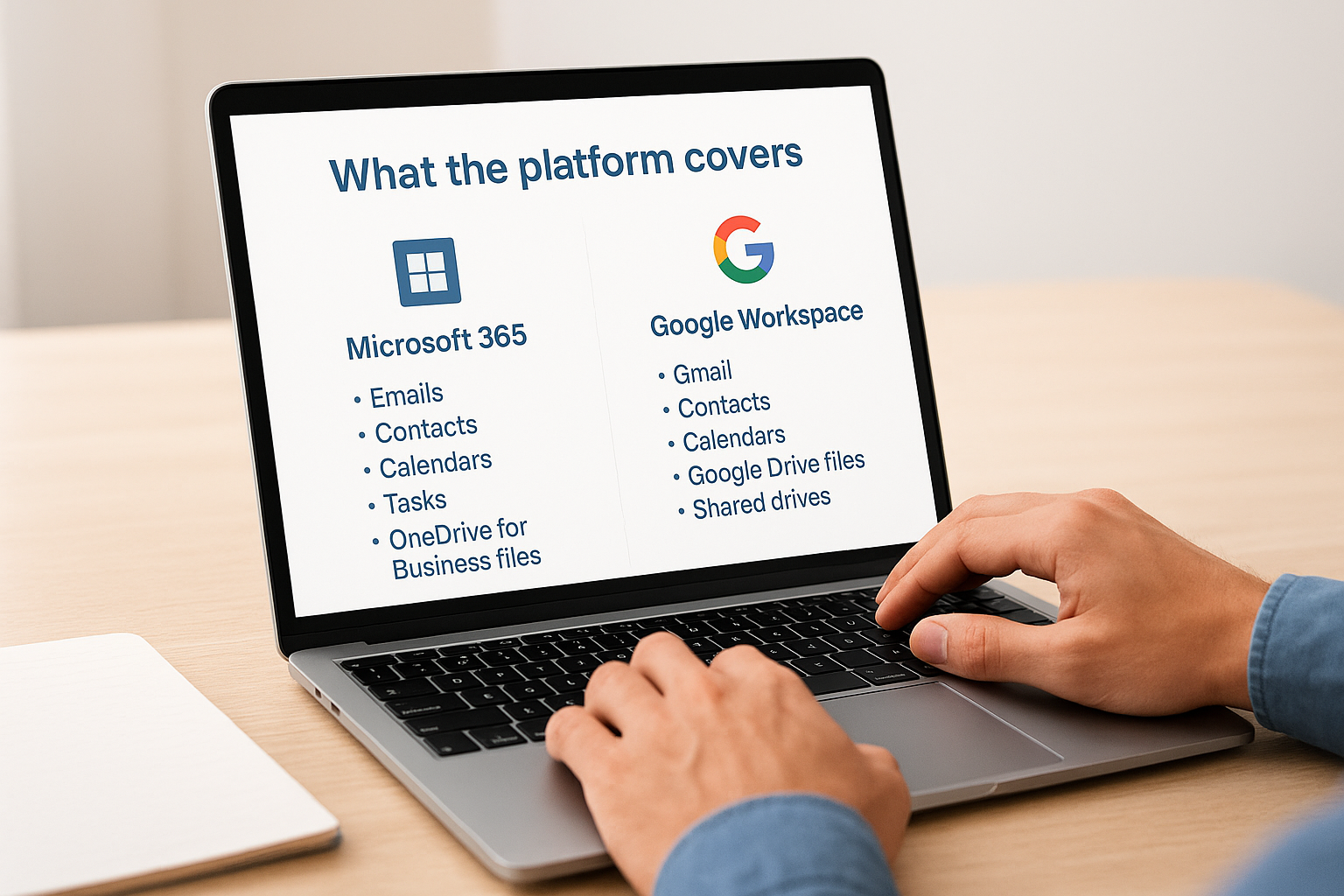
- Microsoft 365: Emails, contacts, calendars, tasks (in Exchange Online), OneDrive for Business files, and SharePoint sites
- Google Workspace: Gmail, contacts, calendars, Google Drive files, and shared drives
Shared drives and SharePoint sites are included, which matters because many competing tools only cover individual user mailboxes and personal storage.
Where coverage stops
Teams channel messages, third-party application data, and platform-level configuration settings such as admin policies and security rules fall outside the scope of the backup. If your clients rely on Teams’ conversation history or use integrated apps that store data separately, you will need supplementary tools to fill those gaps. It is also worth noting that the platform backs up user-level data, not tenant-level configuration, so restoring a full environment from scratch goes beyond what Datto SaaS Protection alone can provide.
How Datto SaaS Protection works for MSPs
Datto SaaS Protection connects to your clients’ Microsoft 365 or Google Workspace environments via authorised API connections, meaning no agents to deploy and no manual configuration on the client side. Once connected, the platform runs automated daily backups for every licensed user, storing data in a separate cloud environment that sits entirely outside the client’s tenant.
Multi-tenant management and MSP controls
The platform’s multi-tenant dashboard lets you oversee every client account from a single login, set backup policies, and trigger restores without switching between accounts. This saves valuable time when you are managing 10 or 100 clients simultaneously.
Backup activity does not depend on end-user action because the platform connects via API, meaning you are not relying on clients to do anything correctly.
Billing and licensing structure
Per-user, per-month pricing fits naturally into the recurring revenue model most MSPs already operate. Each licensed user receives unlimited storage for their backed-up data, removing the unpredictability of storage-based pricing tiers.
Billing scales with your client base, so onboarding a new client takes minutes. This predictable cost structure makes it simple to include SaaS backup in your standard service packages without complicated pricing conversations.
How to implement, monitor, and restore confidently
Getting Datto SaaS Protection up and running for a new client takes under 10 minutes. You connect via the API authorisation flow inside the dashboard, select the users you want to protect, and the first backup runs automatically. There is no software to install and no end-user involvement required.
Setting up and monitoring your clients
Once connected, the platform begins its automated daily backup cycle without further input. The dashboard surfaces backup status, the last successful run, and any errors at a glance so that you can spot issues across your entire client base in one view. Key things to monitor daily include:
- Failed backup alerts for any licensed user
- Last successful backup timestamp per client
- User licence coverage to avoid gaps
Resolving a backup alert the same day it fires is far less disruptive than explaining a data loss event after the fact.
Running a restore when it matters
When you need to recover data, granular restore options let you retrieve a single email, a specific file, or an entire mailbox without pulling everything back. You can restore directly to the user’s account or export to a local file, giving flexibility depending on the situation.
Practising tests regularly means your team knows exactly what steps to follow under pressure. Recovery speed depends on how prepared your team is before an incident happens, not during it.
Key takeaways and next steps
Datto SaaS Protection gives MSPs a reliable, scalable way to protect Microsoft 365 and Google Workspace data that native platform tools simply cannot cover. You now understand what it backs up, where its limits sit, how billing works, and what a restore looks like in practice. These are the fundamentals your clients deserve to have in place before an incident forces the conversation.
Your next decision is whether SaaS backup fits into your current service offering or whether you need a broader cybersecurity strategy alongside it. If you are building out a layered security posture for your clients and want expert guidance tailored to your environment, speak to the TrustedIA team. With over 30 years of experience in managed security services, we help businesses make confident, informed decisions about the tools and strategies that actually protect them.