ISO 27001 log retention requirements come down to one rule. The standard sets no number of days or years, but it does require you to log security events, protect those logs, and keep them for a period you have defined, justified and can prove you follow. In practice, 12 months is the most commonly recommended baseline, with the most recent 90 days kept immediately searchable.
Log retention is one part of a wider question: how long you keep every type of record, and how you dispose of it when the time is up. Auditors treat the two together, so the ISO 27001 data retention requirements and the log rules need to fit into one consistent approach.
This article explains what the standard asks for, how to choose periods that stand up to scrutiny, how to write the policy and schedule, how to protect and delete logs, and what auditors check. TrustedIA supports UK organisations through ISO 27001 certification and runs a 24/7 Security Operations Centre, so the advice covers both the policy on paper and the logs in the system.
Why ISO 27001 leaves retention periods to you
ISO 27001 does not prescribe how long to keep logs or any other data. It expects you to decide the periods from your own risks, legal duties and contracts, write them down, and enforce them. That puts the burden of justification on you, and auditors will test it.
What the standard actually requires

Several Annex A controls and one clause shape your retention decisions. None of them contains a number.

| Reference | Subject | What it asks of you |
|---|---|---|
| Annex A 8.15 | Logging | Produce, store, protect and analyse logs of activities, exceptions, faults and other relevant events |
| Annex A 8.16 | Monitoring activities | Watch networks, systems and applications for anomalous behaviour |
| Annex A 8.17 | Clock synchronisation | Keep system clocks aligned to approved time sources so logs correlate |
| Annex A 5.33 | Protection of records | Protect records from loss, destruction, falsification and unauthorised access, and maintain a retention schedule |
| Annex A 5.31 | Legal and contractual requirements | Identify and document the rules that affect what you must keep |
| Annex A 8.10 | Information deletion | Delete information when it is no longer required |
| Annex A 5.34 | Privacy and PII | Protect personal data in line with applicable law |
| Clause 7.5 | Documented information | Create, control and update the documents the ISMS needs |
Logging was Annex A 12.4 in the 2013 edition and became 8.15 in the 2022 edition. Many online articles still cite the old numbering, so check which version a source describes.
ISO 27001 does not tell you how long to keep logs. It tells you to decide, justify and prove it.
Why a missing number is not a free pass
Auditors will ask how you chose your periods. "We kept the default" is a weak answer, and "we copied a figure from a blog" is not much better. A good answer links each period to a risk, a legal duty or a contract.
There is also a practical floor. Certification runs on a cycle of annual surveillance audits, and an auditor may ask for evidence from any point since the last one. Keeping less than 12 months of security logs makes that evidence hard to produce. Logs also have to reach back far enough to investigate an incident, and breaches are often discovered weeks or months after they begin.
Log retention versus data retention
Logs are one category of record. Data retention covers everything else too: HR files, finance records, customer data, contracts, email and chat messages. Each category gets its own period in the retention schedule.
Logs raise a particular privacy question. Usernames, IP addresses and device identifiers can all be personal data, so the UK GDPR principle of storage limitation applies to them. Security wants long retention and privacy law wants no longer than necessary. Your documented rationale for each period is how you reconcile the two.
How to set log retention periods you can defend
Set each period by working from four inputs, then record the reasoning next to the number. The result should be a short list of log categories, each with a period and a stated reason. A period you can explain beats a longer one you cannot.
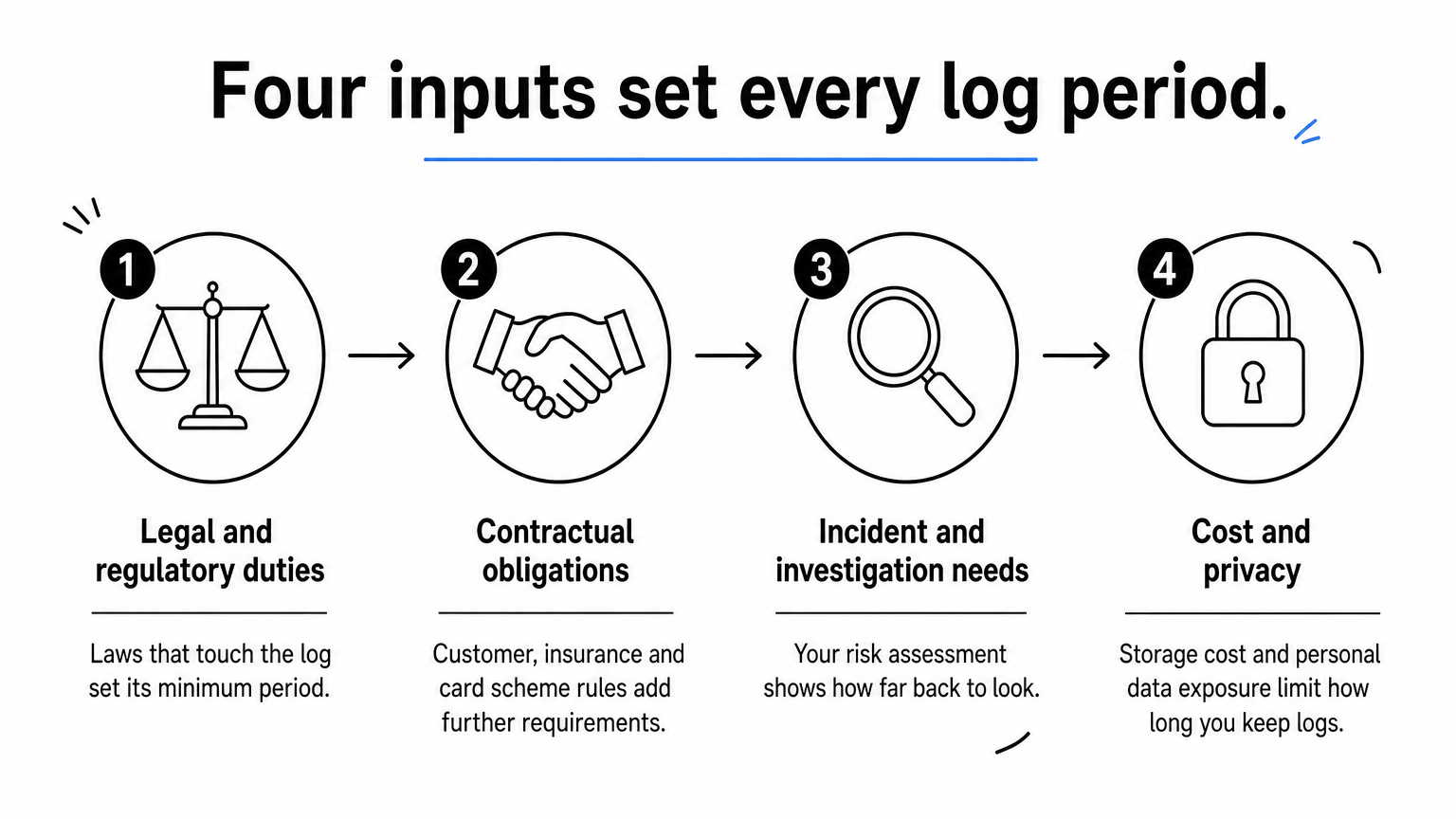
Four inputs that decide the period
Work through these in order for every log category:
- Legal and regulatory duties. Identify which laws touch the log. Financial records and employment records have long statutory or limitation-period drivers. Plain security logs usually have none, which leaves the decision to risk.
- Contractual obligations. Check customer contracts, insurance policies and card scheme rules. Enterprise customers often ask for 12 months of log history, and PCI DSS expects 12 months with the latest three months immediately available.
- Incident and investigation needs. Ask how long an intruder could stay undetected in your environment and how far back you would need to look. Your risk assessment should answer this.
- Cost and privacy. Weigh storage cost and the exposure of holding personal data in logs. This usually argues against keeping everything forever.
Every retention period should trace back to a law, a contract or a risk, and your record should say which.
Typical periods by log type
Treat the figures below as starting points drawn from common practice. They are not requirements of ISO 27001.
| Record type | Common starting point | Main driver |
|---|---|---|
| Firewall, IDS and VPN logs | 12 months | Incident investigation, customer contracts |
| Authentication and identity logs | 12 months | Detecting credential abuse, audit evidence |
| Operating system and application logs | 90 days to 12 months | Operational troubleshooting, risk level of the system |
| Privileged and admin activity logs | 12 months to 3 years | Accountability, insider risk |
| ISMS audit and review records | 1 to 3 years | Evidence across the certification cycle |
| Financial records | At least 6 years | HMRC requirements |
| Employment records | 6 years after employment ends | Limitation period for contract claims |
Most organisations land on 12 months for core security logs. Shorter periods are fine for low-risk operational logs, provided the risk assessment says so.
A worked example with searchable and archived tiers
Take a 60-person UK professional services firm that holds no card data and wants ISO 27001 certification. Its firewall produces about 2 GB of logs a day.
It decides to keep firewall and authentication logs for 12 months. The first 90 days stay searchable online and the remainder moves to cheaper archive storage. The sums look like this:
- Full 12 months: 2 GB × 365 = 730 GB.
- Searchable tier, 90 days: 2 GB × 90 = 180 GB.
- Archive tier: 730 GB − 180 GB = 550 GB.
The firm records three reasons: incident investigation, two customer contracts that ask for 12 months of history, and the annual audit cycle. Admin activity logs are held for 24 months because insider risk scored higher in the risk assessment. Managed services can automate this tiering. TrustedIA’s managed SIEM, for example, supports configurable retention from 90 days to 7 years.
How to write the retention policy and schedule
Write two documents: a short policy that sets the rules, and a schedule that lists each category with its period. Keep the policy to a page or two, because the schedule is where auditors spend their time. Both must be controlled documents under clause 7.5, with an owner, a version number and an approval record.
What the policy must cover
A policy that satisfies auditors usually contains these elements:
- Purpose and scope, stating that it covers all information in all locations: laptops, servers, cloud services and paper.
- Principles, including that information is kept only as long as needed and no longer.
- How periods are agreed, naming who proposes and who approves them.
- Roles and responsibilities for owners, IT and whoever authorises disposal.
- Protection rules for retained records and logs.
- Disposal methods and who evidences them.
- Legal holds, which suspend deletion during litigation or investigation.
- Review frequency. Review at least annually and whenever the law, contracts or your systems change.
Here is a short statement you can adapt for the log section:
Log retention statement
Security logs are retained for the periods set out in the Information
Retention Schedule. Periods are based on legal and contractual duties,
the information security risk assessment, and incident investigation
needs. Logs are stored in a protected location with restricted access,
are synchronised to an approved time source, and are deleted or
destroyed when the retention period ends. Deletion is suspended where
the Legal Hold procedure applies. The schedule is reviewed at least
annually by the Information Security Manager and approved by
management.
A one-page policy that matches how your systems behave beats a twenty-page policy nobody follows.
Building the retention schedule
The schedule turns the policy into decisions. One row per category is enough, with columns that answer the questions an auditor will ask.
| Category | Owner | Location | Retention | Basis | Disposal |
|---|---|---|---|---|---|
| Firewall logs | IT Manager | SIEM and archive | 12 months | Risk assessment, customer contracts | Automated lifecycle deletion |
| Authentication logs | IT Manager | Identity platform and SIEM | 12 months | Risk assessment, audit cycle | Automated lifecycle deletion |
| Admin activity logs | Security Manager | SIEM | 24 months | Insider risk | Automated lifecycle deletion |
| Supplier invoices | Finance Manager | Accounting system | 6 years | HMRC requirements | Secure deletion with log entry |
| Leaver HR files | HR Manager | HR system | 6 years after leaving | Limitation period | Secure deletion with log entry |
Build the schedule from your asset register. If you do not know what information you hold or where it lives, you cannot assign periods to it. Chat messages and email count as records too, so include them rather than leaving them to default platform settings.
How to protect, store and delete logs
A retention period means little if the logs can be altered, read by the wrong people or kept after they should be gone. Annex A 8.15 requires logs to be protected, and 8.10 requires deletion when information is no longer needed. Auditors test both ends of the lifecycle.

Protect integrity and access
Logs are evidence, so anyone who could benefit from changing them should not be able to. Send logs to a central platform away from the systems that generate them. Restrict write and delete rights to a small named group, and keep administrators from controlling the logs that record their own activity.
Add integrity measures such as write-once storage, hashing or immutable storage settings. Keep system clocks synchronised under Annex A 8.17, because timestamps that disagree make an investigation unreliable. Back up archived logs and test that you can restore them, since a log you cannot retrieve fails the same test as a log you never kept.
Delete on schedule, backups included
When a period ends, delete the data and keep evidence that you did. Automated lifecycle rules in your cloud storage or SIEM remove the human error from this step. For manual disposal, record the category, the date, the method and the person who authorised it.
Backups are where retention policies most often fail. Data deleted from production can survive for years in snapshots and off-site copies. Apply the same periods to backups, or document why backup cycles are shorter than the retention period and how you manage the difference.
Legal holds and privacy requests
Suspend scheduled deletion when litigation, a regulatory inquiry or a live investigation makes the data relevant. Your policy should say who can place and lift a hold. Resume deletion only when the hold is formally released.
Privacy rights add a second exception to normal deletion. If someone asks you to erase their personal data, check whether a legal duty, such as tax record keeping, requires you to keep it. If not, delete it. You can also cut risk at the source by logging only the personal data you need for security purposes.
Retention is half the job. Auditors also test whether protection and disposal work in practice.
What auditors check and the mistakes that fail audits
Auditors compare what your documents say with what your systems do. A policy that promises 12 months while a cloud service purges logs at 30 days is a nonconformity, however well written the policy is. Expect them to sample real data rather than accept a document alone.
The evidence auditors typically ask for
Have these ready before the audit:
- The retention policy and schedule, with version history and approval.
- The legal and contractual register that justifies the periods.
- Screenshots or exports of system retention settings that match the schedule.
- Sample logs from a date near the limit of the period, for example 11 months ago for a 12-month policy.
- Disposal records or deletion job logs.
- Evidence of access restrictions on log storage.
- Management review minutes showing that the schedule was reviewed.
An auditor might pick one log source, such as your firewall, and ask for entries from a specific day. If you can produce them quickly, the control passes. If you cannot, expect questions about every other source.
Common mistakes and how to avoid them
The same problems appear repeatedly:
- Borrowing a number. A period copied from a template with no rationale. Fix it by recording the driver beside each period.
- Default settings. Many cloud and SaaS services keep audit logs for only a short default period unless you change them. Check each platform’s actual setting against your schedule.
- Ignoring backups and archives. Apply the schedule to every copy.
- No owner. Every category needs a named person responsible for it.
- Keeping everything forever. Indefinite retention breaches storage limitation and is a likely finding.
- No review. Set an annual review and a trigger for law or contract changes.
A gap analysis against Annex A exposes these mismatches before the certification body does. It is the cheapest point at which to find them.
Auditors do not fail you for choosing 12 months over 18. They fail you when the policy and the system disagree.
Set the period, then prove it
ISO 27001 does not name a retention period. It requires you to choose periods for logs and other records from your risks, laws and contracts, document them, protect the records and delete them on schedule. For core security logs, 12 months with the latest 90 days searchable is the most common and defensible starting point. Longer periods for privileged activity, financial records and employment files should rest on a stated reason.
Write a short policy, build a schedule with an owner and a basis for every line, and check that your systems enforce it. Then keep the evidence an auditor will ask for.
If you want help setting periods, configuring log storage or preparing for a Stage 1 and Stage 2 audit, talk to TrustedIA’s ISO 27001 specialists.