A single ransomware attack can halt operations for days, drain finances, and erode the trust you’ve spent years building with clients. Yet most businesses still treat cyber security as a reactive problem, something to deal with after things go wrong. Effective cyber risk mitigation strategies flip that approach entirely, giving your organisation a structured way to identify threats before they escalate into full-blown incidents.
The challenge isn’t a lack of available defences. It’s knowing which ones actually matter for your business, how to prioritise them, and where to start when resources are limited. Whether you’re an IT manager tightening controls or a business owner trying to make sense of compliance requirements like ISO 27001, the goal is the same: reduce your exposure to the threats most likely to cause real damage.
At TrustedIA, we’ve spent over 30 years helping UK businesses do exactly that, from conducting cyber audits and penetration testing to building out full managed security programmes. This article draws on that hands-on experience to give you 12 practical strategies you can apply right now. Each one targets a specific area of risk, from endpoint protection and employee awareness through to incident response planning and disaster recovery. No jargon-heavy theory, just clear, actionable steps to strengthen your security posture where it counts.
1. Engage a managed security service for 24/7 cover
Most cyber attacks don’t respect business hours. Threat actors deliberately target evenings, weekends, and bank holidays because that’s when in-house teams are offline. A managed security service provider (MSSP) gives your business continuous monitoring, so threats are detected and contained regardless of when they strike.
What this mitigates
A managed service addresses one of the most dangerous gaps in any organisation’s cyber risk mitigation strategies: unmonitored time. Without round-the-clock visibility, ransomware can encrypt your servers, attackers can move laterally across your network, and data exfiltration can go completely unnoticed until it’s too late to limit the damage.
The average time to identify a breach exceeds 190 days, meaning most businesses are compromised for months before they realise anything is wrong.
How to implement it in an SMB
Start by mapping your current monitoring gaps, specifically which systems, hours, and alert types have no coverage. Then engage an MSSP that operates a Security Operations Centre (SOC) with defined response times and escalation procedures. Confirm the service includes endpoint detection, log analysis, and out-of-hours alerting before signing anything.
Before you shortlist providers, run through these questions:
- Does the SOC operate 24/7/365 with human analysts, not just automated rules?
- What is the guaranteed response time for a critical alert?
- How does the service integrate with your existing tools and infrastructure?
- Is the onboarding process structured, or will you configure everything yourself?
What to measure to prove it works
Once the service is live, track these metrics consistently:
- Mean time to detect (MTTD): How long between an event occurring and the SOC flagging it
- Mean time to respond (MTTR): How long from detection to a containment action
- False positive rate: A high rate means your alert configuration needs tuning
- Incidents resolved autonomously: This shows how much workload the service is genuinely absorbing
Review these figures quarterly with your provider and agree on improvement targets in writing.
Where TrustedIA fits
TrustedIA’s Security Operations Centre delivers continuous monitoring backed by experienced analysts who understand the UK threat landscape. Rather than handing you a platform and leaving you to interpret every alert, the team investigates, validates, and responds on your behalf. Your business gets the depth of a dedicated security function without the cost of building one in-house.
2. Build and maintain an asset and data inventory
You cannot protect what you don’t know you have. Many businesses discover gaps in their asset visibility only after an incident, which is far too late. A complete inventory of your hardware, software, and data gives your security team a reliable foundation for every other control in your cyber risk mitigation strategies.
What this mitigates
An unknown asset is an unmanaged risk. Unpatched systems, forgotten cloud instances, and shadow IT devices give attackers easy entry points that your defences simply never cover. A maintained inventory closes those blind spots before threat actors exploit them.
Research consistently shows that organisations have 20 to 40% more active assets than their IT teams are aware of, each one a potential entry point.
How to implement it in an SMB
Start by running a network discovery scan to identify every connected device, then layer in your software and data records. Assign each asset an owner, classify data by sensitivity, and store everything in a centralised register that you update whenever something changes. Review the register at least quarterly, and trigger an immediate update whenever you onboard new staff, adopt new software, or shift infrastructure to the cloud.
What to measure to prove it works
Track the percentage of assets with a confirmed owner, the number of unclassified data stores, and how quickly new assets appear in the inventory after they go live. Regular reconciliation against your procurement records will expose gaps faster than waiting for a formal audit.
Common mistakes to avoid
The two most common failures are building the inventory once and never updating it, and treating it as a purely IT exercise. Data classification needs input from business teams who understand what information is sensitive, what it’s used for, and who should legitimately access it.
3. Run a risk assessment and prioritise the risk register
A risk assessment gives you a structured view of where your business is most exposed and why. Without one, your security spending is essentially guesswork. With it, you can direct budget, time, and attention toward the vulnerabilities that carry the highest potential impact, rather than spreading resources thin across every possible threat.

What this mitigates
Unfocused security activity wastes money and leaves genuine gaps unchecked. A formal risk assessment directly underpins your broader cyber risk mitigation strategies by forcing you to name your actual threats, measure their likelihood, and score the potential damage. Regulatory frameworks like ISO 27001 require documented risk assessments precisely because they produce results.
Organisations that conduct regular risk assessments are significantly better positioned to prevent breaches than those relying on ad-hoc security decisions.
How to implement it in an SMB
Start with the asset inventory from strategy two, then list the credible threats against each asset. Score both likelihood and impact on a consistent scale, then plot the results in a risk register. Assign an owner to every risk and document the treatment decision: accept, mitigate, transfer, or avoid. Review the register at least every six months, and trigger an immediate update whenever your environment changes significantly.
What to measure to prove it works
Track the number of risks reduced or closed each quarter, and monitor how quickly new risks enter the register after a change in your environment. A shrinking count of high-rated, unmitigated risks is the clearest sign your process is working.
Common mistakes to avoid
The most common failure is completing a risk assessment once and filing it away. Risk profiles change constantly as you add software, hire staff, or shift to cloud services. Treat the register as a living document, not a compliance checkbox.
4. Patch and upgrade systems quickly
Unpatched software is one of the most exploited attack vectors in existence. Attackers scan the internet continuously for known vulnerabilities, and once a patch is public, exploit code often follows within 24 to 48 hours. Keeping your systems current is one of the fastest, highest-return steps in any set of cyber risk mitigation strategies.
What this mitigates
Delayed patching leaves your business exposed to known, documented vulnerabilities that security vendors have already fixed. Ransomware groups and opportunistic attackers specifically target unpatched systems because the effort required is minimal and the success rate is high. Exploits like EternalBlue, which powered the WannaCry ransomware attack, succeeded almost entirely because organisations failed to apply an available patch.
The majority of successful breaches exploit vulnerabilities for which a patch was already available at the time of the attack.
How to implement it in an SMB
Start by categorising your assets by criticality, then assign a patching timeline to each category. Critical systems, such as internet-facing servers and authentication infrastructure, should receive patches within 48 to 72 hours of release. Less critical internal tools can follow a monthly cycle. Use automated patch management tools to reduce manual effort, and test patches in a staging environment before rolling them out to production.
What to measure to prove it works
Track the mean time to patch (MTTP) for critical vulnerabilities, and monitor the percentage of assets within your patching SLA each month. A declining number of unpatched critical CVEs across your estate confirms the process is working and closing exposure faster than attackers can act.
Common mistakes to avoid
Many organisations patch servers diligently but neglect end-user devices, printers, and network equipment. Third-party applications, browsers, and plugins carry just as much risk as operating systems. Treat your entire asset inventory as in scope, not just the systems your IT team manages directly.
5. Enforce MFA and strong authentication
Stolen credentials sit behind a significant share of all cyber incidents. Passwords alone are no longer sufficient protection, particularly when attackers can purchase breached credential lists cheaply and test them against your systems in seconds. Adding multi-factor authentication (MFA) to your accounts is one of the most effective and immediately deployable controls within your cyber risk mitigation strategies.
What this mitigates
MFA directly counters credential-based attacks, including phishing, brute force, and credential stuffing. Even when an attacker obtains a valid password, MFA blocks the login because they cannot produce the required second factor.
Microsoft reports that MFA blocks over 99% of automated credential attacks when applied consistently across accounts.
How to implement it in an SMB
Start by enforcing MFA across your highest-risk entry points: email, VPN, cloud platforms, and remote desktop services. Use an authenticator app rather than SMS where possible, as SMS codes are vulnerable to SIM-swapping attacks.
Apply conditional access policies so that logins from unusual locations or unfamiliar devices trigger additional verification automatically. This adds a layer of context-aware protection that catches attackers even when they hold valid credentials and a working second factor.
What to measure to prove it works
Track the percentage of user accounts protected by MFA, and monitor authentication logs for failed MFA attempts, which often signal an active attack against a compromised password.
Aim for 100% coverage on all internet-facing accounts first, then expand inward. Set a quarterly review to confirm that no new accounts have been provisioned without MFA in place.
Common mistakes to avoid
The most common error is assuming partial coverage is adequate. Organisations frequently miss the following:
- Service accounts and shared mailboxes, which attackers target for their broad access
- Legacy protocols such as SMTP and IMAP that bypass MFA entirely if not blocked
- New starters and contractors who are onboarded before MFA enrolment is completed
6. Protect privileged accounts with PAM and least privilege
Privileged accounts, those with administrative access to your systems, data, or infrastructure, are the keys to your entire organisation. When attackers compromise a standard user account, they gain a foothold. When they compromise a privileged account, they gain full control. Privileged Access Management (PAM) combined with a least-privilege policy ensures that even if an attacker breaches one account, they cannot freely move across your environment.
What this mitigates
Admin credential abuse appears consistently in the most damaging breaches, including ransomware deployments and large-scale data exfiltration. Attackers target elevated accounts specifically because they remove every barrier between the intruder and your most sensitive systems. Applying least-privilege principles across your cyber risk mitigation strategies limits what any single compromised account can actually do.
Microsoft research indicates that applying least privilege removes the risk from more than 90% of critical Windows vulnerabilities.
How to implement it in an SMB
Start by auditing every account with elevated permissions and removing access that staff no longer need. Implement a PAM solution that requires users to check out credentials for specific tasks, with all sessions recorded and time-limited. Separate standard user accounts from admin accounts so that nobody browses the web or reads email while logged in as an administrator.
What to measure to prove it works
Track the number of standing privileged accounts over time and work to reduce it consistently. Monitor privileged session logs for unusual behaviour, and measure how quickly excess permissions are revoked when a role changes or a staff member leaves.
Common mistakes to avoid
Many businesses grant admin rights to resolve a one-off problem and never revoke them. These accounts accumulate silently and become high-value targets. Shared admin credentials are equally dangerous, as they make individual accountability impossible and significantly complicate your incident response when something goes wrong.
7. Lock down endpoints with EDR and hardening
Every laptop, desktop, and server in your organisation is a potential entry point for attackers. Endpoint Detection and Response (EDR) tools go far beyond traditional antivirus by continuously monitoring device behaviour, flagging anomalies in real time, and enabling rapid containment when something suspicious occurs. Pairing EDR with systematic endpoint hardening gives your cyber risk mitigation strategies a critical layer of defence directly at the point of attack.
What this mitigates
EDR addresses the reality that perimeter defences alone cannot stop a determined attacker. Once malware executes on a device, traditional antivirus often fails to detect fileless attacks, living-off-the-land techniques, and zero-day exploits. Hardening your endpoints by disabling unused services, enforcing application controls, and removing default credentials removes the footholds attackers rely on after gaining initial access.
Verizon’s Data Breach Investigations Report consistently identifies endpoints as the most frequently targeted asset class in confirmed breaches.
How to implement it in an SMB
Deploy an EDR solution across every managed device, including remote and home-working machines. Configure it to alert on suspicious process execution, unusual network connections, and privilege escalation attempts. Harden each device by disabling unnecessary ports, services, and protocols, enforcing screen lock policies, and applying a standard baseline configuration across your fleet.
What to measure to prove it works
Track the number of devices with active EDR coverage as a percentage of your total asset inventory, and monitor alert-to-investigation time monthly. Aim for full fleet coverage with zero unmanaged exceptions.
Common mistakes to avoid
Businesses frequently deploy EDR in monitor-only mode and never enable active response capabilities, which means detected threats still execute without containment. Excluding devices because they run legacy software is equally dangerous; those machines typically carry the highest vulnerability density across your environment.
8. Control software execution with allowlisting and signing
If a piece of software cannot run, it cannot cause damage. Application allowlisting restricts execution to a pre-approved list of programs, blocking everything else by default. Combined with code signing verification, this control stops a wide range of attacks before they ever execute, making it one of the more underused layers in most cyber risk mitigation strategies.
What this mitigates
Allowlisting directly counters malware, ransomware, and unauthorised tools that attackers drop onto your systems after gaining initial access. Many modern attacks rely on running unsigned or injected code that your perimeter defences never see, because the files arrive through legitimate channels like email attachments or browser downloads. Blocking unsigned executables removes that entire attack path.
The Australian Cyber Security Centre lists application control as one of the most effective single controls for preventing malware execution on managed systems.
How to implement it in an SMB
Start by auditing the software your business actually uses and building a baseline of approved applications. Deploy a policy that permits only those approved, signed executables to run. Apply the strictest rules to high-risk areas first, including internet-facing machines and finance systems, then expand coverage across your fleet. Test thoroughly before enforcing, as gaps in your approved list will block legitimate tools and frustrate staff if you skip that step.
What to measure to prove it works
Track the number of blocked execution attempts per week and investigate any spikes immediately. Monitor the percentage of managed devices with active allowlisting policies applied, and audit your approved application list quarterly to remove software your business no longer uses.
Common mistakes to avoid
Running allowlisting in audit-only mode indefinitely provides no real protection. Many businesses also forget to include script interpreters like PowerShell and Python, which attackers routinely abuse to run malicious code without ever dropping a traditional executable.
9. Segment networks and secure remote access
A flat network gives an attacker who breaches one device unrestricted access to everything else on the same infrastructure. Network segmentation breaks that assumption by dividing your environment into isolated zones, so a compromised laptop in your office cannot freely communicate with your finance servers or customer database.

What this mitigates
Segmentation limits lateral movement, which is the technique attackers use to escalate from an initial foothold to a full network compromise. Combined with secure remote access controls, it also protects the connections your staff make from home or in transit, which are frequent targets in modern cyber risk mitigation strategies.
The UK National Cyber Security Centre identifies network segmentation as a core control for containing the spread of ransomware and other network-propagating threats.
How to implement it in an SMB
Start by mapping the traffic flows between your systems and identifying logical groupings, such as finance, operations, and guest Wi-Fi. Apply firewall rules between each segment to permit only the communication each zone genuinely requires. For remote access, replace open VPN tunnels with zero-trust network access (ZTNA) principles, granting users access only to the specific resources their role demands, rather than the entire network.
What to measure to prove it works
Track the number of firewall rules permitting unrestricted cross-segment traffic and work to reduce them over time. Monitor remote access logs for connections from unusual locations or outside normal working hours, which frequently indicate compromised credentials.
Common mistakes to avoid
Many businesses segment their network initially but never revisit the rules as systems change. Legacy applications in particular tend to accumulate overly broad firewall exceptions that quietly erode your segmentation over months or years.
10. Centralise logs in SIEM and automate response
Without a single place to collect and correlate event data, attackers can move freely between your systems while each individual log source shows nothing alarming on its own. A Security Information and Event Management (SIEM) platform brings those logs together, enabling your team to spot patterns that no single tool would catch in isolation.
What this mitigates
Fragmented logging is one of the most common blind spots in cyber risk mitigation strategies. Attackers rely on the fact that a suspicious login, an unusual process execution, and an outbound data transfer each look unremarkable when viewed separately. A SIEM correlates those events across sources in real time, making the full attack chain visible before significant damage occurs.
IBM’s Cost of a Data Breach Report found that organisations using security AI and automation contained breaches 108 days faster than those that did not.
How to implement it in an SMB
Feed your firewall, endpoint, identity, and cloud platform logs into a centralised SIEM and configure correlation rules tuned to your environment. Activate automated response playbooks for high-confidence alerts, such as blocking a device or disabling a compromised account, so containment begins without waiting for a human to act.
What to measure to prove it works
Track the volume of events ingested versus actionable alerts generated, and monitor how many incidents your playbooks contained automatically. A falling ratio of noise to signal confirms your tuning is improving over time.
Common mistakes to avoid
Many businesses ingest logs but never build or test response playbooks, leaving the SIEM generating alerts that sit unread. Logging only perimeter devices and ignoring internal systems and cloud services leaves the lateral movement stage of most attacks completely invisible.
11. Back up, recover, and practise restoration
Backups are only valuable if they actually work when you need them. Many businesses discover their backup process is broken or incomplete at the worst possible moment: mid-incident, under pressure, with operations at a standstill. Building and regularly testing a solid backup and recovery process is a non-negotiable pillar in your cyber risk mitigation strategies.

What this mitigates
A reliable backup and restoration capability is your last line of defence against ransomware, accidental deletion, and hardware failure. When every other control fails, a tested backup lets you restore operations without paying a ransom or accepting prolonged downtime.
The UK National Cyber Security Centre recommends following the 3-2-1 rule: three copies of your data, on two different media types, with one copy stored offline and offsite.
How to implement it in an SMB
Apply the 3-2-1 rule across your critical systems and verify that at least one copy is air-gapped or immutable, meaning ransomware cannot reach and encrypt it. Schedule automated backups daily for critical data and weekly for secondary systems, then store your offsite copy in a geographically separate location.
What to measure to prove it works
Track recovery time objective (RTO) and recovery point objective (RPO) for each critical system, and test restoration against those targets at least twice per year. Log every test result and resolve failures before your next scheduled exercise.
Common mistakes to avoid
The single most dangerous assumption is that a backup exists and therefore works. Organisations routinely skip restoration testing entirely, and only discover corrupted or incomplete backups during a live incident, when there is no time to fix the problem.
12. Manage third-party risk and strengthen staff behaviour
Your suppliers, contractors, and staff are part of your attack surface whether you account for them or not. Third-party vendors with weak security practices and employees who click phishing links represent two of the most persistent and underestimated vulnerabilities in any set of cyber risk mitigation strategies.
What this mitigates
Attackers frequently target your business indirectly by compromising a trusted supplier or software vendor first, then using that access to reach you. At the same time, human error drives a significant share of incidents internally. Phishing, weak passwords, and accidental data sharing remain among the most common initial attack vectors in confirmed breaches.
The UK NCSC reports that supply chain attacks have increased significantly year-on-year, with attackers specifically targeting smaller suppliers as a route into larger organisations.
How to implement it in an SMB
Start by assessing every third party that holds or accesses your data, assigning each a risk tier based on the sensitivity of that access. Require vendors to complete a security questionnaire annually and confirm minimum controls before you grant access. Internally, run phishing simulation exercises at least quarterly and deliver targeted training to staff who fail, rather than blanket sessions that lose impact quickly.
What to measure to prove it works
Track the phishing simulation click rate across your organisation over time, and monitor the number of third-party vendors who have completed their annual security review. Declining click rates and full supplier assessment coverage confirm both programmes are delivering measurable improvement.
Common mistakes to avoid
Many businesses assess suppliers once at onboarding and never revisit that assessment as vendor relationships evolve. Equally, treating security awareness training as an annual tick-box exercise means staff knowledge degrades before the next session arrives.
Next steps
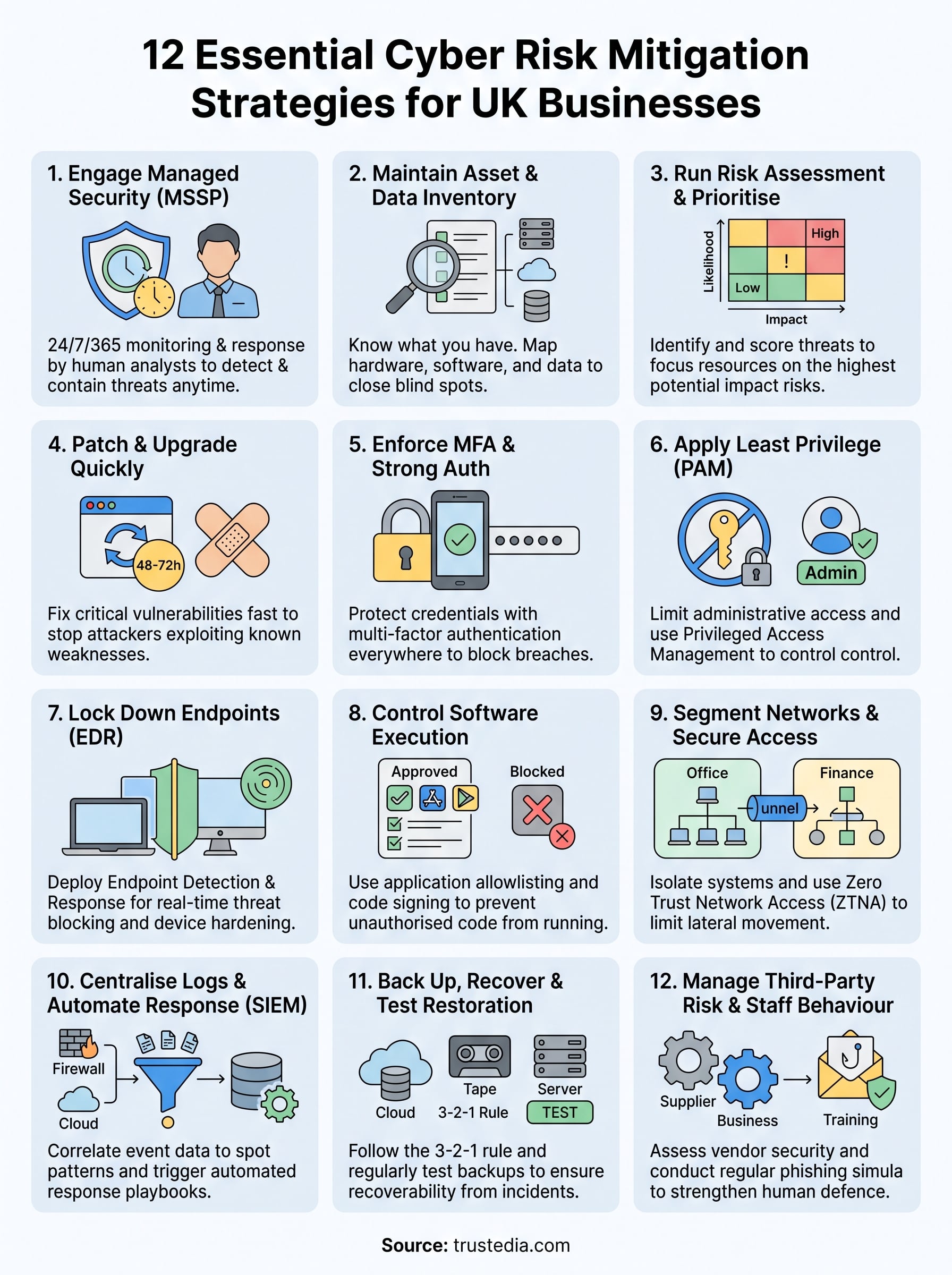
The 12 cyber risk mitigation strategies covered in this article give you a structured path from broad exposure to a measurable, defendable security posture. None of them requires a large in-house team or an unlimited budget. What they do require is consistent action, clear ownership, and a commitment to reviewing your controls as your business and the threat landscape change.
Start with the areas where your visibility is weakest. If you have no asset inventory, build one before deploying additional tools. If your accounts lack MFA, fix that before investing in more sophisticated detection. Sequence matters because each layer supports the ones that follow it.
If you want an expert second opinion on where your greatest gaps sit right now, TrustedIA can help. Our team conducts in-depth cyber audits and vulnerability assessments tailored to UK businesses of all sizes. Talk to TrustedIA about your cyber security posture and find out exactly where to focus first.