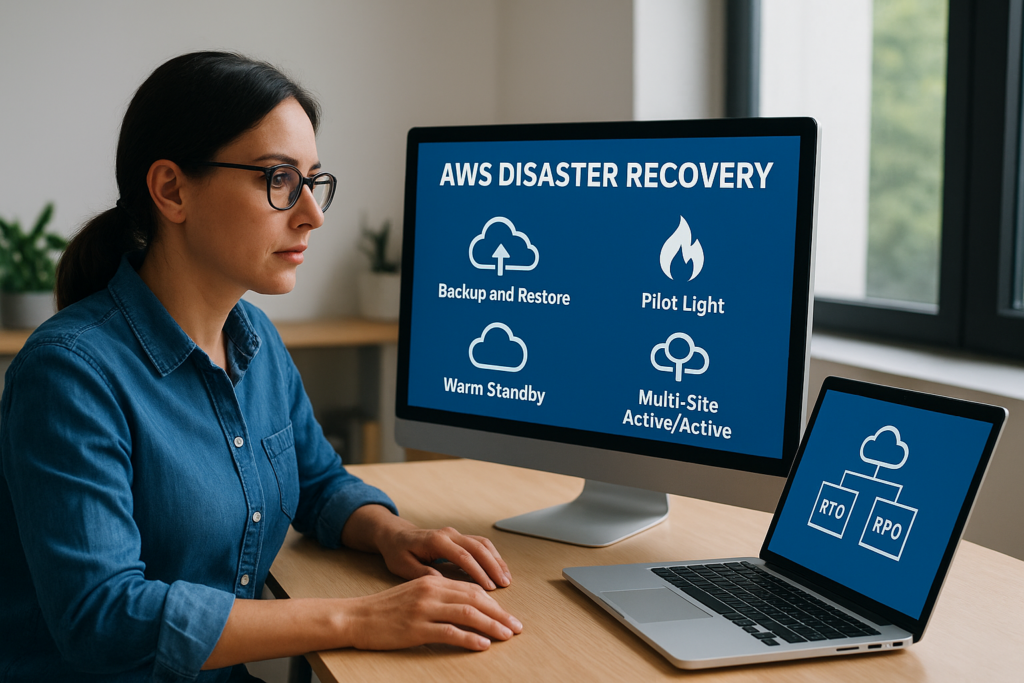
Every organisation running workloads on AWS needs a clear plan for what happens when things go wrong. Hardware fails, regions go dark, ransomware encrypts production databases, and the difference between a brief disruption and a catastrophic loss often comes down to how well your disaster recovery strategy was designed before the incident occurred. The AWS disaster recovery whitepaper is the foundational document that outlines exactly how to approach this, and understanding it properly can save your business from costly downtime and data loss.
AWS defines four core DR architectural patterns, each with different cost profiles and recovery capabilities. Choosing the right one depends on your Recovery Time Objective (RTO) and Recovery Point Objective (RPO), two metrics that directly reflect how much downtime and data loss your organisation can actually tolerate. Get these wrong, and you either overspend on infrastructure you don’t need or discover gaps precisely when you can least afford them.
At TrustedIA, disaster recovery planning is central to the managed security services we deliver for businesses across the UK. With over 30 years of experience in IT services and a solution-agnostic approach, we help organisations design, test, and maintain DR strategies that align with their actual risk profile, not just tick a compliance box. Our work in business continuity and disaster recovery gives us a practical perspective on how AWS’s recommendations translate into real-world resilience.
This guide breaks down the key strategies from the AWS whitepaper, walks through each DR option in detail, and explains how to match your RTO/RPO requirements to the right architectural pattern.
Why the AWS DR whitepaper matters for UK businesses
UK businesses face a distinct set of pressures when it comes to disaster recovery. Between data protection obligations under UK GDPR, sector-specific regulatory requirements, and the growing frequency of ransomware attacks targeting organisations of every size, having a documented and tested recovery strategy is no longer optional. The AWS disaster recovery whitepaper gives organisations a structured framework to build that strategy, but you need to understand how its guidance maps to your specific regulatory context before you start designing architecture.
UK regulatory obligations that make DR planning non-negotiable
The UK GDPR requires organisations to implement technical and organisational measures that ensure the ongoing availability and resilience of processing systems and services. Article 32 specifically references the ability to restore the availability and access to personal data in a timely manner following a physical or technical incident. If you process personal data on AWS, that obligation applies directly to how you architect and test your disaster recovery capability.
Failing to demonstrate a tested recovery process is not just an operational risk. It can constitute a breach of your UK GDPR obligations and expose your organisation to regulatory action from the ICO.
Beyond data protection law, organisations in financial services, healthcare, and critical national infrastructure face additional requirements from bodies such as the FCA, PRA, and NHS Digital. These regulators expect firms to evidence their recovery capabilities through documented RTO and RPO targets, regular testing cycles, and post-incident reviews. The AWS whitepaper provides the technical vocabulary and architectural options that underpin those evidential requirements.
The real cost of unplanned downtime for UK organisations
Most UK businesses significantly underestimate the operational and financial impact of unplanned downtime until they experience it. A 2023 report from the Ponemon Institute estimated the average cost of IT downtime at over $9,000 per minute for large enterprises, and smaller organisations face proportionally severe impacts on revenue, customer trust, and staff productivity. When systems go down without a recovery plan in place, recovery time stretches from hours into days as teams work reactively rather than from a tested playbook.
UK businesses also face reputational consequences that compound the financial damage. Customers and partners expect resilience. A prolonged outage or data loss incident signals to the market that your organisation lacks the controls to protect what it handles. For businesses operating in regulated sectors, that reputational damage often precedes formal enforcement action, making the case for proactive planning even stronger.
Why AWS-specific guidance is necessary
General disaster recovery guidance has its place, but AWS infrastructure operates differently from on-premises environments in ways that matter for DR planning. AWS regions, availability zones, and service-level failover capabilities introduce architectural options that do not exist in traditional data centre setups, but they also introduce dependencies and failure modes you need to plan around specifically.
AWS publishes and updates its disaster recovery documentation through the AWS Well-Architected Framework, giving you a structured way to evaluate your current workloads against proven reliability practices. The DR whitepaper sits within this broader framework and provides specific architectural patterns, service recommendations, and configuration guidance tailored to cloud-native environments. Without understanding this material, you risk applying on-premises thinking to a cloud architecture, which consistently produces either overspending, under-protection, or both.
For UK businesses evaluating their AWS posture, the whitepaper is the starting point, not the endpoint. You still need to map its recommendations to your actual workloads, your RTO and RPO requirements, and the regulatory obligations specific to your sector. The sections that follow break down exactly how to do that in a structured and practical way.
What the AWS whitepaper covers and what it does not
The AWS disaster recovery whitepaper gives you a structured view of how to design resilient architectures on AWS, but it has clear boundaries. Understanding both sides prevents you from treating it as a complete solution rather than a technical reference and starting point for your DR programme.
What the whitepaper covers
The whitepaper defines the four core DR strategies AWS recommends: backup and restore, pilot light, warm standby, and multi-site active/active. For each pattern, it explains the architecture, the typical RTO and RPO ranges you can expect, and the trade-offs between cost and recovery capability. It also introduces the key AWS services that support each strategy, including Amazon S3, AWS Backup, Route 53, and AWS CloudFormation, giving you a practical toolkit for implementation.
Beyond the four strategies, the document covers how to think about failover, data replication, and infrastructure automation within and across AWS regions. It includes guidance on testing your DR capability, not just designing it, which is one of the most commonly neglected areas in recovery planning. The whitepaper also connects to the broader AWS Well-Architected Framework’s Reliability pillar, where you can find deeper guidance on building durable systems.
Treating the whitepaper as a checklist you complete once will leave gaps. DR planning on AWS is an ongoing discipline, not a one-time design task.
What the whitepaper does not cover
The whitepaper is technically focused and vendor-specific by design, which means it does not address several areas your organisation needs to manage separately. It does not cover the legal and regulatory obligations that apply to your sector or geography, including UK GDPR requirements or FCA operational resilience rules. Translating AWS architecture options into compliance evidence your auditors and regulators will accept requires additional work beyond what the document provides.
You also will not find guidance on establishing governance, ownership, and testing cadences within your organisation. Who declares a disaster event? Who authorises a failover? How often do you run live tests? These questions require internal policy decisions that no technical document can resolve for you. Similarly, the whitepaper does not account for third-party dependencies, supply chain risks, or hybrid environments where part of your workload runs outside AWS. You need to map those gaps yourself before your architecture design decisions will actually hold up under real conditions.
Core recovery metrics you must set: RTO and RPO
Before you select any architecture from the aws disaster recovery whitepaper, you need two numbers: your Recovery Time Objective (RTO) and your Recovery Point Objective (RPO). Every design decision you make in DR planning flows from these two figures, and if you set them incorrectly, you will either overpay for protection you do not need or discover critical gaps during an actual incident.
What RTO means and how to set it
RTO defines the maximum acceptable time your system can be unavailable following an incident. If your RTO is four hours, your architecture must be capable of restoring full service within that window. Setting RTO requires input from business stakeholders, not just technical teams, because the correct figure depends on operational impact and revenue exposure during downtime, not on what your engineers consider technically convenient.
To set RTO accurately, you need to quantify what an hour of downtime actually costs your organisation across revenue, staff productivity, customer impact, and regulatory exposure. Different workloads will produce very different answers. A customer-facing payment system carries a very different RTO than an internal reporting tool, so you should calculate this per workload rather than applying a single figure across your estate.
What RPO means and how to set it
RPO defines the maximum amount of data loss your organisation can tolerate, expressed as a time window. An RPO of one hour means you can afford to lose up to one hour of transactions or changes. Achieving a tighter RPO requires more frequent data replication, which increases both architectural complexity and cost.
Setting RPO without input from legal, compliance, and data owners is one of the most common mistakes organisations make during DR planning.
Your RPO directly determines your replication strategy. If you cannot lose more than a few minutes of data, you need synchronous or near-synchronous replication, which constrains which AWS regions and services you can use. For workloads subject to UK GDPR, your RPO also has a compliance dimension, since losing personal data beyond a recoverable point may trigger notification obligations to the ICO.
How RTO and RPO drive your DR strategy choice
Once you have defined RTO and RPO per workload, these figures map directly to the four architectural strategies AWS recommends. Longer RTOs and RPOs allow simpler, lower-cost approaches such as backup and restore. Tighter requirements push you toward warm standby or multi-site active/active configurations, which carry higher infrastructure costs but deliver significantly faster recovery. Skipping this step and choosing an architecture first is one of the fastest ways to build a DR programme that fails when it matters most.
AWS disaster recovery strategies explained and compared
The aws disaster recovery whitepaper defines four architectural patterns, each designed for a specific range of RTO and RPO requirements. Understanding the differences between them lets you choose based on actual business need rather than defaulting to the most expensive option or the simplest one available.
The four strategies at a glance
Each strategy sits on a spectrum from low cost with slower recovery to high cost with near-instant recovery. The table below gives you a quick reference before diving into the detail.
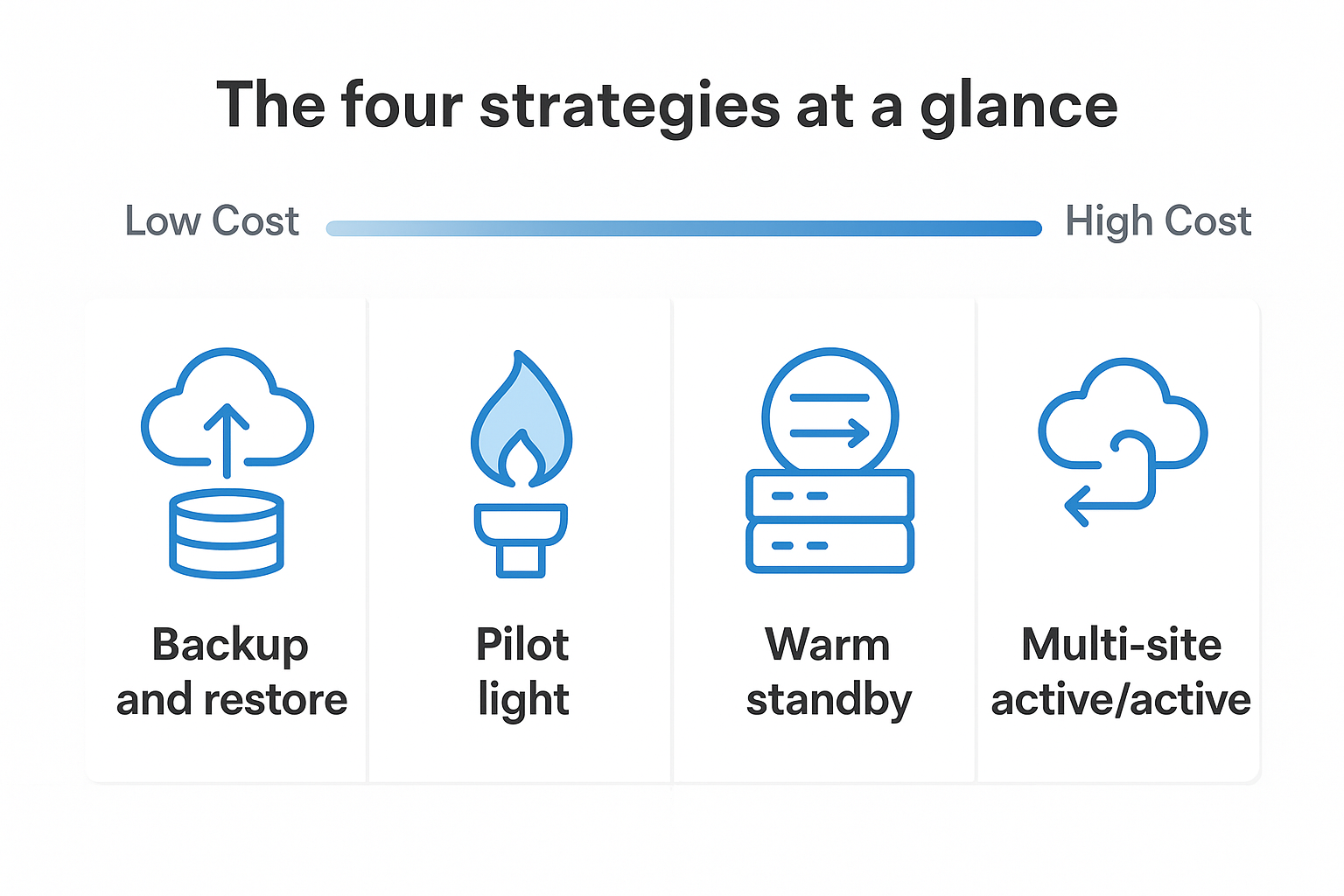
| Strategy | Typical RTO | Typical RPO | Relative Cost |
|---|---|---|---|
| Backup and restore | Hours | Hours | Low |
| Pilot light | Tens of minutes | Minutes | Low to medium |
| Warm standby | Minutes | Seconds to minutes | Medium to high |
| Multi-site active/active | Near zero | Near zero | High |
Backup and restore and pilot light
Backup and restore is the simplest strategy. You back up data and infrastructure configuration to AWS storage, then rebuild the environment when a disaster occurs. It works well for non-critical workloads where your business can tolerate several hours of downtime, and it carries the lowest ongoing cost. The trade-off is recovery time: rebuilding from scratch takes considerably longer than switching to a pre-provisioned environment.
Pilot light takes this further by keeping a minimal version of your core infrastructure running in a secondary region at all times. When disaster strikes, you scale that environment up to full production capacity. This cuts recovery time significantly compared to backup and restore, though it introduces ongoing running costs for the always-on components you need to maintain in readiness.
Warm standby and multi-site active/active
Warm standby runs a reduced-capacity but fully functional replica of your production environment in a second AWS region. Because the environment is already running, failover is faster and relies on scaling up existing resources rather than rebuilding from nothing. This approach suits workloads where downtime of more than a few minutes carries significant business impact on revenue or customer trust.
Multi-site active/active is the most resilient option available, but it is also the most expensive and architecturally complex to operate correctly.
Multi-site active/active runs identical, fully scaled environments across two or more AWS regions simultaneously, with traffic distributed between them. Failover happens automatically and recovery time is measured in seconds rather than minutes. This suits mission-critical workloads where even brief unavailability produces unacceptable revenue loss or regulatory exposure for your organisation.
Key AWS services and building blocks used for DR
The aws disaster recovery whitepaper identifies a core set of AWS services that appear across all four strategies in different combinations. Knowing what each service does and where it fits in a DR architecture prevents you from building solutions that look complete on paper but fail under real conditions. These services form the practical toolkit you draw from when translating your RTO and RPO targets into a working design.
Data backup and replication services
AWS Backup provides a centralised service for automating and managing backups across multiple AWS resources, including EC2, RDS, EFS, and DynamoDB. You can define backup policies, enforce retention schedules, and copy backups to a secondary AWS region, all from a single console. For organisations running backup and restore or pilot light strategies, AWS Backup is the primary mechanism for meeting your RPO without building custom scripts or manual processes.
Amazon S3 underpins most DR storage configurations due to its durability guarantees and built-in replication capabilities. S3 Cross-Region Replication automatically copies objects to a bucket in a different region as they are written, which supports tighter RPO targets for workloads that store data in object storage. For databases, Amazon RDS automated backups and read replicas give you both point-in-time recovery and the ability to promote a replica to a standalone instance during a failover event.
Infrastructure automation and failover tools
Rebuilding or scaling infrastructure manually during an incident introduces human error and wastes time you cannot afford to lose. AWS CloudFormation lets you define your entire environment as code, so you can provision a replica environment in a secondary region reliably and repeatedly without relying on institutional memory or step-by-step runbooks.

If your DR architecture cannot be deployed from code, your recovery time will always be longer than your RTO target suggests.
Amazon Route 53 handles DNS-level failover by routing traffic to a healthy endpoint automatically when a health check fails. For warm standby and multi-site active/active strategies, Route 53 routing policies such as failover and weighted routing are central to how traffic shifts between primary and secondary environments without manual intervention.
Monitoring and orchestration services
Amazon CloudWatch gives you visibility into the health of your workloads and triggers automated responses when thresholds breach. Combined with AWS Lambda, you can automate failover steps, notify on-call teams, and execute recovery logic without waiting for a human to detect the problem and respond. These services reduce the gap between incident detection and recovery initiation, which is where a significant portion of your RTO is typically consumed.
How to choose the right DR strategy per workload
No single DR strategy fits every system you run on AWS. Applying warm standby to a low-traffic internal tool costs far more than it needs to, while applying backup and restore to a customer-facing payment service will expose you to downtime you cannot afford. The starting point for choosing correctly is a structured inventory of your workloads, assessed against the RTO and RPO figures you established before any architecture decisions were made.
Classify your workloads by criticality
Before you open the aws disaster recovery whitepaper and select a strategy, you need to sort your workloads into tiers based on their business impact. Most organisations find that a three-tier model works well in practice: mission-critical systems that directly generate revenue or handle regulated data, business-important systems that affect internal operations without directly touching customers, and low-priority systems where extended downtime causes inconvenience but no significant financial or compliance exposure.
Classifying workloads without input from finance, legal, and operations will produce a list that reflects IT priorities rather than business risk.
For each workload, document the financial impact of one hour of downtime, the compliance obligations attached to the data it processes, and any contractual SLAs you have committed to with customers or partners. These figures drive your tier assignment and prevent subjective decisions that inflate your DR spend or leave critical gaps in your recovery capability.
Match workload tier to DR strategy
Once your tiers are defined, mapping them to a specific strategy becomes a straightforward exercise. Mission-critical workloads with tight RTO targets below fifteen minutes and near-zero RPO requirements point directly to warm standby or multi-site active/active configurations. Business-important systems with moderate tolerance for downtime measured in tens of minutes typically align well with a pilot light approach, which balances cost against recovery speed.
Low-priority workloads can almost always rely on backup and restore, provided your teams are realistic about recovery timelines when they set expectations with the wider business. The table below gives you a practical reference for this mapping.
| Workload Tier | RTO Target | RPO Target | Recommended Strategy |
|---|---|---|---|
| Mission-critical | Under 15 minutes | Seconds to minutes | Warm standby or multi-site active/active |
| Business-important | 15 to 60 minutes | Minutes | Pilot light |
| Low priority | Several hours | Hours | Backup and restore |
Run this classification exercise at least annually, or whenever a significant new workload is deployed. Business priorities shift, and a system that qualified as low priority two years ago may now sit at the heart of your operations.
How to plan, run, and improve DR tests on AWS
Designing a DR strategy and testing it are two separate activities, and most organisations treat the second one as optional until an incident proves otherwise. The aws disaster recovery whitepaper is direct on this point: an untested recovery plan is not a recovery plan at all. Building a regular testing programme into your DR operating model is the only way to confirm that your RTO and RPO targets are actually achievable under real conditions.
Define your test scope before you schedule anything
Every DR test needs a clear scope defined before anyone touches infrastructure. You need to specify which workloads are included, what failure scenario you are simulating, and what a successful outcome looks like in measurable terms. Testing everything at once is rarely practical, so start with your highest-criticality workloads and work downward through your tiers.

Document the pre-test state of your environment so you have a baseline to compare against after recovery. Assign roles explicitly: who executes the test steps, who monitors system health, and who holds authority to stop the test if production risk increases beyond acceptable limits. Without this structure, tests produce incomplete results and create confusion about what the outcome actually demonstrated.
Running a DR test without a defined success criterion turns it into an exercise with no measurable outcome.
Run the test and capture results systematically
During the test, track time stamps against every recovery step so you can calculate your actual RTO at the end. Record any manual interventions that were required, any automated steps that failed or behaved unexpectedly, and the exact point at which each system returned to a functional state. AWS services such as Amazon CloudWatch Logs and AWS CloudTrail give you detailed records of infrastructure events during the test window, which saves time during the post-test review.
Simulate realistic failure conditions rather than clean, predictable ones. A planned database promotion during a scheduled maintenance window is not the same as an unplanned region failure at peak load. The closer your test scenario matches an actual incident, the more reliable your results will be.
Review findings and close gaps before the next cycle
After each test, hold a structured review that compares actual recovery times against your documented RTO and RPO targets. Identify every gap, assign an owner, and set a deadline for remediation before your next scheduled test. Treat unresolved gaps as open risk items, not backlog tasks. Schedule your next test at a fixed interval, typically every six to twelve months for critical workloads, and repeat the cycle consistently.
Common AWS DR pitfalls and how to avoid them
Even organisations that study the aws disaster recovery whitepaper carefully can fall into predictable mistakes once they move from planning to implementation. Most pitfalls share a common root: teams treat DR as a technical project with a completion date rather than an ongoing discipline that requires governance, regular testing, and cross-functional ownership. Knowing where others go wrong gives you a clear opportunity to build something that actually holds up under real conditions.
Treating DR as a one-time implementation
The most damaging assumption in DR planning is that designing the architecture once covers you permanently. Workloads change, new systems are added, compliance requirements evolve, and AWS services your architecture depends on receive updates that affect failover behaviour. If you stop maintaining your DR programme after the initial build, you will discover the gaps only when an incident exposes them.
Set a documented review schedule tied to both calendar intervals and trigger events such as major deployments or changes to workload criticality.
Build DR reviews into your standard change management process so that every significant infrastructure change includes an assessment of its impact on recovery capability. Assign a named owner who is accountable for keeping documentation, test results, and architecture current at all times.
Skipping automation in your recovery steps
Manual recovery processes consistently extend your actual recovery time beyond your documented RTO target. When teams are under pressure during a live incident, manual steps get skipped, performed out of order, or blocked by access issues. Any recovery step that relies on a human performing it correctly under stress carries measurable risk of delay.
Replace manual procedures with automated runbooks using AWS Systems Manager or Lambda-triggered workflows wherever possible. Route 53 health checks and automated failover policies should redirect traffic without requiring someone to log in and change a configuration mid-incident. Test your automation under simulated failure conditions, not just in clean, planned environments where everything cooperates.
Misaligning DR costs with actual workload criticality
Applying the same DR strategy across all workloads without classifying them by business impact produces two equally poor outcomes: overspending on non-critical systems and underspending on the ones that carry real financial or compliance risk. Organisations routinely build warm standby environments for internal tools that could tolerate hours of downtime, while leaving revenue-generating platforms protected only by infrequent backups.
Map your DR investment directly to the financial and regulatory risk each workload carries. Use the RTO and RPO figures you set per workload to validate that your architecture and its costs are proportionate to what your business actually needs to recover from.
How to align AWS DR with ISO 27001 and audits
ISO 27001 and the aws disaster recovery whitepaper address overlapping concerns from different angles. The standard defines what your organisation must be able to demonstrate: availability controls, business continuity planning, and tested recovery procedures. AWS documentation tells you how to build those capabilities technically. Closing the gap between the two requires deliberate translation work, not just an assumption that a well-architected AWS environment automatically satisfies your auditors.
ISO 27001 controls that DR directly addresses
Annex A of ISO 27001 includes several controls that sit squarely within the scope of your DR programme. Control 8.13 covers information backup, requiring you to maintain and test backup copies in accordance with your agreed recovery policies. Control 8.14 addresses redundancy, requiring sufficient processing capacity to meet availability requirements. Your AWS architecture choices, including replication strategy, backup retention, and multi-region configuration, need to be documented against these controls specifically, not just described in technical runbooks.
The standard also requires you to define and document your RTO and RPO targets as part of business continuity planning under Annex A control 5.30. Auditors expect these figures to be formally approved by management, not left as informal engineering estimates. Tie your AWS-level recovery objectives directly to your Statement of Applicability so the connection between technical controls and compliance evidence is explicit and traceable.
Auditors do not accept architecture diagrams as evidence of control effectiveness. They require test results, documented procedures, and records showing the controls operate as described.
Turning AWS DR evidence into audit-ready documentation
Your DR testing programme generates the evidence your auditors need, but only if you capture it in a format they can assess. Test records should include the date, scope, failure scenario, and measured recovery time for each exercise. Compare those times against your documented RTO and RPO targets and record the outcome formally, including any gaps identified and the remediation actions assigned.
AWS services such as AWS CloudTrail and Amazon CloudWatch Logs produce detailed records of infrastructure activity during tests and real incidents. Retain these logs in line with your data retention policy and reference them in your internal audit reports. When an ISO 27001 surveillance audit or recertification assessment takes place, you can present a consistent record of test cycles, outcomes, and improvements rather than relying on verbal explanations or reconstructed timelines.
At TrustedIA, our ISO 27001 subject matter experts work directly with your technical and compliance teams to map your AWS DR controls to the standard’s requirements, so your next audit starts from a position of documented evidence rather than a reactive scramble.
Next steps
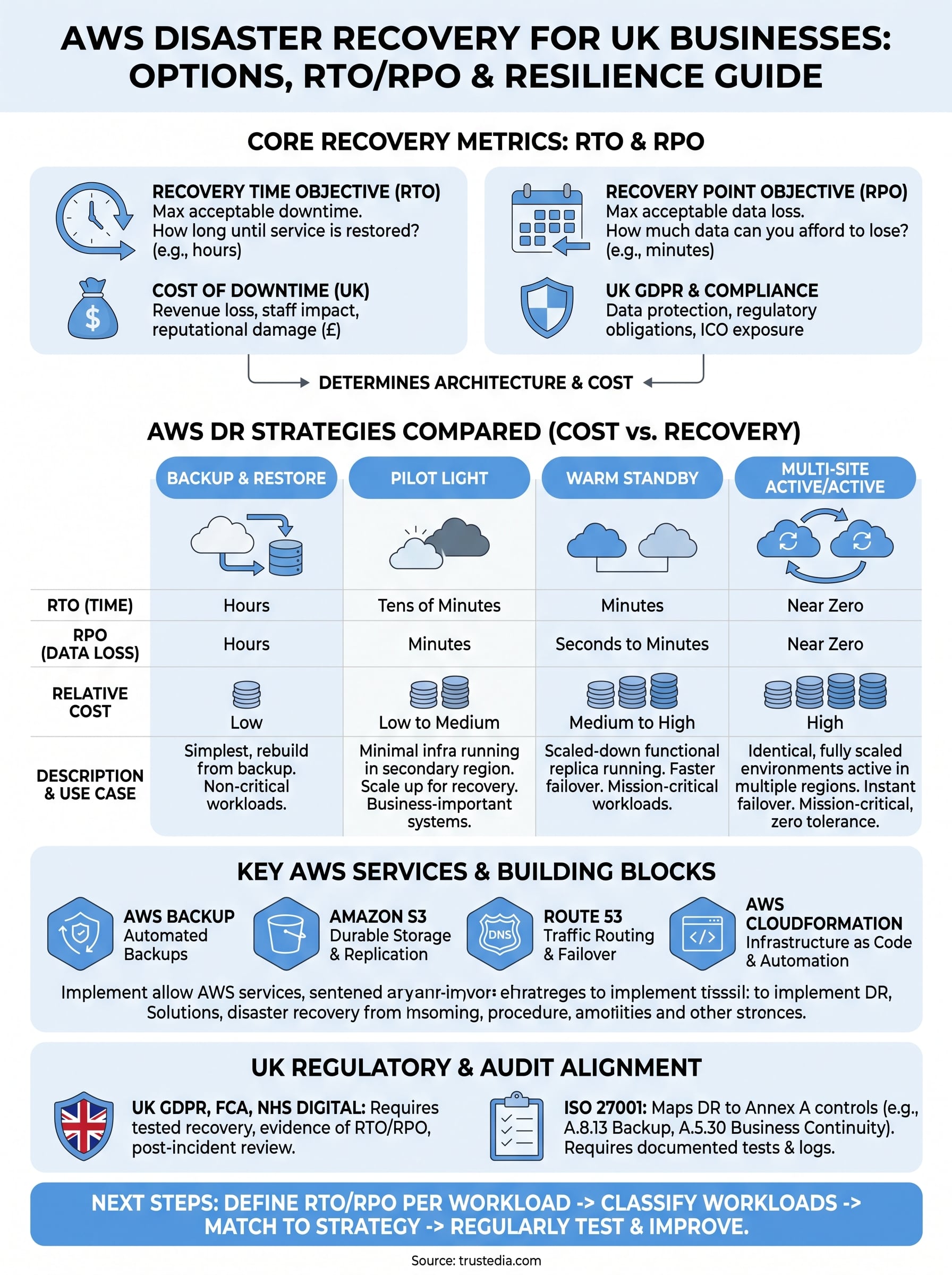
The aws disaster recovery whitepaper gives you a solid technical foundation, but turning that foundation into a tested, audit-ready programme requires deliberate action on your part. Start by defining your RTO and RPO per workload this week, then classify your systems into criticality tiers before you touch any architecture decisions. Those two steps alone will prevent the majority of DR planning mistakes organisations make.
Once your targets are set, map each workload to the appropriate AWS strategy and schedule your first DR test within the next quarter. Do not wait until your architecture feels perfect before testing it, because testing is precisely how you find out what needs fixing.
If you need expert support translating these requirements into a compliant, practical DR programme, TrustedIA’s team brings over 30 years of experience in managed security and business continuity. Talk to TrustedIA about your disaster recovery needs and build resilience that holds up when it matters.