Move your data to the cloud and you inherit a new set of risks alongside the convenience. Misconfigured storage buckets, weak access controls, and unmonitored file sharing cause more breaches than sophisticated hacking ever does, and they sit at the top of the most common cloud data security problems we see. If you’re trying to work out how to keep company data safe once it leaves your own servers, you need a clear picture of what’s actually protecting it.
Cloud data protection services cover the tools, policies, and processes that keep data secure, available, and recoverable while it sits in cloud environments. That includes encryption, backup and recovery, access management, and continuous monitoring, working together so a lost laptop or a ransomware attack doesn’t turn into a lost business. Whether you’re comparing cloud services data protection options or building a policy from scratch, understanding these mechanics matters more than picking a brand name.
In this article, we’ll break down how data protection cloud services actually work, the core benefits for businesses handling sensitive data, and the best practices we apply at TrustedIA when helping clients secure cloud environments and stay audit-ready under standards like ISO 27001.
Why cloud data protection services matter
The financial and reputational stakes keep rising
Businesses that treat cloud storage as someone else’s problem find out the hard way that a breach still lands squarely on their desk. Data breach costs have climbed steadily for years, and cloud misconfigurations remain one of the leading causes of exposure according to IBM’s Cost of a Data Breach Report. Customers, regulators, and cyber insurers all expect you to know exactly where your data lives and who can access it, regardless of which provider hosts your servers. A single exposed storage bucket or unpatched application can undo years of trust with clients who assumed their information was safe.
Hackers rarely need sophisticated tools when a business leaves an S3 bucket public or grants blanket admin rights to a shared account. Reputational damage from these incidents often outlasts the technical fix, because clients remember the breach long after your systems are patched. For any organisation handling customer records, financial data, or health information, that reputational hit can matter more than the immediate cost of remediation.
Compliance obligations don’t disappear when you move to the cloud
Shifting workloads off your own servers doesn’t remove your obligations under UK GDPR and the DPA 2018 or frameworks like ISO 27001. Regulators such as the Information Commissioner’s Office still hold your business accountable if customer data leaks from a cloud application, even when a third-party vendor caused the underlying fault. This catches out plenty of the SMBs we work with at TrustedIA, who discover the gap only when a client contract or the controls an insurer asks for at renewal suddenly demand proof of things they assumed their cloud provider had already sorted.
Getting data protection cloud based services right early saves you from scrambling during an audit or, worse, during a breach investigation when a regulator is asking pointed questions about your controls. ISO 27001 certification in particular forces you to document exactly how cloud data is classified, encrypted, and monitored, which is a useful exercise even if certification isn’t your immediate goal.
The shared responsibility model catches people out
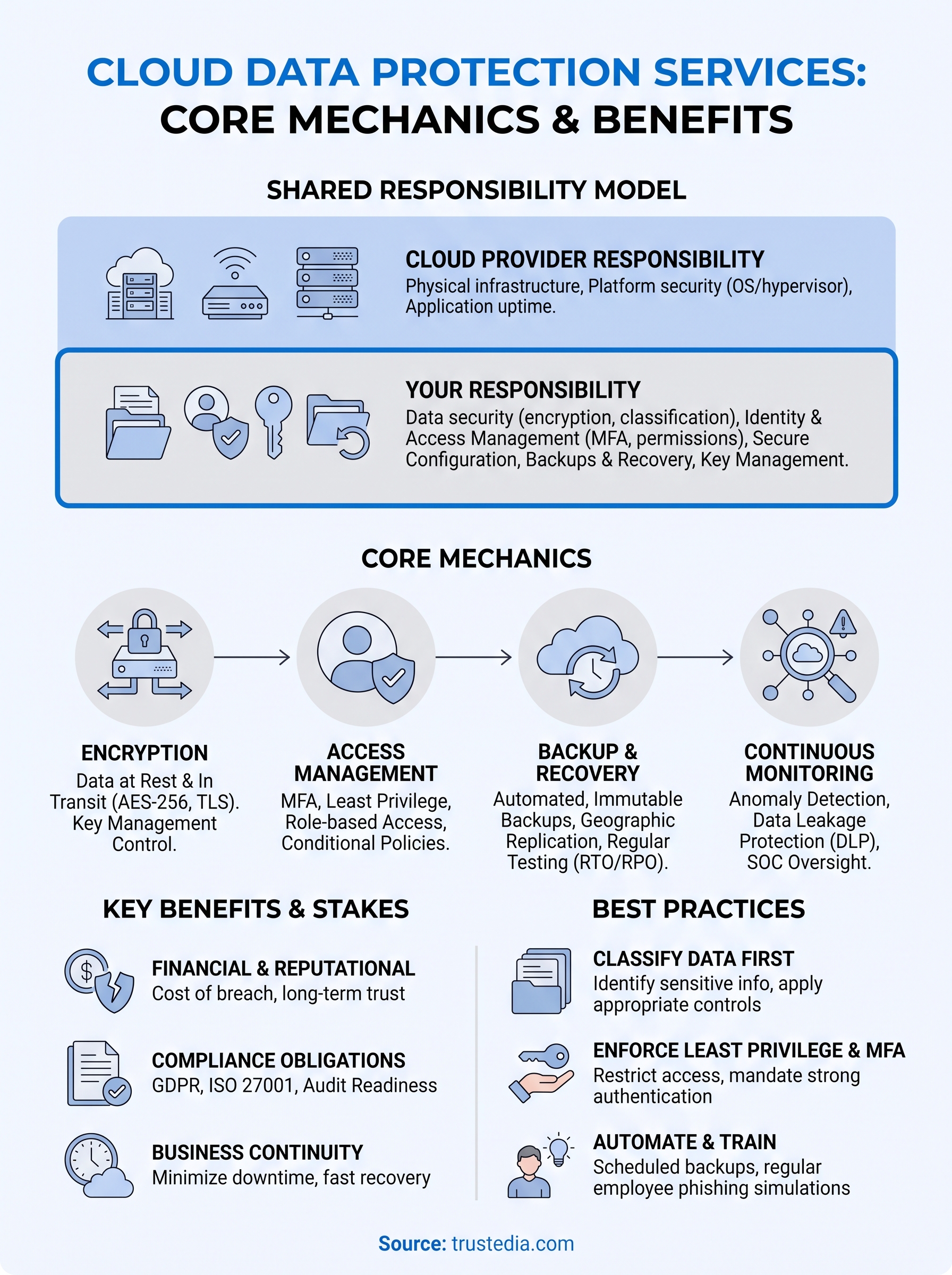
Cloud providers such as Microsoft and Amazon secure the physical infrastructure, but they draw a hard line at data, identity, and configuration, which stays firmly your job. This split, known as the shared responsibility model and something we explain in more depth in what managed security services actually cover, is the single most misunderstood aspect of cloud security among the businesses we assess.

The cloud provider protects the platform; you’re still the one accountable for what happens to your data on it.
Understanding where that line sits is the difference between a resilient setup and an accidental data leak.
| Layer | Cloud provider’s responsibility | Your responsibility |
|---|---|---|
| Physical infrastructure | Data centres, hardware, network backbone | Not applicable |
| Platform | OS patching, hypervisor security | Not applicable |
| Applications | Service uptime and availability | Secure configuration, access rights |
| Data | Encryption capability (where offered) | Classification, backups, key management |
| Identity | Authentication infrastructure | MFA enforcement, user permissions |
Downtime hurts as much as a breach does
Security gets most of the headlines, but business continuity is just as much a part of why cloud data protection services matter. A ransomware attack that encrypts your cloud-synced files, or a provider outage that takes your systems offline for a day, can cost you as much revenue as an actual breach. Proper backup, replication, and disaster recovery planning mean you can restore operations within hours instead of watching a bad week turn into a bad quarter.
Recovering fast depends entirely on preparation done long before an incident happens. Testing your recovery process, verifying backup integrity, and knowing your recovery time objectives are all part of the same discipline as encryption and access control, not an afterthought bolted on once the security basics are covered.
How cloud data protection services work
Understanding the mechanics behind cloud data protection services helps you ask the right questions when evaluating a provider, rather than taking marketing claims at face value. These services aren’t a single product you switch on. They’re a layered set of controls that work together, each covering a different way data can be lost, stolen, or corrupted.
Encryption locks data down at rest and in transit
Encryption turns readable data into scrambled text that’s useless without the right key, whether that data is sitting in storage or moving between your office and a cloud server. Most reputable cloud based services data protection setups apply AES-256 encryption for stored data and TLS for data in transit, but the detail that actually matters is who holds the encryption keys. If your provider manages the keys entirely, you’re trusting them completely with your data’s confidentiality. If you manage your own keys through a customer-managed key setup, you retain control even if the provider’s environment is compromised.
Encryption without key control is just a padlock where someone else keeps the spare key.
Identity and access management decides who gets through the door
Access controls determine which users, devices, and applications can reach your data, and this is where most breaches actually originate. Multi-factor authentication, role-based permissions, and the principle of least privilege all reduce the chance that a stolen password turns into a full-blown incident. Conditional access policies add another layer by checking device health, location, and login behaviour before granting entry, flagging anything that looks out of place for manual review, which is how a zero trust approach works in practice.
Backup and disaster recovery keep data available when something breaks
Protection isn’t just about keeping attackers out. It’s also about making sure data survives accidental deletion, hardware failure, or a ransomware attack that encrypts your files. Automated backups, geographic replication, and tested recovery procedures form the backbone of this side of cloud data protection, which is exactly what immutable cloud-based backup and recovery is built to deliver.

- Automated, scheduled backups that run without relying on someone remembering to trigger them
- Geographic replication across separate data centres so a single site failure doesn’t wipe out your only copy
- Immutable backup copies that ransomware can’t encrypt or delete
- Regular recovery testing to confirm backups actually restore cleanly, not just that they exist
Continuous monitoring catches trouble before it spreads
Monitoring tools watch for unusual file access, mass downloads, impossible login locations, and configuration drift that could open a gap in your defences. A properly resourced SOCaaS team reviews these alerts around the clock, because attackers don’t wait for office hours and neither should your detection capability. Data leakage protection tools sit alongside this monitoring layer, scanning outbound traffic and file shares for sensitive information leaving in ways it shouldn’t, such as a customer database attached to a personal email account.
Without monitoring, even the best encryption and backup strategy leaves you blind to an attacker already inside your environment, quietly moving through files before triggering any obvious alarm.
Key features to look for in a provider
Choosing between cloud data protection services often comes down to a handful of features that separate a genuinely secure setup from a checklist exercise. Vendors all claim to offer encryption, backups, and monitoring, but the depth and transparency of these features vary enormously. Knowing what to ask for during a sales call saves you from discovering the gaps only after an incident.
Certifications prove more than marketing claims
Anyone can claim to take security seriously, but independent certifications back that claim with evidence. Look for providers holding ISO 27001 certification themselves, and ask whether they support your own path to certification rather than just selling you tools. TrustedIA’s help embedding ISO 27001 into your business exists precisely because most SMBs need support translating a provider’s technical controls into documented, auditable policy, not just the technology itself.
Encryption and key management transparency
Demand a straight answer on key management options before signing anything. A provider that can’t explain clearly who holds encryption keys, how key rotation works, and what happens to your data if you leave the service is one to avoid.
If a provider can’t explain their key management in plain language, assume they can’t explain their security either.
Equally important is whether the provider supports customer-managed encryption, giving you a fallback if their own environment is ever compromised.
Backup, recovery, and support commitments
Backup claims mean nothing without specifics attached to them. Push any prospective provider for hard numbers rather than vague reassurance:
- Recovery Time Objective (RTO): how long before systems are back online after an incident (see how RTO and RPO targets are defined)
- Recovery Point Objective (RPO): how much data you could lose between backups
- Backup retention period: how far back you can restore data
- Immutability guarantees: confirmation that backups can’t be altered or deleted by ransomware
- 24/7 incident response access, not a support ticket queue that opens at 9am
Getting these figures in writing, not just in a sales deck, gives you something to hold the provider to when things go wrong.
Visibility, reporting, and audit trails
Ongoing visibility into your environment matters as much as the initial setup. A provider worth using gives you dashboards showing access logs, anomaly alerts, and configuration changes in real time, rather than a monthly PDF summary you read after the fact. Reporting also needs to map cleanly onto whatever compliance framework you’re working towards, so audit evidence doesn’t require weeks of manual reconstruction.
Finally, ask how the provider handles incident escalation when something looks wrong. A Security Operations Centre that flags an anomaly at 2am and waits until Monday to tell you isn’t providing real protection, no matter how good their dashboard looks on a demo call.
Best practices for implementing cloud data protection
Knowing the mechanics of cloud data protection services counts for little if you never put them into practice properly. Most breaches we investigate at TrustedIA trace back to a control that existed on paper but wasn’t actually configured, tested, or enforced day to day. The practices below turn theory into something that actually holds up under pressure.
Classify your data before you protect it
Before choosing tools, work out what you’re actually protecting and why. Data classification sorts information into tiers, public, internal, confidential, and restricted, so you can apply stronger controls where the stakes are highest instead of spreading effort evenly across everything. A spreadsheet of customer bank details deserves far tighter access rules than a marketing brochure sitting in the same cloud drive.
You can’t protect data properly if you don’t know where your most sensitive files actually live.
Skipping this step is how businesses end up encrypting low-risk files while leaving payroll data exposed on a shared drive nobody audited.
Enforce least privilege and multi-factor authentication everywhere
Grant access strictly on a need-to-know basis, and revisit those permissions on a set schedule rather than letting them accumulate forever. Least privilege access stops a single compromised account from exposing your entire cloud environment, because that account simply can’t reach files it was never given permission to touch. Pair this with mandatory multi-factor authentication across every account with cloud access, including third-party contractors and legacy service accounts that often get overlooked during onboarding.
Here’s a quick checklist worth running against your current setup:
- Remove unused or dormant accounts every quarter
- Require MFA on all admin and privileged accounts without exception
- Review shared folder permissions before, not after, an audit
- Apply conditional access rules based on device and location
Automate backups and test recovery regularly
Setting up backups once and forgetting about them is a common trap. Automated backup schedules remove the risk of human error, but the real test comes when you actually try to restore from them. Run recovery drills quarterly, not annually, and confirm your restore times actually match the recovery objectives you promised stakeholders or clients.
Train employees to close the human gap
Technical controls mean little if an employee clicks a phishing link that hands an attacker legitimate credentials. Running phishing simulations properly alongside short, practical training sessions builds the habits that stop most social engineering attempts before they reach your systems. Ongoing awareness training, delivered a few times a year rather than once at induction, keeps the risk visible instead of fading into a distant memory after month one.
Schedule an audit of your current cloud security posture through TrustedIA’s approach to vulnerability assessments if you’re unsure where your gaps actually sit. Guessing at your weak points costs far more than finding them properly.
Building a resilient approach to cloud data
Cloud data protection services aren’t a single purchase you make once and forget about. They’re a combination of encryption, access controls, backups, and monitoring that only work when they’re configured properly and tested regularly. The businesses that get burned are usually the ones who assumed their provider had everything covered, without checking where the shared responsibility line actually sat.
Getting this right means treating data classification, least privilege access, and recovery testing as ongoing habits rather than boxes ticked once during setup. Whether you’re chasing ISO 27001 certification or simply trying to sleep better at night, the fundamentals covered in this article give you a solid starting point for evaluating any provider or building your own internal controls.
If you’d rather have experts assess your current setup than guess where the gaps are, book a cloud security audit across your cloud estate and we’ll help you build a data protection strategy that actually holds up under pressure.