Knowing what vulnerabilities exist across your network is the first step toward fixing them, and Greenbone Vulnerability Management (GVM) is one of the most widely adopted platforms for doing exactly that. Built on the open-source foundations of OpenVAS, GVM provides organisations with the tools to scan, identify, and prioritise security weaknesses before attackers can exploit them.
Whether you’re evaluating GVM for the first time or comparing it against commercial alternatives, understanding its architecture, features, and protocols matters. At TrustedIA, vulnerability assessments are a core part of our managed security services, and our solution-agnostic approach means we recommend tools based on what genuinely fits, not vendor relationships. That perspective shapes how we break down solutions like GVM: practically, and without bias.
This article covers what Greenbone Vulnerability Management is, how it relates to OpenVAS, what the Greenbone Management Protocol (GMP) does, and how the platform fits into a broader vulnerability management strategy. By the end, you’ll have a clear picture of whether GVM is the right fit for your environment and security goals.
What Greenbone Vulnerability Management is
Greenbone Vulnerability Management is an open-source vulnerability scanning and management platform developed by Greenbone Networks, a German cybersecurity company. At its core, GVM gives you a structured way to discover, assess, and track security weaknesses across your network infrastructure, servers, endpoints, and applications. Rather than providing a one-off snapshot, the platform supports a continuous process for identifying exposure and monitoring remediation progress over time, which is what separates it from basic scanning tools.
The platform’s purpose
GVM exists to answer a specific question: what is vulnerable in your environment right now? The platform runs thousands of individual vulnerability tests against your networked assets, cross-references findings against known CVE databases, and produces prioritised, actionable reports your team can work from directly. It is not a firewall, an intrusion detection system, or a SIEM. GVM focuses specifically on vulnerability identification, which makes it a foundational layer in any structured security programme rather than an all-in-one solution.
Vulnerability scanning is only useful if it feeds into a clear remediation workflow. GVM is built to support exactly that loop.
Who maintains and develops it
Greenbone Networks GmbH maintains both the open-source community edition and the commercial Greenbone Enterprise product line. The community edition is available under open-source licences and gives you access to the core scanning engine alongside a regularly updated feed of vulnerability tests. The enterprise tier adds extended feed coverage, dedicated hardware appliances, and vendor support contracts, giving organisations with stricter compliance or uptime requirements a fully supported deployment path. Crucially, both versions share the same underlying architecture, which means teams starting with the community edition face a manageable learning curve if they later move to the commercial offering.
How GVM relates to OpenVAS
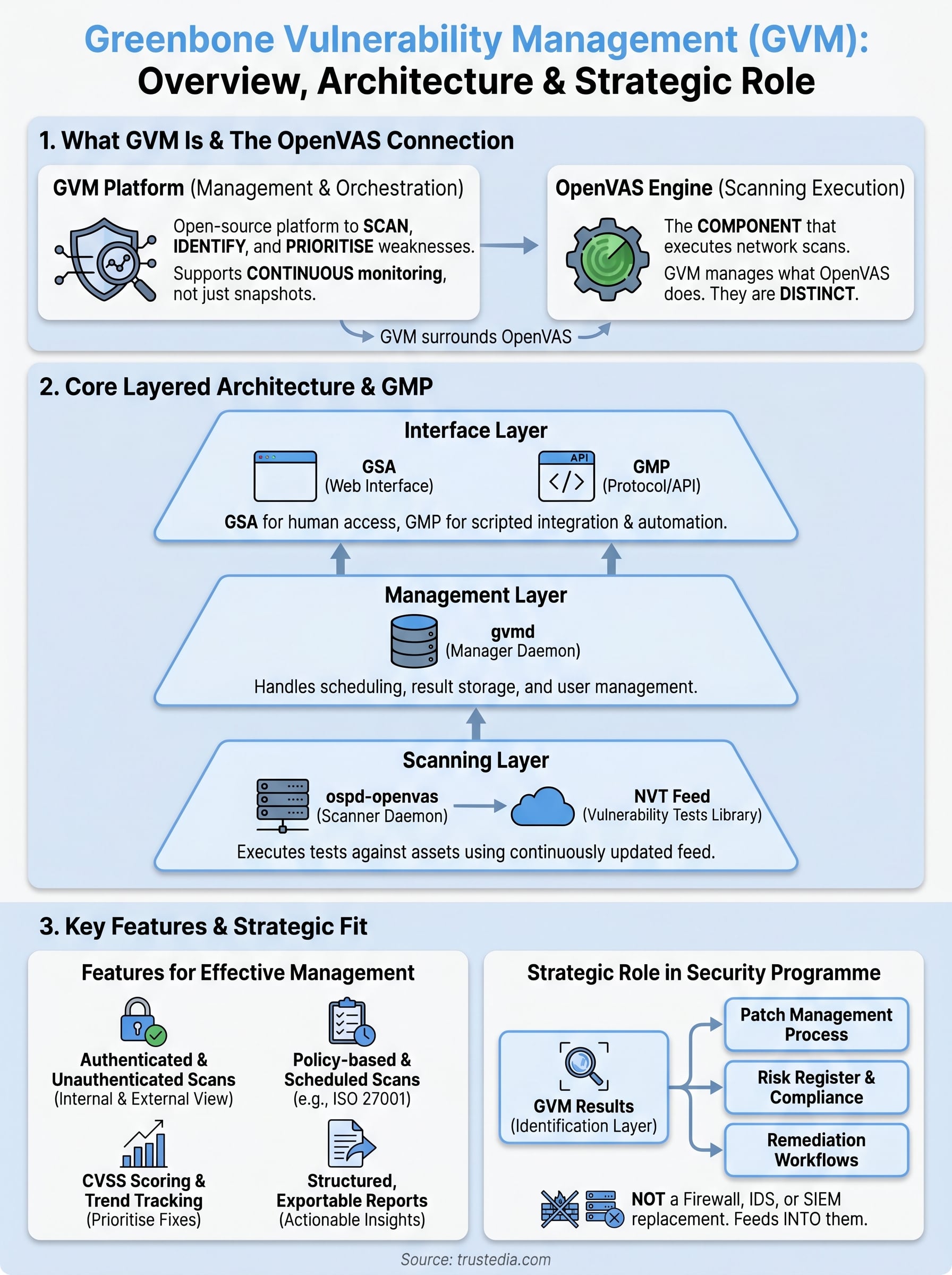
OpenVAS (Open Vulnerability Assessment Scanner) is the scanning engine that sits at the heart of Greenbone Vulnerability Management. Many people use the names interchangeably, but that creates confusion. OpenVAS is one component within GVM, specifically the part responsible for executing the actual network scans. GVM is the broader platform that surrounds and orchestrates that engine, adding management layers, reporting infrastructure, and protocol support on top.
OpenVAS is what scans; GVM is what manages everything that scanning produces.
How the naming evolved
Greenbone Networks originally developed OpenVAS as a fork of the Nessus scanner after Nessus moved to a proprietary licence in 2005. For years, OpenVAS served as the umbrella name for the entire project. As the platform grew in complexity, Greenbone rebranded the full framework as GVM to reflect its expanded scope, while retaining the OpenVAS name specifically for the scanning daemon (ospd-openvas). You will still find both names used in documentation and community discussions, which is why understanding the distinction saves you significant confusion during setup and integration.
What this means when you search for downloads
When you look for installation packages or community resources, you will encounter both "OpenVAS" and "GVM" references pointing to the same project. The Greenbone Community Edition is the current open-source release and the correct starting point for any new deployment.
Core components and how the architecture works
Greenbone Vulnerability Management runs on a layered architecture where each component handles a distinct function. Understanding what each layer does helps you deploy and troubleshoot the platform more effectively, and gives you a clearer sense of where bottlenecks or configuration issues are likely to appear.
The scanning layer
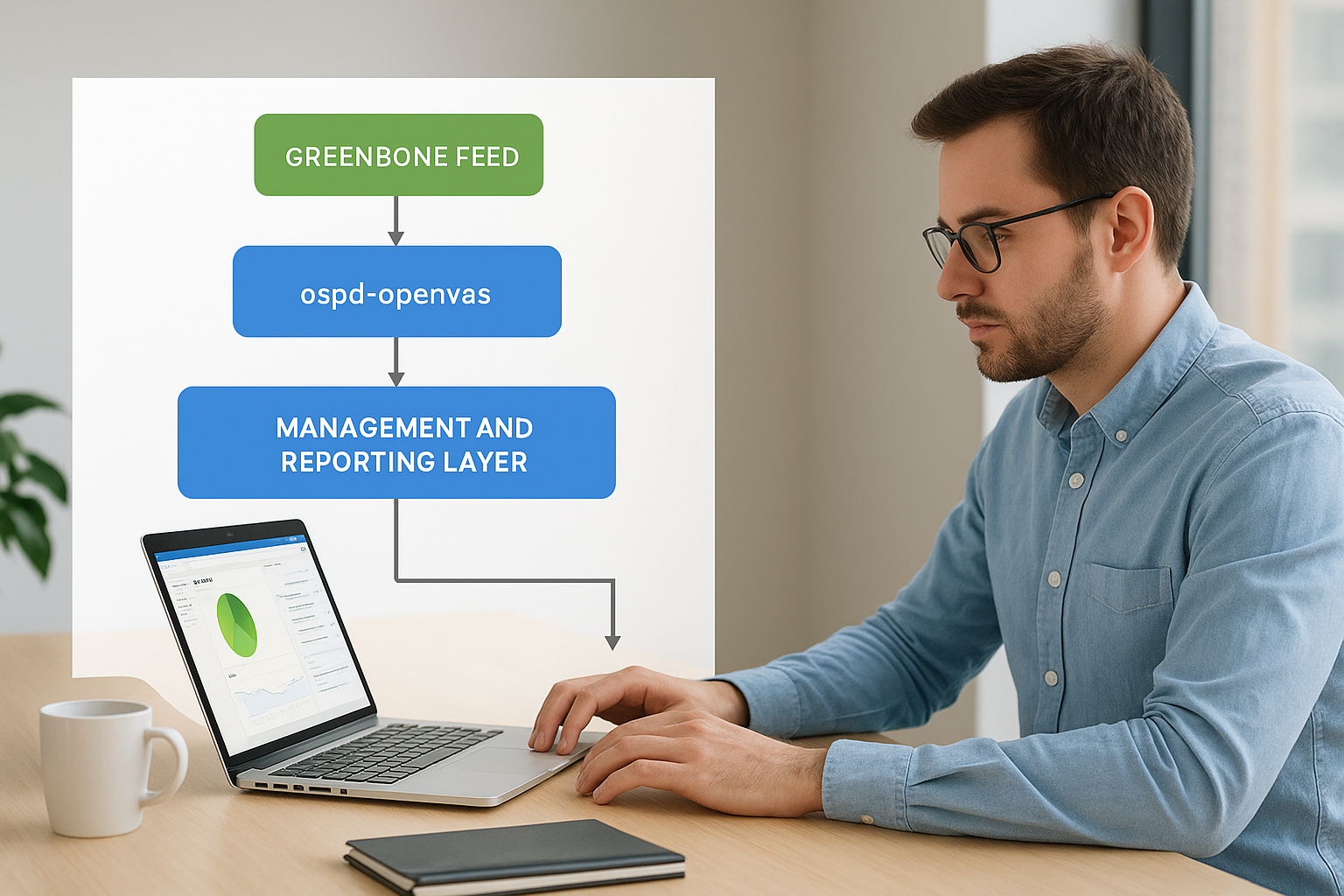
The scanning layer centres on ospd-openvas, the daemon that executes individual network tests against your assets. It draws from the Greenbone Feed, a continuously updated library of Network Vulnerability Tests (NVTs) that maps directly onto published CVEs and security advisories. Without a current feed, your scan results quickly become unreliable.
Keeping your NVT feed up to date is as important as running the scans themselves.
The management and reporting layer
gvmd (the Greenbone Vulnerability Manager daemon) sits above the scanner and handles task scheduling, result storage, and user management. You interact with it either through the Greenbone Security Assistant (GSA), a browser-based interface, or directly via the Greenbone Management Protocol (GMP), which allows scripted or API-driven control. GMP is particularly useful when you need to integrate scan data into your existing security tooling or reporting workflows, removing the need to manage results manually inside the web interface.
Key features and where GVM fits in a security programme
Greenbone vulnerability management delivers a feature set built around continuous exposure tracking rather than one-off audits. Its authenticated and unauthenticated scanning modes let you test assets from both an external attacker’s perspective and from inside the system, giving you a more complete picture of actual risk across your environment.
Running both scan types against the same asset often reveals a significant gap between what an outsider can see and what exists internally.
What the platform covers
Policy-based scanning lets you tailor scans to specific compliance requirements, including frameworks such as ISO 27001. Scheduled scans run automatically against defined asset groups, and results feed into dashboards that track vulnerability trends over time rather than presenting isolated findings. The built-in severity scoring, based on CVSS ratings, helps you prioritise fixes without manually triaging every result your team receives.
Reporting is another practical strength. GVM produces structured, exportable reports that map findings to remediation steps, which makes it easier to communicate risk to stakeholders who are not directly involved in technical operations.
Where GVM sits in your security stack
The platform is not a replacement for endpoint protection, a firewall, or a SIEM. It fits specifically as the vulnerability identification layer that informs decisions across your wider programme. Results from GVM feed your patch management process, risk register, and remediation workflows, making it a structured input rather than a self-contained solution.
How to implement GVM in your environment
Getting Greenbone Vulnerability Management running in your environment starts with choosing the right deployment method. The Greenbone Community Edition is available as a virtual machine appliance, Docker-based setup, or source installation, giving you flexibility depending on whether you’re running a lab, a production network, or a cloud environment.
Feed synchronisation can take 30 to 60 minutes on the first run, so plan your first scan session accordingly.
Starting with the community edition
The quickest path to a working deployment is the Docker Compose setup, which Greenbone maintains in an official repository. You pull the required containers, run a single command, and access the GSA web interface within minutes. This approach suits most teams evaluating the platform for the first time, and it handles feed synchronisation automatically.
Key steps to get started:
- Pull the Docker Compose configuration from Greenbone’s official repository
- Run the initialisation command to download containers and sync the NVT feed
- Log in to the GSA interface and configure your first scan target
Scoping your first scan
Once the platform is running, define your asset scope clearly before launching any scans. Start with a small, representative subnet rather than scanning your entire network at once.
This gives you manageable, prioritised results to work through and helps you understand how the platform surfaces findings before you scale up coverage across your full infrastructure.
Conclusion
Greenbone Vulnerability Management gives you a structured, continuously updated view of the weaknesses across your network, without requiring a large commercial budget to get started. The platform’s layered architecture, authenticated scanning modes, and GMP-driven integration options make it a practical foundation for any vulnerability management programme, whether you’re running a small internal team or scaling across a complex enterprise environment.
The key is treating GVM as one input within a broader security strategy. Scan results only create value when they feed directly into remediation workflows, risk registers, and patch management processes. Used that way, the platform helps you close exposure gaps systematically rather than reacting to incidents after the fact.
If you want expert support turning scan findings into a working security programme, TrustedIA’s vulnerability assessment and managed security services are built to do exactly that. Talk to our team to find the right approach for your environment.